web
You’re offline. This is a read only version of the page.
close
Skip to main content

Notifications

Announcements

No record found.

Community site session details

Community site session details

Session Id :
Supply chain | Supply Chain Management, Commerce
Suggested Answer

How do Asset Item entities link back to Assets in Asset Management? [Supply Chain Management]

(1) ShareShare
ReportReport
Posted on by 22

Learning Asset Management for my business. My goal is to enhance asset lifecycle tracking and management our operational assets used in our facilities across the globe.

I am trying to create 'Asset Items' in the setup area of the Asset Management Module and then use this as my base data when I add new assets to the system. We have master data for all assets our business owns in a spread sheet. This data we have is metadata associated with an asset like manufacturer, model, dimensions, costs, etc- this is not an inventory of stock but metadata for assets that our business uses.

I'm trying to mirror this master data in dynamics. I am trying to see if I can extend an existing entity or just create a new one- and Asset Items seems promising for extending. However I have been unable to find any documentation on "Asset items" so if you have some to share that would be awesome. If there's another entity you recommend me to look into instead, I'll will look into it. All I have found for Asset Items so far is from the Microsoft docs here: https://docs.microsoft.com/en-us/dynamics365/supply-chain/asset-management/data-management/target-entities

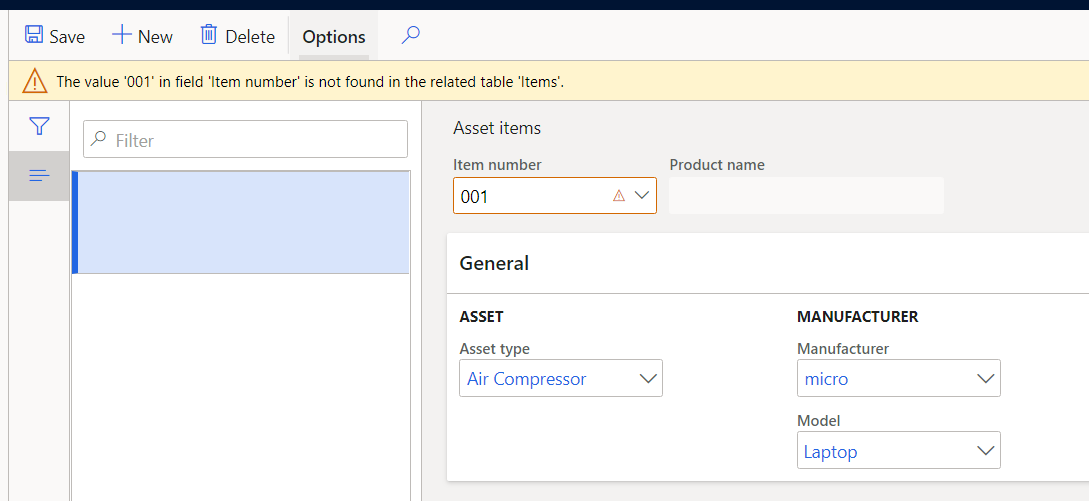
When I try to create an asset item... it doesn't let me because it says the 'id' I have put in the item number field doesn't exist in the related table 'Items'. I was able to finally figure out that the 'item number' field maps to a table called EcoResProduct which is where the metadata is stored. This is confusing because it's in the product information management module and not the asset management module. Should we be using product information management instead? Or is this a bad idea?

The most important thing I am trying to understand is how does Asset Item relate to an Asset? I can't find where I can enter the asset item identifier when creating or editing an Asset. I drew a diagram that will hopefully help explain the way it appears to me now. It seems that I can link an Asset Type to an Asset Item... and an Asset Type to an Asset installed at a functional location. But I can't link the Asset Item to the Asset installed at a location. Am I missing something? Thanks in advance!

Images mirrored on imgur because they are blurry on forum:  https://imgur.com/a/3frPaAx
pastedimage1583261744756v2.png

Asset item created.. it can 

pastedimage1583270212985v3.png

New asset has no field for asset item...
pastedimage1583270399375v4.png

Edit asset has no column for asset item...

pastedimage1583270467645v5.png

diagram for how it appears to be laid out to me... Also I can link manufacturer and model to multiple places so it's confusing to know where it should go! 

pastedimage1583272021099v7.png

I have the same question (0)
  • Suggested answer
    Rahul Mohta Profile Picture
    21,032 on at

    try using entities

    Asset management asset attribute requirements

    Asset management attribute values

  • Thomas Krogh Profile Picture
    34 on at

    Hi,

    Asset items are ONLY used together with "Pending assets". (Asset management->Common->Assets->Pending assets)

    In Pending Assets you can create assets based on a Purchase Order, ex. you've bought 10 gearboxes and you want to create them as assets in Asset Management.

    And since you refer to an item number on the PO, you need to set up what asset type, manufacturer and model that you want to use when you create the assets based on the PO. You also need to set up a number sequence for "Automatically created asset".

    When you've set up Asset items, you'll automatically see PO's using that item number in "Pending assets", then you mark the line/lines and click "Create assets".

    When Asset Management was a Dynaway product, we could link an asset to an item, unfortunately Microsoft has removed that link/field.

    /Thomas

  • SmithaNataraj Profile Picture
    on at

    Hi ForeverLearning,

    Did Thomas's reply answer your question? If so, please mark as verified.

    Thanks

    Smitha

Under review

Thank you for your reply! To ensure a great experience for everyone, your content is awaiting approval by our Community Managers. Please check back later.

Helpful resources

Quick Links

Responsible AI policies

As AI tools become more common, we’re introducing a Responsible AI Use…

Neeraj Kumar – Community Spotlight

We are honored to recognize Neeraj Kumar as our Community Spotlight honoree for…

Leaderboard > Supply chain | Supply Chain Management, Commerce

#1
Laurens vd Tang Profile Picture

Laurens vd Tang 302 Super User 2025 Season 2

#2
Siv Sagar Profile Picture

Siv Sagar 183 Super User 2025 Season 2

#3
André Arnaud de Calavon Profile Picture

André Arnaud de Cal... 120 Super User 2025 Season 2

Last 30 days Overall leaderboard

Product updates

Dynamics 365 release plans



