web
You’re offline. This is a read only version of the page.
close
Skip to main content

Notifications

Announcements

No record found.

Community site session details

Community site session details

Session Id :
Finance | Project Operations, Human Resources, ...
Answered

Sort Field in Lookup Control

(0) ShareShare
ReportReport
Posted on by 97

Hi All,

These objects are fully customized not standard,

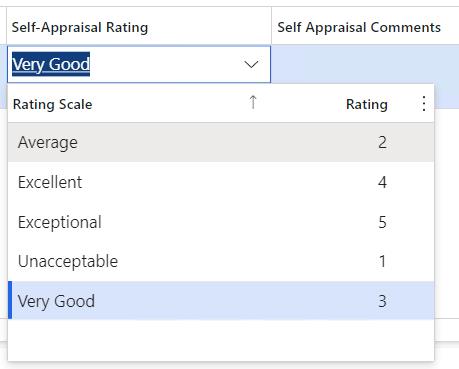
Initially the lookup sort out based on Rating scale,

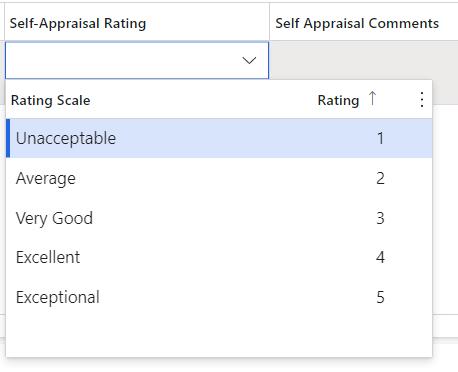
Requirement is to change sort based on Rating,


I tried using custom code , but first time when we click on lookup its coming properly,

After selecting any value and again click on lookup, its showing sorting based on rating scale
 

pastedimage1684319099057v1.jpeg


pastedimage1684319099061v2.jpeg


 [FormControlEventHandler(formControlStr(LTPMSJournalDetailsYrEnd, BusinessProcesses_SelfAppraisalRating), FormControlEventType::Lookup)]
    public static void BusinessProcesses_SelfAppraisalRating_OnLookup(FormControl sender, FormControlEventArgs e)
    {
        Query query = new Query();
        QueryBuildDataSource queryBuildDataSource;
        QueryBuildRange queryBuildRange;
        SysTableLookup sysTableLookup = SysTableLookup::newParameters(tableNum(LTRatingMasterCompetency), sender);
        queryBuildDataSource = query.addDataSource(tableNum(LTRatingMasterCompetency));
        //
       // queryBuildDataSource.clearSortIndex();
       // queryBuildDataSource.sortClear();
        queryBuildDataSource.addSortField(fieldnum(LTRatingMasterCompetency,Rating),sortOrder::Ascending);
       // queryBuildDataSource.removeOrderByField(fieldnum(LTRatingMasterCompetency, RatingScale));
       // queryBuildDataSource.applyFilter(fieldnum(LTRatingMasterCompetency,Rating));

        sysTableLookup.addLookupField(fieldNum(LTRatingMasterCompetency, RatingScale));
        sysTableLookup.addLookupField(fieldNum(LTRatingMasterCompetency, Rating));

        sysTableLookup.parmQuery(query);
        sysTableLookup.performFormLookup();
        FormControlCancelableSuperEventArgs cancelableSuperEventArgs = e as FormControlCancelableSuperEventArgs;
        cancelableSuperEventArgs.CancelSuperCall();
    }

 The base table for this lookup is RatingTable.

In that table also i changed the clusterIndex property as based on rating index.


What i need to do to fix this issue, kindly advise me, thanks in advance.

I have the same question (0)
  • Suggested answer
    GirishS Profile Picture
    27,827 Moderator on at

    Hi Pj John,

    Try creating query and set the order by field on the query for Rating field - Create a view from the query and use that view in the lookup instead of custom tables.

    Thanks,

    Girish S.

  • PJ JohnPaul Profile Picture
    97 on at

    Hi Girish,

    Thanks for your reply , using query and views also its not working facing same issue.

  • GirishS Profile Picture
    27,827 Moderator on at

    I think this is because there is a value given in the rating scale field. It gets filtered based on the rating scale field, and it omits sort order added in the rating field.

    Try adding the Rating as a first field in the lookup field and check. If the Rating field as added first check if it works in that case.

    sysTableLookup.addLookupField(fieldNum(LTRatingMasterCompetency, Rating));
    sysTableLookup.addLookupField(fieldNum(LTRatingMasterCompetency, RatingScale));

    Thanks,

    Girish S.

  • PJ JohnPaul Profile Picture
    97 on at

    Hi Girish,

    I tried as you mentioned, now the number(rating - ex: 4) like that its getting inserted in the control after that if i click again the lookup its sort based on rating scale , same issue.

    Thanks

  • Verified answer
    GirishS Profile Picture
    27,827 Moderator on at

    Sorry, this is final workaround you have.

    So, the reason may be as soon as you type in some value in the lookup field - sort order added will get cleared and order gets changes based on the entered data.

    I don't think there is no fix available as you have tried some suggestions as mentioned.

    Thanks,

    Girish S.

  • Suggested answer
    PJ JohnPaul Profile Picture
    97 on at

    Thanks Girish for your suggestion, i created one tmp table and inserted value in tmp table whenever lookup control cliked and added tmp table in syslookup now its working fine.

Under review

Thank you for your reply! To ensure a great experience for everyone, your content is awaiting approval by our Community Managers. Please check back later.

Helpful resources

Quick Links

Responsible AI policies

As AI tools become more common, we’re introducing a Responsible AI Use…

Neeraj Kumar – Community Spotlight

We are honored to recognize Neeraj Kumar as our Community Spotlight honoree for…

Leaderboard > Finance | Project Operations, Human Resources, AX, GP, SL

#1
Martin Dráb Profile Picture

Martin Dráb 611 Most Valuable Professional

#2
André Arnaud de Calavon Profile Picture

André Arnaud de Cal... 529 Super User 2025 Season 2

#3
Sohaib Cheema Profile Picture

Sohaib Cheema 285 User Group Leader

Last 30 days Overall leaderboard

Product updates

Dynamics 365 release plans