web
You’re offline. This is a read only version of the page.
close
Skip to main content

Notifications

Announcements

No record found.

Community site session details

Community site session details

Session Id :
Customer experience | Sales, Customer Insights,...
Suggested Answer

Lead notifications to business unit

(0) ShareShare
ReportReport
Posted on by 15

I have 5 business units in our instance.  Id like to send email to the business unit or team when an marketing form is completed.

Do I have to set up email for the business unit, or will it send to members email addresses.

using members email address would be preferred. 

I have the same question (0)
  • dian74 Profile Picture
    2,477 Most Valuable Professional on at

    Can you clarify how you'll  know which business unit to send the email to? Is this tracked on the marketing form you mentioned?

  • RKingTN Profile Picture
    15 on at

    Thank you for reply.  The business unit is the owner of the marketing form.

  • dian74 Profile Picture
    2,477 Most Valuable Professional on at

    Just to clarify, so the business unit is a 'Team' record correct? And the team has members?

  • RKingTN Profile Picture
    15 on at

    correct.

  • Suggested answer
    dian74 Profile Picture
    2,477 Most Valuable Professional on at

    You can do this with power automate flows. In this example I used opportunities and the trigger is when the status changes to won. You probably want to set your trigger to creation of the marketing form is my guess. Once you select the trigger, you need to click on the ellipse(...) on the right of the flow and select'settings'. Under Trigger conditions you need to add a trigger condition and paste in the following:

    @equals(triggerOutputs()?['body/_ownerid_type'],'teams')

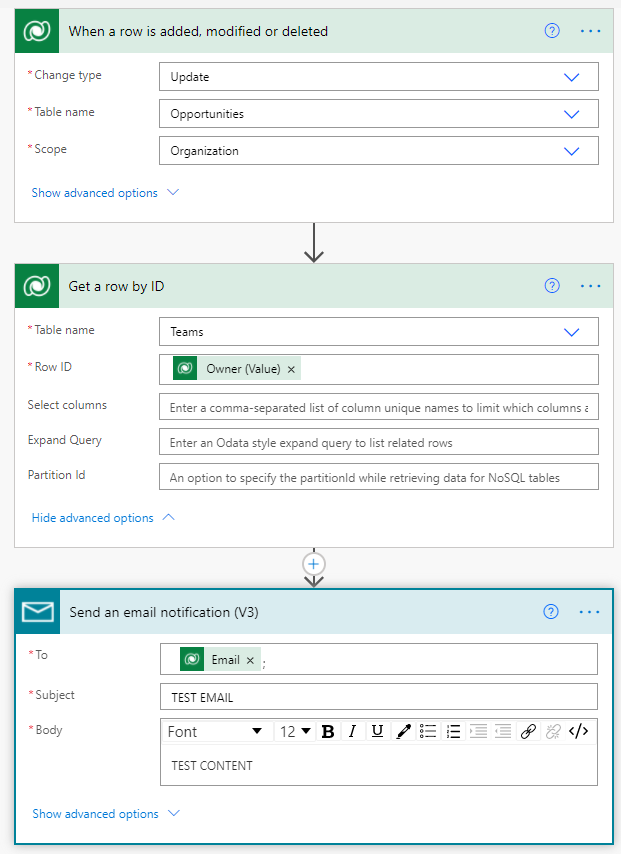
    This is so that if these records are not owned by a team, the flow won't trigger. The second step is where I get the owning team's unique ID so I can use the out of the box email field of the team. (You can setup  groups in office 365 for each business unit, which is very similar to a distribution list. You can then keep track of the members of that list in exchange.) Make sure you add the email field to the teams form and add the email address for each team.  Below is a screenshot of the flow.

    PLEASE MARK AS VERIFIED IF HELPFUL
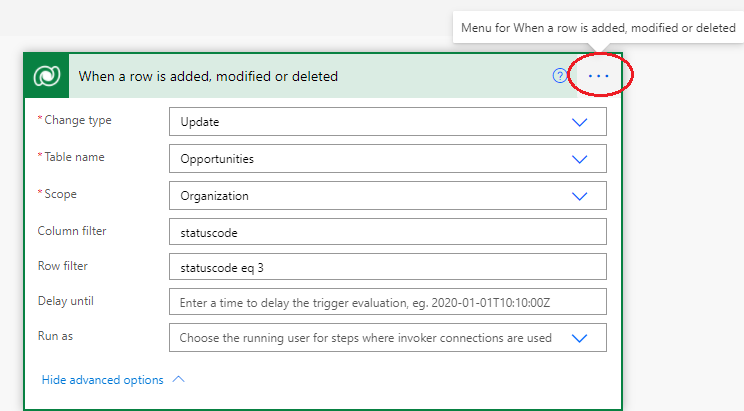
    pastedimage1619639170084v2.png

    below is the window you'll see after you click the ellipse and select settings
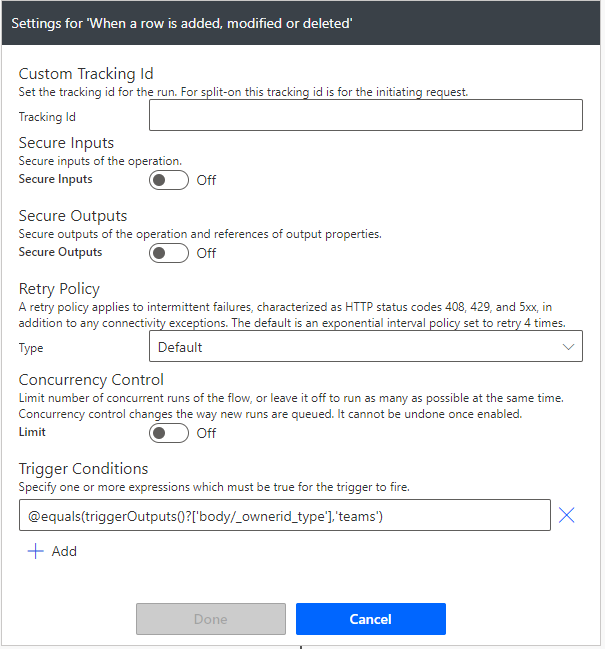
    pastedimage1619639132138v1.png

    entire flow:

    pastedimage1619639247726v3.png

  • Fubar Profile Picture
    2,761 on at

    Just to clarify, are you wanting to send an Email to an email address against the Team or send the email to all of the Users that are a member of the Team?

Under review

Thank you for your reply! To ensure a great experience for everyone, your content is awaiting approval by our Community Managers. Please check back later.

Helpful resources

Quick Links

Responsible AI policies

As AI tools become more common, we’re introducing a Responsible AI Use…

Neeraj Kumar – Community Spotlight

We are honored to recognize Neeraj Kumar as our Community Spotlight honoree for…

Leaderboard > Customer experience | Sales, Customer Insights, CRM

#1
Tom_Gioielli Profile Picture

Tom_Gioielli 73 Super User 2025 Season 2

#2
Gerardo Rentería García Profile Picture

Gerardo Rentería Ga... 43 Most Valuable Professional

#3
Daniyal Khaleel Profile Picture

Daniyal Khaleel 32 Most Valuable Professional

Last 30 days Overall leaderboard

Product updates

Dynamics 365 release plans