web
You’re offline. This is a read only version of the page.
close
Skip to main content

Notifications

Announcements

No record found.

Community site session details

Community site session details

Session Id :
Finance | Project Operations, Human Resources, ...
Answered

PO lines are not updated with Financial Dimensions added into PO header

(0) ShareShare
ReportReport
Posted on by 22,797 Most Valuable Professional

Hello Expert,

We have a case here and we need your assistance in it to proceed further.

We have noticed, for few countries/LE (we have many European countries are operational), while customer is creating PO, the financial dimensions are added into header, not getting updated in PO lines.

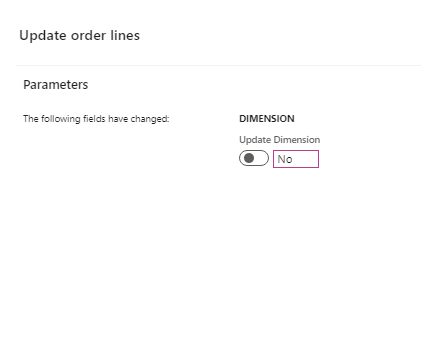
Naturally, system gives a pop up and ask users to update the dimension to PO line or not, and upon selection, PO lines gets updated with the values from header.

However, this is not happening for many countries, are we missing any configuration in this?

Below is the pop up system asks while adding financial dim values updated in header and if we select "Yes" those values get auto added into lines ( we need this for all countries).
pastedimage1595877294537v1.png

Regards,

Ramit

I have the same question (0)
  • Suggested answer
    André Arnaud de Calavon Profile Picture
    301,020 Super User 2025 Season 2 on at

    Hi Ramit,

    On the Accounts Receivable Parameters page, there is a tab called 'Updates'. On this tab you will find a button called 'Update order lines'. When you click this option, you will have the option to set the updates of various different fields, including the dimensions.

    PS. Ensure you have a blue print and check all settings per legal entity for more inconsistencies in setup to prevent issues when you go live and not tested all legal entities.

  • Ramit Paul Profile Picture
    22,797 Most Valuable Professional on at

    Thanks Andre, so does this mean this AR setup will work in AP PO as well? kindly confirm if it doesn't.

    Regards,

    Ramit

  • Verified answer
    Vamsi Pranith Profile Picture
    682 on at

    The similar configuration exists for AP/Purchase order side under Procurement and sourcing -> Parameters -> General -> Update order lines. If you choose Dimension to be updated as Always in the set of options once you click on Update order lines, that should solve the problem.

  • Verified answer
    André Arnaud de Calavon Profile Picture
    301,020 Super User 2025 Season 2 on at

    Hi Ramit,

    It was my bad... I meant to type 'accounts payable'. But indeed, on both sides, you have this feature. Thanks Vamsi for jumping in.

Under review

Thank you for your reply! To ensure a great experience for everyone, your content is awaiting approval by our Community Managers. Please check back later.

Helpful resources

Quick Links

Responsible AI policies

As AI tools become more common, we’re introducing a Responsible AI Use…

Neeraj Kumar – Community Spotlight

We are honored to recognize Neeraj Kumar as our Community Spotlight honoree for…

Leaderboard > Finance | Project Operations, Human Resources, AX, GP, SL

#1
Martin Dráb Profile Picture

Martin Dráb 646 Most Valuable Professional

#2
André Arnaud de Calavon Profile Picture

André Arnaud de Cal... 529 Super User 2025 Season 2

#3
Sohaib Cheema Profile Picture

Sohaib Cheema 285 User Group Leader

Last 30 days Overall leaderboard

Product updates

Dynamics 365 release plans



