web
You’re offline. This is a read only version of the page.
close
Skip to main content

Notifications

Announcements

No record found.

Community site session details

Community site session details

Session Id :
Microsoft Dynamics AX (Archived)

Unable to preview report. BIDS

(0) ShareShare
ReportReport
Posted on by 755

Hello everyone,

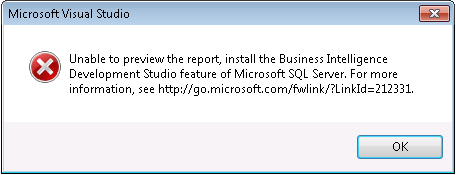
I'm currently familiarizing myself with reporting and have been successful when using VS on the TEST server on the TEST environment. I'm now trying to create reports in DEV and do not have direct access to log in to that server. I'm working from a terminal that has VS installed and I'm able to access my query that I created for my report, but I'm now receiving this error in Visual Studio when I try to preview my design:
Specs:

Dynamics AX 2012

Visual Studio 2010

SQL Server 2012

What should my next step be and what machine does the installation need to occur on. This will be the scenario when working in GOLD as well.

Best,

Russ


*This post is locked for comments

I have the same question (0)
  • Verified answer
    Community Member Profile Picture
    on at

    Hi Russ,

    You should install SSDT in the server where you do Report development (i.e. where you have VS 2010 installed).

    BIDS is no longer available and replaced by SSDT

    This component should be part of SQL setup components.

  • RussTG Profile Picture
    755 on at

    Thanks for the reply. Can I install Visual Studio on my native machine and generate reports for DEV, TEST and GOLD?

  • Suggested answer
    Community Member Profile Picture
    on at

    Yes Russ, as long as you have AX 2012 client components (Client, Debugger, Dev tools, BC, etc), VS 2010, SSDT in your native machine.

    The SSRS report will save back to AOT based on the active AX client configuration available in your machine. Ideally you should develop the report in one environment and then deploy the reports to other environments.

Under review

Thank you for your reply! To ensure a great experience for everyone, your content is awaiting approval by our Community Managers. Please check back later.

Helpful resources

Quick Links

Responsible AI policies

As AI tools become more common, we’re introducing a Responsible AI Use…

Neeraj Kumar – Community Spotlight

We are honored to recognize Neeraj Kumar as our Community Spotlight honoree for…

Leaderboard > 🔒一 Microsoft Dynamics AX (Archived)

#1
Priya_K Profile Picture

Priya_K 4

#1
Martin Dráb Profile Picture

Martin Dráb 4 Most Valuable Professional

#3
Ali Zaidi Profile Picture

Ali Zaidi 2

Last 30 days Overall leaderboard

Featured topics

Product updates

Dynamics 365 release plans



