web
You’re offline. This is a read only version of the page.
close
Skip to main content

Notifications

Announcements

No record found.

Community site session details

Community site session details

Session Id :
Finance | Project Operations, Human Resources, ...
Suggested Answer

distributing form personalisation among multiple users

(0) ShareShare
ReportReport
Posted on by 942

Hello,

I do group by project column and then calculate totals for some fields on the form. When I click on the field on the form there is a standard option group by this field. It's out of the box. Is it possible to apply these changes for all users in the system so that when they open a form they will see the data grouped by project and some totals calculated. We can export and distribute personalisation among multiple users in the system like it's described here

https://kaya-consulting.com/manage-personalizations-in-dynamics-365-for-multiple-users/

But when I open personalize a form the option for export is greyed out. like that 

pastedimage1669577394854v1.png

does it mean that group by field isn't considered as form personalization and therefore can't be saved as a file and disctributed?

Thanks.

I have the same question (0)
  • Suggested answer
    André Arnaud de Calavon Profile Picture
    300,896 Super User 2025 Season 2 on at

    Hi Azat,

    When I try to do a personalization with grouping and totals, I do have the option to export it. Not sure on which for you did your changes and why it is not active. I did try it on the Voucher transactions form using a grouping and a total. The export is then enabled in my environment. When I export it to a file, it does have the grouping included.

    In between I wrote the blog you shared in your question and now, Microsoft introduced Saved views. You can save the grouping and totals as Saved view and use the Personalization form in menu System administration to distribute the personalizations to other users.

    PS I moved all my blogs to a personal blog site. A copy is still available at the website from my previous employer, but there is no option to comment where I can respond. Commenting is enabled on my new personal blog site. Manage personalizations in Dynamics 365 for multiple users (dynamicspedia.com)

  • dark_knight Profile Picture
    942 on at

    Hi Andre,

    Thanks for the answer. I'll do reasearch on the saved views. meantime referring to personalization export. Maybe I'm missing something. I do grouping and totals on the form. Then I click on the gear icon in the right upper corner and click personalize button

    pastedimage1669619970025v1.png

    then I see this with export button greyed out

    pastedimage1669620030756v2.png

    am I doing something wrong?

    Thanks.

  • dark_knight Profile Picture
    942 on at

    I'm trying approach with view either and I have very strange behaviour. I do grouping and totals. Then when I'd like to save these changes in my custom view and click on view selector all the changes are dropped. Therefore I can't save my changes in my view. If I add some custom field to the grid view can be saved then. It seems like the system doesn't understand that grouping and totals are the changes of the view as well.

  • dark_knight Profile Picture
    942 on at

    If someone interested after researching on the subject I found this on the link about saved views

    learn.microsoft.com/.../saved-views

    There are two size variations to the view selector:

    Large view selectors – Pages that prominently feature a list will have a larger view selector for a few reasons. Most importantly, the larger view selector indicates the pages where the view can include user-defined filters and sorts. Because filters and sorts are included in the views, the larger selector size is also warranted as the view names will often be the best description of the data shown on the screen and the expectation is that users will switch between views more often on these page types. Grouping in a grid can also be saved to views on a page with large view selectors.

    Large view selector that supports query modifications on the view.

    pastedimage1669643035123v1.png

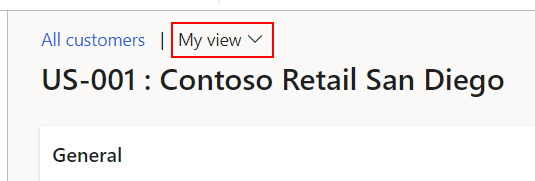
    Small view selectors – All other full-screen pages (except workspaces and the dashboard) have a smaller view selector that appears next to the page caption. Views on these pages include only personalizations, not user-defined filters. On these pages, the caption or record title is often the most important information at the top of the page. The smaller size of the view selector also reflects the lower frequency of view switching that is expected on these pages.

    Small view selector that does not support query modifications on the view.
    pastedimage1669643086567v2.png

    My case is small view selector. I guess, therefore, I can't save my custom groupings and totals calculations. 

Under review

Thank you for your reply! To ensure a great experience for everyone, your content is awaiting approval by our Community Managers. Please check back later.

Helpful resources

Quick Links

Responsible AI policies

As AI tools become more common, we’re introducing a Responsible AI Use…

Neeraj Kumar – Community Spotlight

We are honored to recognize Neeraj Kumar as our Community Spotlight honoree for…

Leaderboard > Finance | Project Operations, Human Resources, AX, GP, SL

#1
Martin Dráb Profile Picture

Martin Dráb 663 Most Valuable Professional

#2
André Arnaud de Calavon Profile Picture

André Arnaud de Cal... 540 Super User 2025 Season 2

#3
Sohaib Cheema Profile Picture

Sohaib Cheema 348 User Group Leader

Last 30 days Overall leaderboard

Product updates

Dynamics 365 release plans



