web
You’re offline. This is a read only version of the page.
close
Skip to main content

Announcements

No record found.

News and Announcements icon
Community site session details

Community site session details

Session Id :
Customer experience | Sales, Customer Insights,...
Unanswered

Deep URL link into a model-driven app

(1) ShareShare
ReportReport
Posted on by 905

Hello,

I want to send a direct link to the users to launch the model-driven that we created. As per the below documentation:


https://learn.microsoft.com/en-us/power-apps/mobile/mobile-deep-links#supported-urls-parameters-for-a-model-driven-app

 Below is the URL that we need to construct to achieve it which I already did:

ms-apps://<org-url>_<app-id>?tenantId=<tenant-id>&isShortcut=true&appType=AppModule&openApp=true&restartApp=true&forceOfflineDataSync=true

The problem is when sending the email covering the link with a href element:
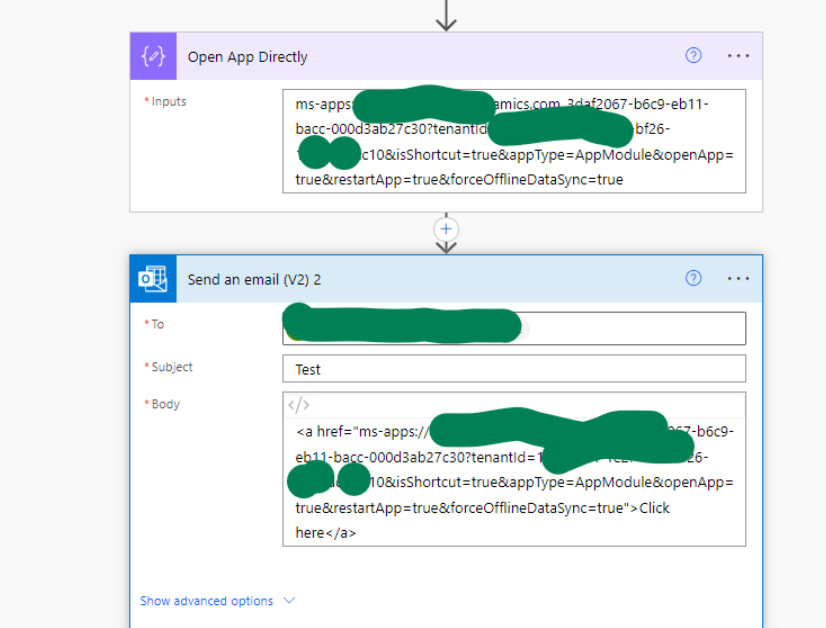
 pastedimage1684698383602v3.png

<a href="ms-apps://<org-url>_<app-id>?tenantId=<tenant-id>&isShortcut=true&appType=AppModule&openApp=true&restartApp=true&forceOfflineDataSync=true">Click here</a>


In outlook web it works perfectly:

pastedimage1684698328924v1.png

In Outlook Mobile the "Click here" is not clickable as below:

pastedimage1684698343449v2.png

What will be the workaround to resolve the above issue?

Any help is greatly appreciated.

Best regards,
EBMRay

I have the same question (0)
  • EBMRay Profile Picture
    905 on at

    Hello,

    I would highly appreciate any assistance.

    Best regards,

    EBMRay

  • Isia Profile Picture
    4 on at
    Hi, I have the same issue. Were you able to fix this?
     
    Best regards, Dominika
  • Pradeep Rai Profile Picture
    5,489 Moderator on at
    Hi,

    You are right. 

    if we send email with anchor tag below:

    <a href="ms-apps://<org-url>_<app-id>?tenantId=<tenant-id>&isShortcut=true&appType=AppModule&openApp=true&restartApp=true&forceOfflineDataSync=true">Click here</a>
     
    Then it does not show as hyperlink.

    Because anchor tag want https:// to open the link.

    Just a suggestion, why don't you try with shorting URL service may be that help.

    I found below connector to create short URL:
     
    Or else create a support ticket with microsoft.

Under review

Thank you for your reply! To ensure a great experience for everyone, your content is awaiting approval by our Community Managers. Please check back later.

Helpful resources

Quick Links

Introducing the 2026 Season 1 community Super Users

Congratulations to our 2026 Super Stars!

Meet the Microsoft Dynamics 365 Contact Center Champions

We are thrilled to have these Champions in our Community!

Congratulations to the March Top 10 Community Leaders

These are the community rock stars!

Leaderboard > Customer experience | Sales, Customer Insights, CRM

#1
11manish Profile Picture

11manish 165

#2
ManoVerse Profile Picture

ManoVerse 156 Super User 2026 Season 1

#3
Zhilan Profile Picture

Zhilan 49

Last 30 days Overall leaderboard

Product updates

Dynamics 365 release plans
