web
You’re offline. This is a read only version of the page.
close
Skip to main content

Notifications

Announcements

No record found.

Community site session details

Community site session details

Session Id :
Microsoft Dynamics AX (Archived)

Streamline my PO Workflow

(0) ShareShare
ReportReport
Posted on by

Hey All-

I have been given the task of creating the workflow for our PO approvals.  The issue is that there are many combinations and consequently, the workflow is going to be fairly large.

The makeup for the workflow requirements are as follows:

1. 140 CostCenters

2. Each CostCenter has 5 different dollar approval amounts ($5000<,   $5,01<$10000,   etc)

3. Each approval level is routed to a User Group which contains the employees that are qualified to approve         the correlating dollar amount

I have started the process of mapping this flow in the way that I could come up with.  My question is whether or not I can streamline the workflow to be more dynamic instead of having 140 levels to build out.

1 out of 140 levels of the workflow (left side are my conditions and the right side are my approvals.

2016_2D00_09_2D00_08_5F00_14_2D00_51_2D00_21.png

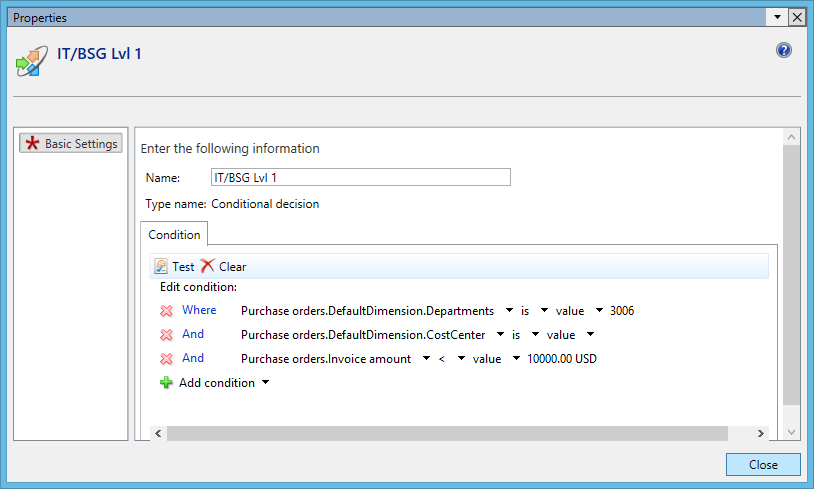
Properties example of one of the conditional decisions
2016_2D00_09_2D00_08_5F00_14_2D00_54_2D00_47.png

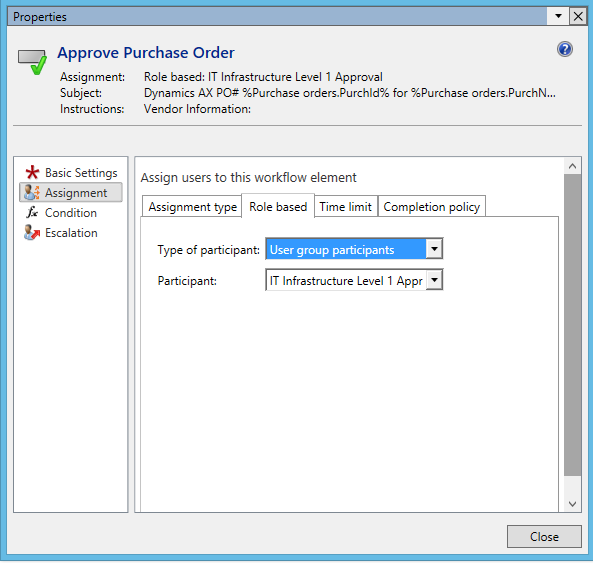
Properties of one of the approval decisions
2016_2D00_09_2D00_08_5F00_14_2D00_56_2D00_46.png


Thanks in Advance!

Phil

*This post is locked for comments

I have the same question (0)
  • Verified answer
    DeadmanWNC Profile Picture
    295 on at

    Hi Phil,

    Had a similar issue here. Business wanted over 1000 logic step in their PO workflow.

    Initially we looked to group DEPT codes (i.e. codes begin with 1 go to group A, codes begin with 2 go to group B)

    Other thing we do is to put multiple steps in a single element (not sure if you are doing this already from your diagrams)?

    So use a "conditional decision" element to evaluate the DEPT code, then send it to an "Approve purchase order" element.

    Within the "Approve purchase order" element create multiple "steps" and setup a condition on each Step to say "Only run this step..." when value is less than X or value is between X and Y etc.

    Finally, be careful when using DEPT financial dimension. POLines can have different DEPTS, so you might need a PO Line workflow not a PO header workflow.

    Also, we had an issue, where the user changed the DEPT and the workflow would not pick up the change until the workflow was recalled and restarted (used a cached DEPT version)!

  • Community Member Profile Picture
    on at

    Awesome! Thank you for the advice.  This really did help me get a better understanding of where to start. I especially was not considering the PO line workflow which I will definitely have to utilize.

    Thanks,

    Phil

  • DeadmanWNC Profile Picture
    295 on at

    Hi Phil,

    Let me know how you get on (would be interested) especially on the POLine element.

    We have stuck with PO header flows because it gets confusing when you split a multi line PO down to different approvers. What are they approving? is it the line value or the total PO value?

    Ideally need a way to say all these lines on a PO add up to £X and are for approver group A and these lines on the same PO add yup to £Y and are for approver group B, but never found a way to do it, so we have to "assume" all lines are for the same approver and they approve based on the total PO value...

    Regards

    Anthony

  • Community Member Profile Picture
    on at

    Yeah, that's pretty much the same boat that we are in. I am exploring now, but it looks like that summation is not possible.

  • DeadmanWNC Profile Picture
    295 on at

    I have just submitted a development request to our in-house dev team to cerate 2 new calculated fields and store them in the PurchTable for a very similar reason...

Under review

Thank you for your reply! To ensure a great experience for everyone, your content is awaiting approval by our Community Managers. Please check back later.

Helpful resources

Quick Links

Responsible AI policies

As AI tools become more common, we’re introducing a Responsible AI Use…

Neeraj Kumar – Community Spotlight

We are honored to recognize Neeraj Kumar as our Community Spotlight honoree for…

Leaderboard > 🔒一 Microsoft Dynamics AX (Archived)

#1
Martin Dráb Profile Picture

Martin Dráb 4 Most Valuable Professional

#1
Priya_K Profile Picture

Priya_K 4

#3
MyDynamicsNAV Profile Picture

MyDynamicsNAV 2

Last 30 days Overall leaderboard

Featured topics

Product updates

Dynamics 365 release plans



