web
You’re offline. This is a read only version of the page.
close
Skip to main content

Announcements

No record found.

News and Announcements icon
Community site session details

Community site session details

Session Id :
Service | Customer Service, Contact Center, Fie...
Suggested Answer

Using flow with lookupfields question

(0) ShareShare
ReportReport
Posted on by 5

Hi,

We want to start using customer voice on incidents to send out surveys.

On our incident record we have a field called responsible contact, a lookup to contacts.

We want to send the survey to this contact, but in the flow when we want to get record contacts, we cannot find the lookup field in the dynamic content....
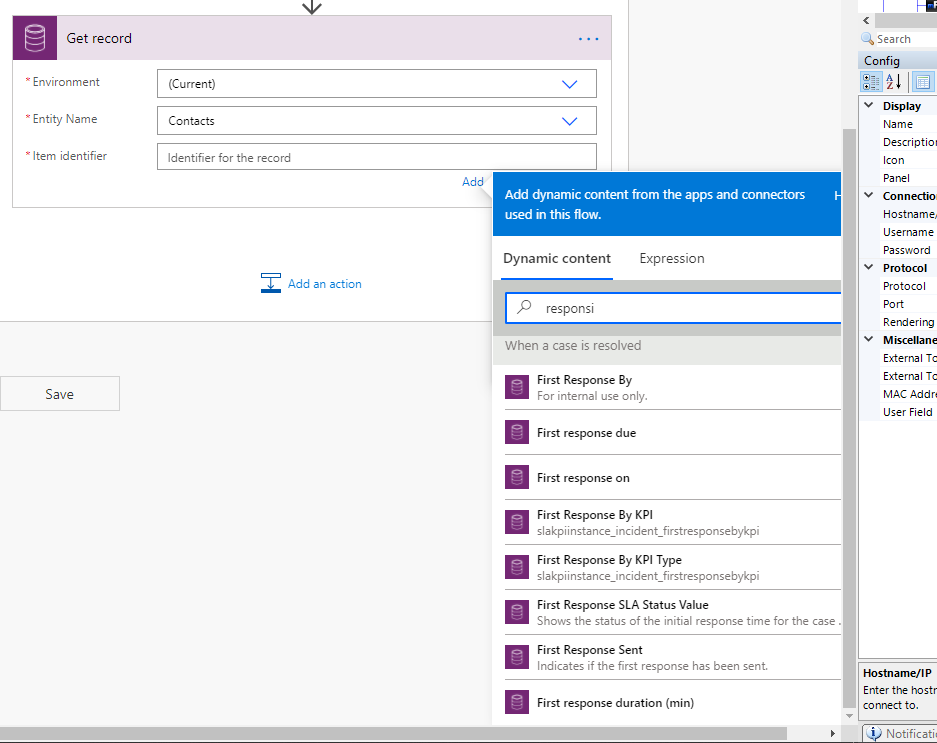
pastedimage1603361248856v1.png

same thing if we try via a list records with filter etc....

Is there a special way to get to these lookup fields?

Rgds

Benny Giebens

  • samerthy parker Profile Picture
    10 on at

    I have had wanted to ask the answer to this problem since ages, I wish that you are able to find the service and help that you require from Merchant Lynx Services reviews if possible.. would be delighted to find if your problem is cleared out.

  • Suggested answer
    Community Member Profile Picture
    on at

    Hi Begie,

    The responsible contact is a field built into the system, it is mainly for internal usage assignment instead reflect the customer who complain or ask question/inquiry.

    It seems that you can’t get it directly in the flow is by-design.

    However, you can copy its value to the newly created lookup field, then you can get contact with the newly created lookup field, which can help you to solve the problem indirectly.

    Here are my steps.

    1.Create a new contact lookup field and add it to the case form.

    pastedimage1603435621784v1.png

    2.Create a business rule to copy responsible contact value to new lookup field.

    pastedimage1603435838427v2.png

    3.Save and active the rule, the publish all customizations.

    4.Test.

    (1) In case form, when you fill responsible contact field, the new lookup field will be filled with the same value automatically.

    pastedimage1603436108689v4.png

    (2) In flow Page, you can select New responsible contact as tem identifier in ‘Get record’ action.

    pastedimage1603436082175v3.png

    Regards,

    Leah Ju

    Please mark as verified if the answer is helpful. Welcome to join hot discussions in Dynamics 365 Forums.

Under review

Thank you for your reply! To ensure a great experience for everyone, your content is awaiting approval by our Community Managers. Please check back later.

Helpful resources

Quick Links

Season of Sharing Community Challenge Winners!

Congratulations to our community stars!

Women in Power Builds Momentum

Expanding mentorship, skilling, and AI innovation

Congratulations to the July Top 10 Community Leaders

These are the community rock stars!

Leaderboard > Service | Customer Service, Contact Center, Field Service, Guides

#1
Syed Aqib Raza Profile Picture

Syed Aqib Raza 42

#2
11manish Profile Picture

11manish 19 Super User 2026 Season 2

#2
Travis South Profile Picture

Travis South 19

Last 30 days Overall leaderboard

Featured topics

Product updates

Dynamics 365 release plans



