Hello.
I have a very strange issue with the Report Designer and none of the other discussions here were able to bring some light into the problem.
When I try to launch the report Designer I am prompted with username / password dialogue and then I get the very ambiguous error.
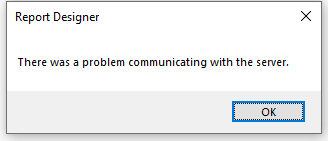
Report Designer
There was a problem communicating with the server.
---------------------
I get this error on both Sandbox and Production environment.
We are Running Platform release Update53 (7.0.6545.122) ON Premise !
Not sure when this error started to occur as last time our accountant edited the reports was last year some 9 months back ... so I don't even know when the error started to appear.
I can fine access WebService URL and browse the Reports from Web Portal URL.
I've run the RegisterETW script and the errors I can see in the event log don't tell me much (2 warnings , 3 informational and 3 errors) :
Warning :
<Provider Name="Microsoft-Dynamics-MR-Logger" Guid="{8d043b9f-5686-4786-b92c-35da15de02a4}" />
<Keywords>0x4000000000000002</Keywords>
<TimeCreated SystemTime="2023-04-21T06:22:38.7578537Z" />
<EventRecordID>10</EventRecordID>
<Correlation ActivityID="{d7cfbfe4-7416-0002-1340-d0d71674d901}" />
<Execution ProcessID="2412" ThreadID="8872" />
<Channel>Microsoft-Dynamics-MR-Logger/Operational</Channel>
<Computer>mycomoputername</Computer>
<Security UserID="S-1-5-21-1071331199-2508690227-853226986-13797" />
</System>
<Data Name="source">DesignerTraceSource</Data>
<Data Name="id">-1</Data>
<Data Name="component" />
<Data Name="errorMessage" />
<Data Name="exceptionMessage">There is no download group named "en-US".</Data>
<Data Name="exceptionSource">System.Deployment</Data>
<Data Name="exceptionType">System.Deployment.Application.InvalidDeploymentException</Data>
<Data Name="stackTrace">at System.Deployment.Application.ComponentStore.CheckGroupInstalled(DefinitionAppId appId, AssemblyManifest appManifest, String groupName) at System.Deployment.Application.SubscriptionStore.CheckGroupInstalled(SubscriptionState subState, DefinitionAppId appId, String groupName) at System.Deployment.Application.ApplicationDeployment.IsFileGroupDownloaded(String groupName) at Microsoft.Dynamics.Performance.Common.ClickOnceDeploymentUtility.LoadSatelliteAssemblies(String cultureName)</Data>
<Data Name="failureBucketId" />
<Data Name="appDomainId">1</Data>
<Data Name="buildVersion">10.0.29005.0</Data>
<Data Name="ProcessMemory">70516736</Data>
</EventData>
</Event>
Warning:
<Provider Name="Microsoft-Dynamics-MR-Logger" Guid="{8d043b9f-5686-4786-b92c-35da15de02a4}" />
<Keywords>0x4000000000000002</Keywords>
<TimeCreated SystemTime="2023-04-21T06:22:39.0395900Z" />
<EventRecordID>11</EventRecordID>
<Correlation ActivityID="{d7cfbfe4-7416-0002-1340-d0d71674d901}" />
<Execution ProcessID="2412" ThreadID="8872" />
<Channel>Microsoft-Dynamics-MR-Logger/Operational</Channel>
<Computer>mycomputername</Computer>
<Security UserID="S-1-5-21-1071331199-2508690227-853226986-13797" />
</System>
<Data Name="source">DesignerTraceSource</Data>
<Data Name="id">-1</Data>
<Data Name="component" />
<Data Name="errorMessage">Could not load ClickOnce file group for culture: en-US.</Data>
<Data Name="exceptionMessage" />
<Data Name="exceptionSource" />
<Data Name="exceptionType" />
<Data Name="stackTrace" />
<Data Name="failureBucketId" />
<Data Name="appDomainId">1</Data>
<Data Name="buildVersion">10.0.29005.0</Data>
<Data Name="ProcessMemory">70516736</Data>
</EventData>
</Event>
Information :
<Provider Name="Microsoft-Dynamics-MR-Logger" Guid="{8d043b9f-5686-4786-b92c-35da15de02a4}" />
<Keywords>0x4000000000000002</Keywords>
<TimeCreated SystemTime="2023-04-21T06:22:39.0753894Z" />
<EventRecordID>13</EventRecordID>
<Correlation ActivityID="{d7cfbfe4-7416-0002-1340-d0d71674d901}" />
<Execution ProcessID="2412" ThreadID="8872" />
<Channel>Microsoft-Dynamics-MR-Logger/Operational</Channel>
<Computer>mycomputername</Computer>
<Security UserID="S-1-5-21-1071331199-2508690227-853226986-13797" />
</System>
<Data Name="id">-1</Data>
<Data Name="component">ServiceFabricDeploymentUtility</Data>
<Data Name="messageText">Initializing isLocalBusinessDataEnvironment=False.</Data>
<Data Name="appDomainId">1</Data>
<Data Name="buildVersion">10.0.29005.0</Data>
<Data Name="ProcessMemory">70516736</Data>
</EventData>
</Event>
Information:
<Provider Name="Microsoft-Dynamics-MR-Logger" Guid="{8d043b9f-5686-4786-b92c-35da15de02a4}" />
<Keywords>0x4000000000000002</Keywords>
<TimeCreated SystemTime="2023-04-21T06:22:39.0724136Z" />
<EventRecordID>12</EventRecordID>
<Correlation ActivityID="{d7cfbfe4-7416-0002-1340-d0d71674d901}" />
<Execution ProcessID="2412" ThreadID="8872" />
<Channel>Microsoft-Dynamics-MR-Logger/Operational</Channel>
<Computer>mycomputername</Computer>
<Security UserID="S-1-5-21-1071331199-2508690227-853226986-13797" />
</System>
<Data Name="id">-1</Data>
<Data Name="component">ServiceFabricDeploymentUtility</Data>
<Data Name="messageText">Initializing isServiceFabric=False.</Data>
<Data Name="appDomainId">1</Data>
<Data Name="buildVersion">10.0.29005.0</Data>
<Data Name="ProcessMemory">70516736</Data>
</EventData>
</Event>
Information :
<Provider Name="Microsoft-Dynamics-MR-Logger" Guid="{8d043b9f-5686-4786-b92c-35da15de02a4}" />
<Keywords>0x4000000000000002</Keywords>
<TimeCreated SystemTime="2023-04-21T06:22:39.0758369Z" />
<EventRecordID>14</EventRecordID>
<Correlation ActivityID="{d7cfbfe4-7416-0002-1340-d0d71674d901}" />
<Execution ProcessID="2412" ThreadID="8872" />
<Channel>Microsoft-Dynamics-MR-Logger/Operational</Channel>
<Computer>mycomputername</Computer>
<Security UserID="S-1-5-21-1071331199-2508690227-853226986-13797" />
</System>
<Data Name="id">-1</Data>
<Data Name="component">CertificateManager</Data>
<Data Name="messageText">Initialize ServicePointManager.CheckCertificateRevocationList=True</Data>
<Data Name="appDomainId">1</Data>
<Data Name="buildVersion">10.0.29005.0</Data>
<Data Name="ProcessMemory">70516736</Data>
</EventData>
</Event>
ERROR :
<Provider Name="Microsoft-Dynamics-MR-Logger" Guid="{8d043b9f-5686-4786-b92c-35da15de02a4}" />
<Keywords>0x4000000000000006</Keywords>
<TimeCreated SystemTime="2023-04-21T06:22:52.1418984Z" />
<EventRecordID>15</EventRecordID>
<Correlation ActivityID="{d7cfbfe4-7416-0002-1340-d0d71674d901}" />
<Execution ProcessID="2412" ThreadID="15608" />
<Channel>Microsoft-Dynamics-MR-Logger/Operational</Channel>
<Computer>mycomputername</Computer>
<Security UserID="S-1-5-21-1071331199-2508690227-853226986-13797" />
</System>
<Data Name="source">DesignerTraceSource</Data>
<Data Name="id">-1</Data>
<Data Name="component" />
<Data Name="errorMessage" />
<Data Name="exceptionMessage">The server was unable to process the request due to an internal error. For more information about the error, either turn on IncludeExceptionDetailInFaults (either from ServiceBehaviorAttribute or from the <serviceDebug> configuration behavior) on the server in order to send the exception information back to the client, or turn on tracing as per the Microsoft .NET Framework SDK documentation and inspect the server trace logs. Action: schemas.microsoft.com/.../fault Fault code: Receiver IsSenderFault: False IsReceiverFault: True Reason: The server was unable to process the request due to an internal error. For more information about the error, either turn on IncludeExceptionDetailInFaults (either from ServiceBehaviorAttribute or from the <serviceDebug> configuration behavior) on the server in order to send the exception information back to the client, or turn on tracing as per the Microsoft .NET Framework SDK documentation and inspect the server trace logs.</Data>
<Data Name="exceptionSource">mscorlib</Data>
<Data Name="exceptionType">System.ServiceModel.FaultException</Data>
<Data Name="stackTrace">Server stack trace: at System.ServiceModel.Channels.ServiceChannel.ThrowIfFaultUnderstood(Message reply, MessageFault fault, String action, MessageVersion version, FaultConverter faultConverter) at System.ServiceModel.Channels.ServiceChannel.HandleReply(ProxyOperationRuntime operation, ProxyRpc& rpc) at System.ServiceModel.Channels.ServiceChannel.Call(String action, Boolean oneway, ProxyOperationRuntime operation, Object[] ins, Object[] outs, TimeSpan timeout) at System.ServiceModel.Channels.ServiceChannelProxy.InvokeService(IMethodCallMessage methodCall, ProxyOperationRuntime operation) at System.ServiceModel.Channels.ServiceChannelProxy.Invoke(IMessage message) Exception rethrown at [0]: at System.Runtime.Remoting.Proxies.RealProxy.HandleReturnMessage(IMessage reqMsg, IMessage retMsg) at System.Runtime.Remoting.Proxies.RealProxy.PrivateInvoke(MessageData& msgData, Int32 type) at Microsoft.Dynamics.Performance.Reporting.Security.ISecurityService.CheckCertificateRevocationList() at Microsoft.Dynamics.Performance.Reporting.Common.Service.ClientBase.<>c__DisplayClass8_0`1.<Execute>b__2() at Microsoft.Dynamics.Performance.Reporting.Common.Service.ClientBase.<>c__DisplayClass8_0`1.<Execute>b__0(Func`1 T) at Microsoft.Dynamics.Performance.Reporting.Common.Service.ClientBase.<>c__DisplayClass8_0`1.<Execute>b__1()</Data>
<Data Name="failureBucketId" />
<Data Name="appDomainId">1</Data>
<Data Name="buildVersion">10.0.29005.0</Data>
<Data Name="ProcessMemory">70516736</Data>
</EventData>
</Event>
CRITICAL :
<Provider Name="Microsoft-Dynamics-MR-Logger" Guid="{8d043b9f-5686-4786-b92c-35da15de02a4}" />
<Keywords>0x4000000000000006</Keywords>
<TimeCreated SystemTime="2023-04-21T06:22:52.1501141Z" />
<EventRecordID>16</EventRecordID>
<Correlation ActivityID="{d7cfbfe4-7416-0002-1340-d0d71674d901}" />
<Execution ProcessID="2412" ThreadID="8872" />
<Channel>Microsoft-Dynamics-MR-Logger/Operational</Channel>
<Computer>mycomputername</Computer>
<Security UserID="S-1-5-21-1071331199-2508690227-853226986-13797" />
</System>
<Data Name="source">DesignerTraceSource</Data>
<Data Name="id">-1</Data>
<Data Name="component" />
<Data Name="errorMessage" />
<Data Name="exceptionMessage">There was a problem communicating with the server.</Data>
<Data Name="exceptionSource">Microsoft.Dynamics.Performance.Reporting.Common</Data>
<Data Name="exceptionType">Microsoft.Dynamics.Performance.Reporting.Common.ReportingServerCommunicationException</Data>
<Data Name="stackTrace">at Microsoft.Dynamics.Performance.Reporting.Common.Service.ClientBase.Execute[TExec](Func`1 executor, Action`1 handler) at Microsoft.Dynamics.Performance.Reporting.Security.Client.SecurityProxy.CheckCertificateRevocationList() at Microsoft.Dynamics.Performance.Reporting.ReportDesigner.StartupCoordinator.SetCheckCertificateRevocationList() at Microsoft.Dynamics.Performance.Reporting.ReportDesigner.StartupCoordinator.<>c.<Initialize>b__9_0() at System.Threading.Tasks.Task`1.InnerInvoke() at System.Threading.Tasks.Task.Execute()</Data>
<Data Name="failureBucketId">339eb5c7-de58-4e79-a615-d04a44bd39ac</Data>
<Data Name="appDomainId">1</Data>
<Data Name="buildVersion">10.0.29005.0</Data>
<Data Name="ProcessMemory">70516736</Data>
</EventData>
</Event>
CRITICAL :
<Provider Name="Microsoft-Dynamics-MR-Logger" Guid="{8d043b9f-5686-4786-b92c-35da15de02a4}" />
<Keywords>0x4000000000000006</Keywords>
<TimeCreated SystemTime="2023-04-21T06:22:52.1517808Z" />
<EventRecordID>17</EventRecordID>
<Correlation ActivityID="{d7cfbfe4-7416-0002-1340-d0d71674d901}" />
<Execution ProcessID="2412" ThreadID="8872" />
<Channel>Microsoft-Dynamics-MR-Logger/Operational</Channel>
<Computer>mycomputername</Computer>
<Security UserID="S-1-5-21-1071331199-2508690227-853226986-13797" />
</System>
<Data Name="source">DesignerTraceSource</Data>
<Data Name="id">-1</Data>
<Data Name="component" />
<Data Name="errorMessage" />
<Data Name="exceptionMessage">One or more errors occurred.</Data>
<Data Name="exceptionSource">mscorlib</Data>
<Data Name="exceptionType">System.AggregateException</Data>
<Data Name="stackTrace">at System.Threading.Tasks.Task.WaitAll(Task[] tasks, Int32 millisecondsTimeout, CancellationToken cancellationToken) at Microsoft.Dynamics.Performance.Common.UISynchronizationUtility.WaitAll(Task[] tasks) at Microsoft.Dynamics.Performance.Reporting.ReportDesigner.ReportDesignerMain.ApplicationInitialize(ApplicationOptions _) at Microsoft.Dynamics.Performance.Reporting.ReportDesigner.ReportDesignerMain.Main(String[] commandLine)</Data>
<Data Name="failureBucketId">339eb5c7-de58-4e79-a615-d04a44bd39ac</Data>
<Data Name="appDomainId">1</Data>
<Data Name="buildVersion">10.0.29005.0</Data>
<Data Name="ProcessMemory">70516736</Data>
</EventData>
</Event>
Any Idea would be appreciated as I have started to hit my head on the wall now :(


