web
You’re offline. This is a read only version of the page.
close
Skip to main content

Notifications

Announcements

Community site session details

Community site session details

Session Id :
Finance | Project Operations, Human Resources, ...
Answered

PurchPrice not posting to VendInvoiceInfoLine table when using VendVendInvoiceServiceClient

(0) ShareShare
ReportReport
Posted on by

Hello all, I am a developer working on an integration with Dynamics AX. I am creating a non-PO based invoice in the system through a C# Web Service.

My issue is that I am defining the "PurchPrice" variable in the "AxdEntity_VendInvoiceInfoLine" of the request and can confirm it is being sent to the program, but when I view the invoice created in AX, the "PurchPrice" is 0. See below:

var lineItem = new AxdEntity_VendInvoiceInfoLine()
{
    OrderAccount = "12345",
    ItemId = "454545",
    Description = "Television",
    ReceiveNow = 1,
    LineAmount = 499.99,
    LineAmountSpecified = true,
    PurchPrice = 499.99,
    PurchPriceSpecified = true,
    Closed = AxdEnum_NoYes.No,
    ClosedSpecified = true
};
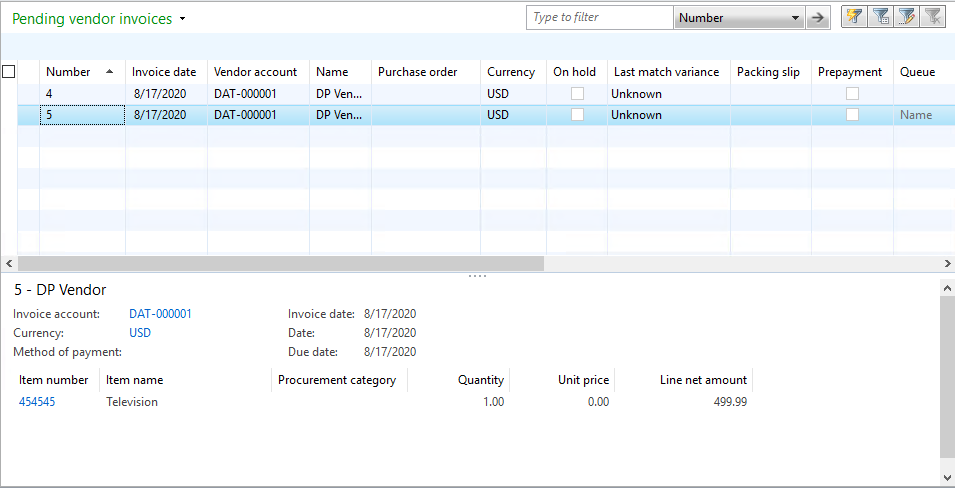
AX_5F00_Invoice.png

All other data that I am passing seems to be posting OK, and I can confirm that the "PurchPrice" field from VendInvoiceInfoLine" is the proper field because if I change the value in SQL after posting it, then it displays correctly.

I have also set the prices in the item itself within AX. I set the purchase price and attempted the posting again, but this value still posts as 0.

Can anyone provide guidance on what controls this value being set? Is there additional configuration in AX needed to set this price? Any help at all will be appreciated. Thank you!

I have the same question (0)
  • Verified answer
    André Arnaud de Calavon Profile Picture
    301,459 Super User 2025 Season 2 on at

    Hi Evan,

    When you have specified a line amount (LineAmountSpecified), then it is considering that there might be a rounding difference or lumpsum. This is then causing the unit price to be 0. Try to remove the coding for the line amount fields and let the application calculate the line amount.

  • Community Member Profile Picture
    on at

    Thank you so much for this response. I guess this was the issue! Passing only the quantity and purchase price automatically calculates the line amount and my purchase price is filling in now. I really appreciate the response!

Under review

Thank you for your reply! To ensure a great experience for everyone, your content is awaiting approval by our Community Managers. Please check back later.

Helpful resources

News and Announcements

Season of Giving Solutions is Here!

Quick Links

Responsible AI policies

As AI tools become more common, we’re introducing a Responsible AI Use…

Neeraj Kumar – Community Spotlight

We are honored to recognize Neeraj Kumar as our Community Spotlight honoree for…

Leaderboard > Finance | Project Operations, Human Resources, AX, GP, SL

#1
Abhilash Warrier Profile Picture

Abhilash Warrier 732 Super User 2025 Season 2

#2
André Arnaud de Calavon Profile Picture

André Arnaud de Cal... 413 Super User 2025 Season 2

#3
Martin Dráb Profile Picture

Martin Dráb 289 Most Valuable Professional

Last 30 days Overall leaderboard

Product updates

Dynamics 365 release plans



