web
You’re offline. This is a read only version of the page.
close
Skip to main content

Notifications

Announcements

No record found.

Community site session details

Community site session details

Session Id :
Customer experience | Sales, Customer Insights,...
Suggested Answer

Advanced find to compare 2 entities

(0) ShareShare
ReportReport
Posted on by 108

Hi All,

My problem is to find the Trainee who has different employers between 2 entities.

I have 2 entities. 1. Training Unit Standards and 2. Training program.

I need to create an advanced find to check whether the trainee has 2 different employers. 

if Trainee is enrolled in "AAA" company, I want to show the same employer in both entities. To do so, I need to find how many trainees are entered as different employers. ?

Here is my advanced find.
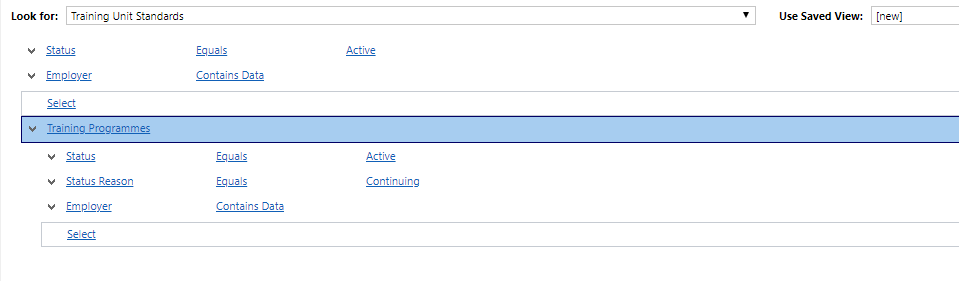
pastedimage1583966654537v1.png

The result of this showing all trainees with their employers. I have added employer from both entities via edit columns. But I want to see only the different employers in both entities.

Hope, someone can resolve my issue.  

Many Thanks,

Poornimaa AN

I have the same question (0)
  • LuHao Profile Picture
    40,892 on at

    Hi Poornimaa,

    Are the entities "Training Unit Standards" and "Training program" in a N: N relationship?

    If so, then I would recommend you create a manual N: N relationship for the entities "Training Unit Standards" and "Training program".

    In this way, we can query by the intersecting entity. Because there are lookup fields of "Training Unit Standards" and "Training program" in the intersecting entity, we can use these two lookup fields to obtain their respective "Employer" values, and then determine whether the two "Employer" values are equal.

    Please refer to this blog on manually creating N: N relationship: carldesouza.com/.../

  • Poornimaa Profile Picture
    108 on at

    Hi Hao,

    Thanks for replying.

    "Training Unit Standards" and "Training program" entities are already in an N: N relationship. I've created a manual N: N relationship, but that's not helping me to find the different employers in both entities.

    Can you please help me further?

    Thank you,

    Poornimaa AN

  • LuHao Profile Picture
    40,892 on at

    Hi Poornimaa,

    I need to confirm two things.

    1. Is the "Employer" field of "Training Unit Standards" and "Training program" entities a lookup field?

    2. If so, does the "Employer" entity have a field that marks the record ID like auto-number field?

  • Suggested answer
    Charles Abi Khirs Profile Picture
    3,569 on at

    Hello,

    You cannot achieve this need in Advanced Find you cannot add a condition to compare two fields.

    What I suggest is the below:

    1. In your intersect entity, add 3 fields: 2 lookups to the employer entity and 1 boolean field to indicate if the two lookups values are the same or not

    2. Create a workflow that will be trigerred on create of the intersect entity and on update of the lookups Training Unit Standards and Training program

    3. In the workflow, add the below steps

       a. Set one lookup employer of the intersect entity to the employer of the Training Unit Standards entity and the other employer lookup to the Training program employer

      b. Add a condition, if the Employer of Training Unit Standards is different than the employer of the Training program = > set the boolean field to true

    4. You can now use the Advanced Find by searching for the intersect records with the boolean value = true. You can of course display the two emaployers lookup fields in your result

Under review

Thank you for your reply! To ensure a great experience for everyone, your content is awaiting approval by our Community Managers. Please check back later.

Helpful resources

Quick Links

Responsible AI policies

As AI tools become more common, we’re introducing a Responsible AI Use…

Neeraj Kumar – Community Spotlight

We are honored to recognize Neeraj Kumar as our Community Spotlight honoree for…

Leaderboard > Customer experience | Sales, Customer Insights, CRM

#1
Tom_Gioielli Profile Picture

Tom_Gioielli 170 Super User 2025 Season 2

#2
#ManoVerse Profile Picture

#ManoVerse 70

#3
Jimmy Passeti Profile Picture

Jimmy Passeti 50 Most Valuable Professional

Last 30 days Overall leaderboard

Product updates

Dynamics 365 release plans



