web
You’re offline. This is a read only version of the page.
close
Skip to main content

Notifications

Announcements

No record found.

Community site session details

Community site session details

Session Id :
Finance | Project Operations, Human Resources, ...
Unanswered

adding new field to data source with custom query

(0) ShareShare
ReportReport
Posted on by 97

Hi, I'm new to d365 customizations and trying to add fields to an existing report (WHSPickListShipping) in d365 finance and operations (which forum should I use?!).  An integration partner walked me through how to

  • create the new version of the report
  • add code to use the new report in print management
  • create the new query
  • change the report to use the new query.

However, we got stuck b/c none of the data for the new fields (SalesId, DeliveryPostalAddress) we added to our query seem to be getting populated with anything. 

The new query is duplicated from WHSPickListShippingReport and we are trying to add a connection to SalesTable.  I see that WHSWorkLine and WHSWorkTable both have relations to SalesTable. 

I've tried setting "Use Relations" to "Yes" but the relation doesn't seem to get added by default.  Should it?

I've tried to manually create the relation a couple different ways to both WHSWorkLIne and WHSWorkTable, I'd appreciate any help that someone can provide on what I might be missing. TIA!

properties for SalesTable:
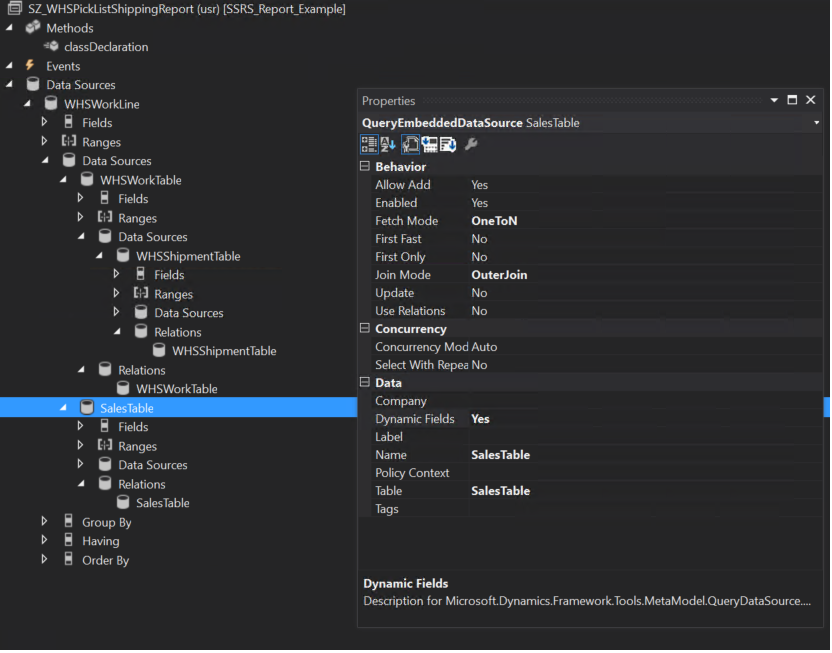
SalesTable_2D00_properties.png

1. manually specifying the fields

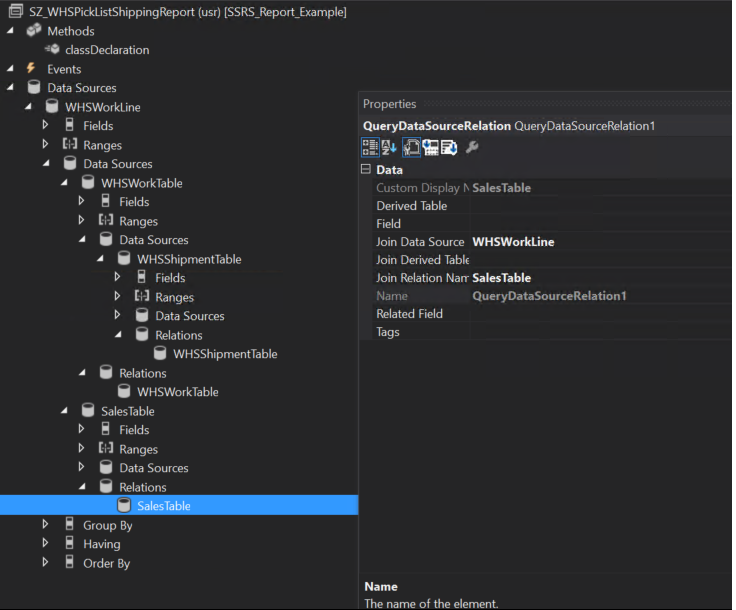
properties for Relation

SalesTable_2D00_relation_2D00_manual.png

2. using the existing relation

SalesTable_2D00_relation_2D00_useRelation.png

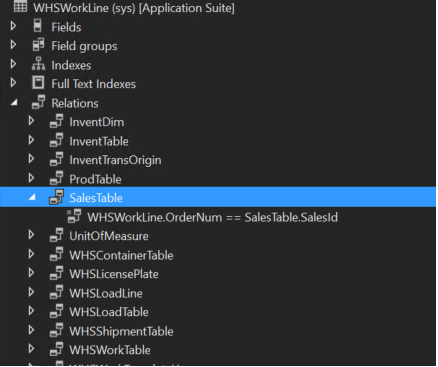
existing relation on WHSWorkLine

WHSWorkLine_2D00_SalesTable_2D00_relation.png

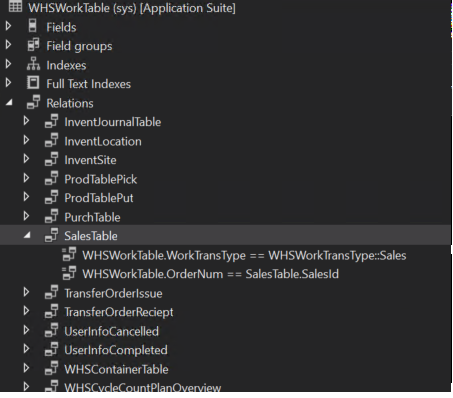
relation on WHSWorkTable

WHSWorkTable_2D00_SalesTable_2D00_relation.png

I have the same question (0)
  • Blue Wang Profile Picture
    on at

    Hi Ifulk,

    Your screenshots are too vague and small, can you upload them again.

    From your first picture, it seems that you added the salestable data source at the same level as WHSWorkTable, try to move it under WHSWorkTable.

    Note:Moved to Finance forum.

  • lfulk Profile Picture
    97 on at

    I've re-uploaded the screenshots. Please let me know if there are additional types of screenshots that would be more helpful.

    I tried adding it at both levels to WHSWorkTable and to WHSWorkLine without any luck.  I've even tried adding WHSWorkTable  to WHSWorkLine again with the exact same settings as the original as far as I could with the exception of "Use relations" as No b/c the relation didn't automatically populate and it wouldn't print that new field.

    original WHSWorkTable in existing query WHSPickListShippingReport

    origWHSWorkTable.png

    version i added

    newWHSWorkTable.png

    expression - field WorkTransTypeLabel is from original. WHSWorkTable WorkTransTypeLabel1 is from one I added  When expression has WorkTransTypeLabel, it prints 3 lines of text. when I change it to WorkTransTypeLabel1, it prints nothing at all.

    expression.png

  • Gunjan Bhattachayya Profile Picture
    35,423 on at

    Hi,

    What's the join type on SalesTable? Also, did you check the data and see if you are getting any results running the query in SSMS?

  • lfulk Profile Picture
    97 on at

    Hi Gunjan Bhattachayya, I have tried both inner and outer join but I think it should be inner join.  I'm very new to d365f&o development so I'm not sure how to get the underlying sql query.  I'd be very grateful if you could point me towards an article that could tell me how to do this as well as getting what the incoming parameters would be for the form I'm testing with in d365.  Thanks!

  • Gunjan Bhattachayya Profile Picture
    35,423 on at

    Hi lfulk,

    I thought you were trying to show SalesId values in a report. Could you please explain your exact requirement here so that we can help you better?

  • lfulk Profile Picture
    97 on at

    Hi Gunjan Bhattachayya, we're essentially trying to make the pick list look more like a packing slip so we are trying to add the order's bill to address, ship to address, order date and ship method to it. I was trying to use SalesId from SalesTable to try to simplify it a little bit to make sure the datasource was working correctly before getting the exact fields I need.

  • Gunjan Bhattachayya Profile Picture
    35,423 on at

    Hi,

    Using the SalesOrder table as you mentioned and joining it to WHSWorkTable, are you still unable to get any values for sales orders?

  • lfulk Profile Picture
    97 on at

    Hi Gunjan Bhattachayya, I have not had any success getting any sales data to populate from SalesTable but I also haven't been able to successfully link any table.  I tried to link WHSWorkTable manually to WHSWorkLine either even though it's already linked by default when I copy the existing query but I'm still unable to get data from it so I think there's some setting I'm missing in general.  It seems odd that the relation does not automatically populate when I set "Use relations" to Yes which is how the data sources are configured from the original query I copied.

  • Sergei Minozhenko Profile Picture
    23,093 on at

    Hi Ifulk,

    By the way, have you check CBD feature based on ER reporting? Shipping pick list is supported and probably you don't need to develop anything in x++ as relations are supported in ER out of the box. And it's much easier to support CBD version than copy of SSRS report.

    docs.microsoft.com/.../configurable-business-documents-reporting-word-excel

  • lfulk Profile Picture
    97 on at

    Hi Sergei Minozhenko, I had not heard of the CBD feature but will definitely check it out. Thanks!!

Under review

Thank you for your reply! To ensure a great experience for everyone, your content is awaiting approval by our Community Managers. Please check back later.

Helpful resources

Quick Links

Responsible AI policies

As AI tools become more common, we’re introducing a Responsible AI Use…

Neeraj Kumar – Community Spotlight

We are honored to recognize Neeraj Kumar as our Community Spotlight honoree for…

Leaderboard > Finance | Project Operations, Human Resources, AX, GP, SL

#1
Martin Dráb Profile Picture

Martin Dráb 663 Most Valuable Professional

#2
André Arnaud de Calavon Profile Picture

André Arnaud de Cal... 540 Super User 2025 Season 2

#3
Sohaib Cheema Profile Picture

Sohaib Cheema 348 User Group Leader

Last 30 days Overall leaderboard

Product updates

Dynamics 365 release plans