web
You’re offline. This is a read only version of the page.
close
Skip to main content

Notifications

Announcements

No record found.

Community site session details

Community site session details

Session Id :
Finance | Project Operations, Human Resources, ...
Answered

excel export through code in AX 2012 R3

(0) ShareShare
ReportReport
Posted on by 30

Hi all,

Can you please let me know i did excel export in AX 2012 R3. It's working fine.

I need some modification in excel.

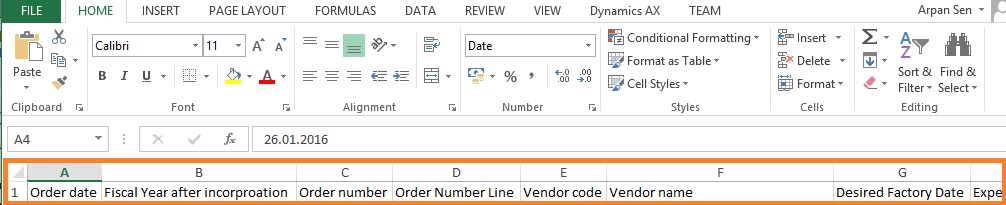
1. In header i wants to make columns BOLD and background YELLOW.
excelheader.jpg

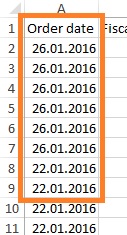
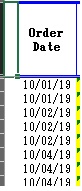
2. The date format customer given below format
dateexcelform.jpg

BUT In excel it's coming like

orderdate.jpg

code

orderDate = maxPurchaseOrderDate;


a = date2str(orderDate,123,2,DateSeparator::Hyphen,2,DateSeparator::Hyphen,4);

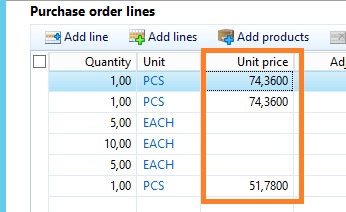
3. In the Unit price and net amount columns customer wants CURRENCY SYMBOL + AMOUNT.

net amount =  PurchLine.netAmount;

Unit price =  PurchLine.PurchPrice

@ JAPAN CURRENCY SYMBOL

4. In excel the amount is showing for Unit price and Net amount IN BELOW FORMAT. I WANTS TO SHOW SAME LIKE AX
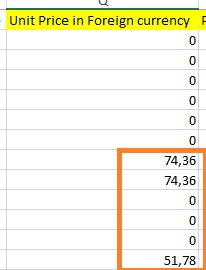
EAMOUNR.jpg

AX

POLINES.jpg

4. I wants to FRREZE panes the HEADER PART ONLY

please give me more shed on this.

thanks!

I have the same question (0)
  • Martin Dráb Profile Picture
    237,880 Most Valuable Professional on at

    How do you do the export?

  • @rp@n Profile Picture
    30 on at

    Through sysexcelApplication...

  • @rp@n Profile Picture
    30 on at

    Can you please anyone

  • Suggested answer
    Anup Shah MSFT Profile Picture
    on at

    I believe the excel date/time settings will come from the default excel template, and the default uses you local language settings

  • Suggested answer
    Sergei Minozhenko Profile Picture
    23,093 on at

    Hi @rp@n,

    You can set cell format using numberFormat method, but you need to determine current user settings. Maybe the easiest way is to set format as Text and use strFmt function to convert date and amount to string and put string value to the Excel file.

    SysExcelCells cells           = worksheet.cells();
    cells.range('A:A').numberFormat('@'); // data as Text for column A

    docs.microsoft.com/.../excel.range.numberformat

  • @rp@n Profile Picture
    30 on at

    Kindly provide me answers of all question please

  • @rp@n Profile Picture
    30 on at

    hello Sergei,

    if possible, give me answer of all questions please

  • Verified answer
    Sergei Minozhenko Profile Picture
    23,093 on at

    Hi @rp@n,

    1. There is style method on SysExcelRange class, you can use it to set up a style for a range. Also, check SysExcelWorksheetHelper class, it contains some useful methods for you.

    2. Check SysExcelWorksheetHelper.getMonetaryNumberFormat and try to design something similar for date. Or format date to a string in AX to the proper format and use text format in Excel.

    3. It's similar to point 2, use SysExcelWorksheetHelper.getMonetaryNumberFormat as a base for own format, or convert to string in AX and use text format in Excel.

    4. Here can be found some information about FreezePanel method community.dynamics.com/.../export-data-to-excel-through-x

  • @rp@n Profile Picture
    30 on at

    thanks a lot Sergei,

    do you have any sample code?

  • Sergei Minozhenko Profile Picture
    23,093 on at

    Hi @rp@n,

    I have only sample how to set cell format and posted it already above. Try to search by references in code by mention methods and classes and check usage.

Under review

Thank you for your reply! To ensure a great experience for everyone, your content is awaiting approval by our Community Managers. Please check back later.

Helpful resources

Quick Links

Responsible AI policies

As AI tools become more common, we’re introducing a Responsible AI Use…

Neeraj Kumar – Community Spotlight

We are honored to recognize Neeraj Kumar as our Community Spotlight honoree for…

Leaderboard > Finance | Project Operations, Human Resources, AX, GP, SL

#1
Martin Dráb Profile Picture

Martin Dráb 611 Most Valuable Professional

#2
André Arnaud de Calavon Profile Picture

André Arnaud de Cal... 529 Super User 2025 Season 2

#3
Sohaib Cheema Profile Picture

Sohaib Cheema 285 User Group Leader

Last 30 days Overall leaderboard

Product updates

Dynamics 365 release plans