web
You’re offline. This is a read only version of the page.
close
Skip to main content

Notifications

Announcements

No record found.

Community site session details

Community site session details

Session Id :
Microsoft Dynamics NAV (Archived)

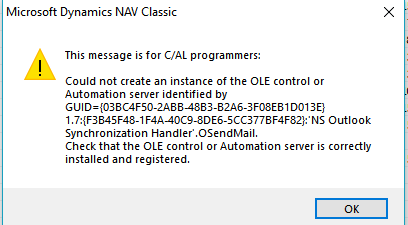
OLE Control Error: NS Outlook Sync Handler.OSendMail

(0) ShareShare
ReportReport
Posted on by

CaptureOLEError.PNG

We are having users receive this error when they try to use a function in NAV that creates an email with their Outlook client.  We had never had issues with this, but I suspect these users are getting new hard drives / fresh installs of OS, Office, Nav, etc.. and now receiving this error.

Is there a missing dll?  What are the things I should check?  I am not the one doing these installs, so I would need to ask some questions if it isn't a straightforward fix.

Nav 2009 classic client

*This post is locked for comments

I have the same question (0)
  • Community Member Profile Picture
    on at

    Same problem, version 2009 Classic. Any Solutions?

  • Community Member Profile Picture
    on at

    Same here with Windows 10, newest build.

    Another forum says there is a change in mapi32.dll.

    I saw that the date of mapi32.dll under c:\windows\system32 has changed with one of the last builds from 16.07.2016 to 29.09.2017.

    Choose the one from the Windows.old, but dont works.

  • Suggested answer
    Community Member Profile Picture
    on at

    After a long process I saw, that MS Office 2016 Home & Business has a own MSMAPI32.DLL in this Office folder

    C:\Program Files (x86)\Microsoft Office\root\VFS\ProgramFilesCommonX86\SYSTEM\MSMAPI\1031\MSMAPI32.DLL

    I renamed the  "C:\Windows\System32\mapi32.dll" in mapi32_old.dll

    And copied the MSMAPI32.dll and renamed it to mapi32.dll

    This works for me.

    Only the function in Snipping Tool dont works. But it is okay for me, because copy paste works.

  • Community Member Profile Picture
    on at

    Any updates on this issue? I have exactly same problem.

  • Community Member Profile Picture
    on at

    Did you try sklmysh workaround?

  • Community Member Profile Picture
    on at

    Yes but then I have problems with trusted installer rights. I cannot rename DLLs.

Under review

Thank you for your reply! To ensure a great experience for everyone, your content is awaiting approval by our Community Managers. Please check back later.

Helpful resources

Quick Links

Responsible AI policies

As AI tools become more common, we’re introducing a Responsible AI Use…

Neeraj Kumar – Community Spotlight

We are honored to recognize Neeraj Kumar as our Community Spotlight honoree for…

Leaderboard > 🔒一 Microsoft Dynamics NAV (Archived)

Last 30 days Overall leaderboard

Featured topics

Product updates

Dynamics 365 release plans
