web
You’re offline. This is a read only version of the page.
close
Skip to main content

Announcements

News and Announcements icon
Community site session details

Community site session details

Session Id :
Microsoft Dynamics AX (Archived)

Install Ax 2012 R2 hotfix on Ax 2012 R3

(0) ShareShare
ReportReport
Posted on by

Hi,

I have a hotfix that should be installed, but when i run AxUpdate i get no databases available to install the hotfix.
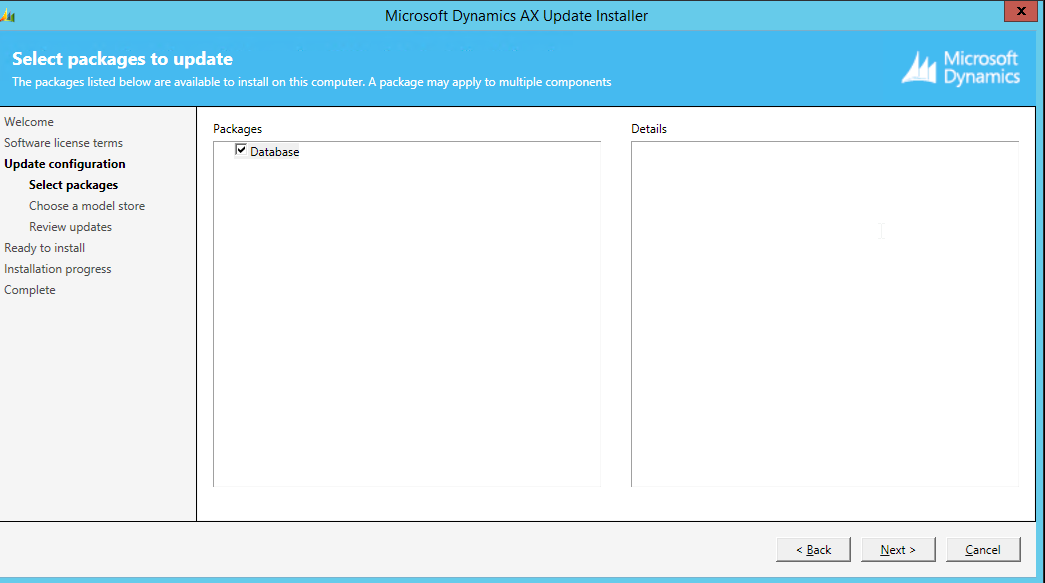
hotfix.png

Manually adding the model database is also not possible (unable to add database instance).

Anyone seen this behaviour before? Hotfix is created for version Ax 2012 R2, our version is Ax 2012 R3, is that the reason?

*This post is locked for comments

I have the same question (0)
  • Verified answer
    Vilmos Kintera Profile Picture
    46,149 on at

    Yes, hotfixes are version-specific. If it is an application hotfix, then you could try to set up a fresh environment for that version, apply the hotfix, then have a look at the model contents to find changed objects. Export those from R2, then do a manual code merge into your R3 developer workspace.

  • Ben Maes Profile Picture
    on at

    Ok, so there is no way to install the hotfix in an R3 environment? I guess i'll have to see about setting up an R2 environment.

    Thanks!

Under review

Thank you for your reply! To ensure a great experience for everyone, your content is awaiting approval by our Community Managers. Please check back later.

Helpful resources

Quick Links

Season of Sharing Community Challenge Launch!

Jump in, show your community spirit, and win prizes!

Women in Power Builds Momentum

Expanding mentorship, skilling, and AI innovation

Congratulations to the May Top 10 Community Leaders

These are the community rock stars!

Leaderboard > 🔒一 Microsoft Dynamics AX (Archived)

#1
Sanhthosh.Kumar.K Profile Picture

Sanhthosh.Kumar.K 2

#2
Raed Salah Bzour Profile Picture

Raed Salah Bzour 1

Last 30 days Overall leaderboard

Featured topics

Product updates

Dynamics 365 release plans
