web
You’re offline. This is a read only version of the page.
close
Skip to main content

Notifications

Announcements

No record found.

Community site session details

Community site session details

Session Id :
Customer experience | Sales, Customer Insights,...
Suggested Answer

Dynamics 365 Workflow Tools - Geocode Address issue

(0) ShareShare
ReportReport
Posted on by 329

I'm trying to use the Geocode Address function in the Dynamics 365 Workflow tools to geocode new addresses in my D365CE instance. I followed these instructions: https://github.com/demianrasko/Dynamics-365-Workflow-Tools/blob/master/docs/Geocode%20Address.md and got it to work once, and now I'm only pulling back zeros.

The only difference between the example and my setup, is that I'm using dynamic values from the record. Again, it worked the first time I tested it, and then I have only gotten zeros back like it can't match the address. 
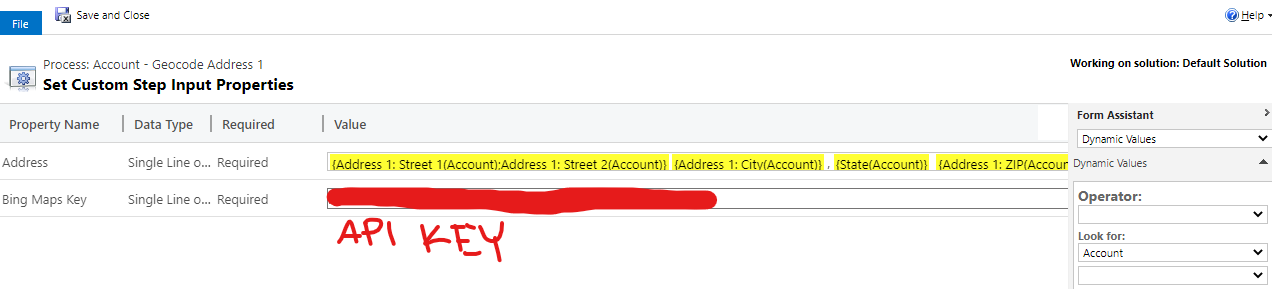
pastedimage1659112471635v1.png

The workflow shows as successful, but the data coming back from Bing is blank. I've tried verified addresses and even re-tried the one address that worked, but all I get are zeros. I tried creating a new Bing API Key, and still had the same behavior. Does anyone have any ideas about what could be going on? 

I have the same question (0)
  • Suggested answer
    a33ik Profile Picture
    84,331 Most Valuable Professional on at

    Hello,

    Since there is a github repo I would recommend opening a bug over there.

  • Suggested answer
    Bipin D365 Profile Picture
    28,983 Moderator on at

    Hi,

    If you have basic c# knowledge then source code can be copied from below location

    github.com/.../GeoCodeAddress.cs

    Try to create simple console application to debug this code.

  • GinaPSync Profile Picture
    17 on at
    Hello,
     
    I ran into the same issue with the Workflow Tools Geocode step in a workflow. It worked if I hardcoded the "Address" parameter, but not if I mapped in Address fields from my Account record.
     
    Thanks to Nick Doelman, I found this solution using Power Automate Flow - Get Geo Co-ordinates from Address values in Common Data Service Records – ReadyXRM - using the Bing Maps connector. It was easy to configure and worked perfectly!

Under review

Thank you for your reply! To ensure a great experience for everyone, your content is awaiting approval by our Community Managers. Please check back later.

Helpful resources

Quick Links

Responsible AI policies

As AI tools become more common, we’re introducing a Responsible AI Use…

Neeraj Kumar – Community Spotlight

We are honored to recognize Neeraj Kumar as our Community Spotlight honoree for…

Leaderboard > Customer experience | Sales, Customer Insights, CRM

#1
Tom_Gioielli Profile Picture

Tom_Gioielli 81 Super User 2025 Season 2

#2
Gerardo Rentería García Profile Picture

Gerardo Rentería Ga... 49 Most Valuable Professional

#3
#ManoVerse Profile Picture

#ManoVerse 40

Last 30 days Overall leaderboard

Product updates

Dynamics 365 release plans
