Hi I got into a weird situation. i am trying to import data into the ax from excel sheet. in that particular sheet i have a product number column. i have to read the product number. in the product numbers i have complete integer product number as well as some product numbers are suffixed with a string. so my situation is i can able to read the product numbers which are having suffixed string. unable to read the only integer values.
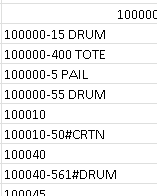
above is the sample column for item numbers. the first row consists only number. where as bellow you can see number suffixed with string.
when i debug my code i can able to see the string values but not the integer values.

see the row number and item id in above picture. i am getting empty here.

but incase of string item i am getting the value.
my code for this
static void RES_PROS_ImportMasterProduct(Args _args)
{
SysExcelApplication application;
SysExcelWorkbooks workbooks;
SysExcelWorkbook workbook;
SysExcelWorksheets worksheets;
SysExcelWorksheet worksheet;
SysExcelCells cells;
COMVariantType type;
Name name;
FileName filename;
//ProductType productType;
InventTable inventTable;
int row;
Dialog dialog;
Dialogfield dialogfield;
str 100 itemID;
str 100 s;
boolean first = true;
;
application = SysExcelApplication::construct();
workbooks = application.workbooks();
//filename = @"C:\Users\Desktop\ImportWareHouse.xlsx";
dialog = new dialog('Excel Import');
dialogfield = dialog.addField(extendedTypeStr(FilenameOpen), 'File Name');
dialog.run();
filename =(dialogfield.value());
try
{
workbooks.open(filename);
}
catch (Exception::Error)
{
throw error("File cannot be opened.");
}
workbook = workbooks.item(1);
worksheets = workbook.worksheets();
worksheet = worksheets.itemFromNum(1);
cells = worksheet.cells();
while select forUpdate inventTable
{
do
{
row++;
s = any2str(cells.item(row, 2).value().bStr());
itemID = cells.item(row, 2).value().bStr();
if(itemID == inventTable.ItemId)
{
inventTable.RES_MasterProduct = cells.item(row, 7).value().bStr();
inventTable.doInsert();
}
type = cells.item(row+1, 7).value().variantType();
}while (type != COMVariantType::VT_EMPTY);
row=0;
}
application.quit();
workbooks.close();
info("Done");
}







