web
You’re offline. This is a read only version of the page.
close
Skip to main content

Announcements

News and Announcements icon
Community site session details

Community site session details

Session Id :
Microsoft Dynamics 365 | Integration, Dataverse...
Answered

Can't set "Marketing List Lookup View" as default view in a subgrid

(1) ShareShare
ReportReport
Posted on by 165 User Group Leader

Hello,

I am currently working in Dynamics 365 v8.2 while setting a Marketing List subgrid on the contact form,I countered the following problem, when I try to add a record in the grid no record is shown.
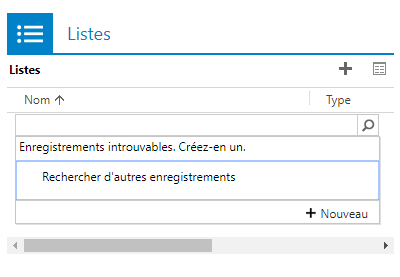
pastedimage1585573946651v2.png

After clicking on the loop, I recognized that the view used to search for the records isn't 'Marketing List Lookup View'

pastedimage1585574040680v3.png

How can I alter the 'Look in' (Dans) field to show 'Marketing List Lookup view' instead?

PS: I am aware of changing the view manually but I'd like to set 'Marketing List Lookup view' as the default view to do my researches directly

I have the same question (0)
  • Suggested answer
    Miguel Lourenco Profile Picture
    Microsoft Employee on at

    Hi,

    Have you tried to go to the form settings and see the properties of the sub grid?

    pastedimage1585578934953v1.png

  • NoellaB Profile Picture
    165 User Group Leader on at

    Yes I did, but it doesn't allow me to modify the intended view of the lookup, it only makes me choose the view that I want to set in the subgrid.

    All I could understand is that the system must show 'Marketing List Lookup View' when I'm searching for a record instead it shows 'Active Marketing List', someone must've messed with some configuration, I need to figure out where I can set the default lookup view of an entity.

  • Suggested answer
    Miguel Lourenco Profile Picture
    Microsoft Employee on at

    Hi Nouhaila,

    I think it is by design, I have the same behavior in my org.

    I believe only public views can be set as default views, this is why it won't show up

  • Suggested answer
    Miguel Lourenco Profile Picture
    Microsoft Employee on at

    when trying to set it as default view:

    pastedimage1585582435638v1.png

    You will need to create a public view

  • NoellaB Profile Picture
    165 User Group Leader on at

    I think you misunderstood me or I haven't explained myself well.

    When I search for records in other entities I get this:

    pastedimage1585584812450v1.png

    When I search for records in Marketing List entity, I get this:

    pastedimage1585584868973v2.png

    How can I set the view that shows in that field to be 'Marketing Lists Lookup View' instead of 'Active Marketing List View' (aka Liste actives in french)?

  • Miguel Lourenco Profile Picture
    Microsoft Employee on at

    Hi Nouhaila,

    I couldnt find any supported way to change that lookup view from the default one to another one.

    Anyway, can you try to inspect if the button was customized ? You can check with with ribbon workbench.

    regards,

  • Verified answer
    meelamri Profile Picture
    13,218 User Group Leader on at

    Hi,

    Please check this view: "Marketing list associated with the Owner". It used by default in my environment. Waiting for your feedback !

Under review

Thank you for your reply! To ensure a great experience for everyone, your content is awaiting approval by our Community Managers. Please check back later.

Helpful resources

Quick Links

Season of Sharing Community Challenge Launch!

Jump in, show your community spirit, and win prizes!

Women in Power Builds Momentum

Expanding mentorship, skilling, and AI innovation

Congratulations to the May Top 10 Community Leaders

These are the community rock stars!

Leaderboard > Microsoft Dynamics 365 | Integration, Dataverse, and general topics

#1
Subra Profile Picture

Subra 118

#2
André Arnaud de Calavon Profile Picture

André Arnaud de Cal... 89 Super User 2026 Season 1

#3
BillurSamdancioglu Profile Picture

BillurSamdancioglu 85 Most Valuable Professional

Last 30 days Overall leaderboard

Product updates

Dynamics 365 release plans



