web
You’re offline. This is a read only version of the page.
close
Skip to main content

Notifications

Announcements

Community site session details

Community site session details

Session Id :
Microsoft Dynamics AX (Archived)

XDS Policy Restriction on Field Level

(0) ShareShare
ReportReport
Posted on by 75

My requirement was to restrict data in Transfer orders based on the current logged in store worker's associated warehouse.

I made an XDS Policy for this and added InventTransferTable as a constrained table and InventLocation Table as a Primary Table in my query and the policy worked fine.  

E.g: If a current logged in store worker's warehouse was W003 it showed only those relevant records which contained W003 in either From warehouse field or To warehouse field.
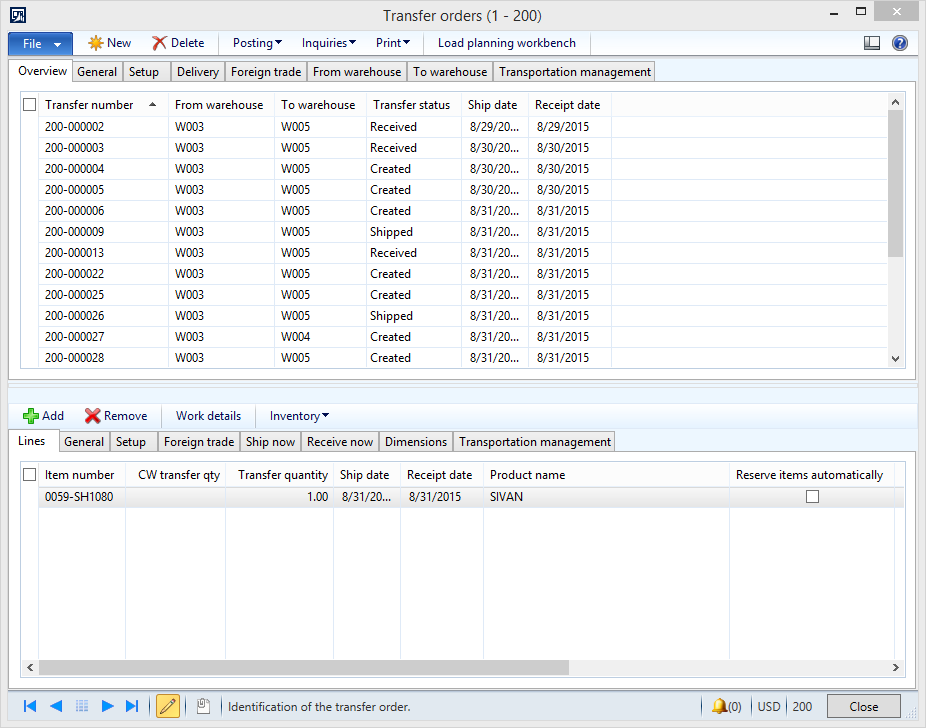
2015_2D00_11_2D00_03_5F00_14_2D00_03_2D00_24.png


Now what my new requirement is that I want everything to remain the same the only thing that needs change is when I create a new record I should be able to have an option to select all the warehouses in only the To warehouse field.

As XDS Policy is applied on the entire Table level so it is only showing W003 in the drop-down menu of To Warehouse. Whereas I want the drop-down to show all the warehouses and also be able to select any warehouse in the To Field.

*This post is locked for comments

I have the same question (0)
  • Sohaib Cheema Profile Picture
    49,540 User Group Leader on at

    It reminds me an old discussion, can you give a try to XDSServices.setXDSState(0); in your lookup of To warehouse

  • Omar Iqbal Profile Picture
    75 on at

    Sohaib In InventTransferTable there is no lookup method.

    There are 2 methods

    void lookupReqPo(FormStringControl ctrl,InventLocationId _from, InventLocationId _to)

    and

    void lookupWMSReception(FormStringControl ctrl)

    I have tried disabling XDS in lookupReqPo but it doesn't work.

    Any suggestions ?

  • Verified answer
    Sohaib Cheema Profile Picture
    49,540 User Group Leader on at

    Current lookup on standard Form is because of realationship on InventLocationIdTo (EDT)

    give a try to overriding lookup method on form DataSource and create your custom lookup at following location

    \\forms\InventTransferOrders\DatSources\InventTransferTable\Fields\InventLocationIdTo

    create your custom lookup and try to implement XDSServices.setXDSState(0); inside your own lookup

  • Omar Iqbal Profile Picture
    75 on at

    Thanks Sohaib, it's working now

  • Omar Iqbal Profile Picture
    75 on at

    Sohaib there is a problem occuring, the To Field now shows all the warehouses but when I select a warehouse different than the current logged in workers warehouse then the infolog throws the following exception error.

    The value 'W004' in field 'To warehouse' is not found in the related table 'Warehouses'.

  • Sohaib Cheema Profile Picture
    49,540 User Group Leader on at

    can you show you code

  • Omar Iqbal Profile Picture
    75 on at

    It's pretty simple I have 1 policy and 1 query InventLocation is my primary table and I have added InventTransferTable as a constrained table by free form expression having the below condition

    ((InventTransferTable.InventLocationIdFrom == InventLocation.InventLocationId) || (InventTransferTable.InventLocationIdTo == InventLocation.InventLocationId))


    2015_2D00_11_2D00_03_5F00_20_2D00_42_2D00_02.png

  • Sohaib Cheema Profile Picture
    49,540 User Group Leader on at

    how if you remove below line form your code

    InventTransferTable.InventLocationIdTo == InventLocation.InventLocationId

    also show me lookup code

  • Omar Iqbal Profile Picture
    75 on at

    Can't remove the line because the requirement is that user should be able to see all transfer orders from his store as well as to his store. If I remove this part of the check then only those transfer orders are shown which are from the workers store.

    The lookup code is attached below


     1581.cc.png

  • Sohaib Cheema Profile Picture
    49,540 User Group Leader on at

    so after all this I cannot think of any other way other than what I specified in my previous post

    because nasty thing which comes with XDS is that its applied across whole AX. Only If(condition) can be a helpful here, as per my thoughts at this time.

    You can also wait for any more replies on thread.

    Note:

    you can revert back status of question to un-answered

Under review

Thank you for your reply! To ensure a great experience for everyone, your content is awaiting approval by our Community Managers. Please check back later.

Helpful resources

News and Announcements

Season of Giving Solutions is Here!

Quick Links

Responsible AI policies

As AI tools become more common, we’re introducing a Responsible AI Use…

Neeraj Kumar – Community Spotlight

We are honored to recognize Neeraj Kumar as our Community Spotlight honoree for…

Leaderboard > 🔒一 Microsoft Dynamics AX (Archived)

#1
TAHER Mehdi Profile Picture

TAHER Mehdi 3

#2
Martin Dráb Profile Picture

Martin Dráb 2 Most Valuable Professional

#2
Nakul Profile Picture

Nakul 2

Last 30 days Overall leaderboard

Featured topics

Product updates

Dynamics 365 release plans



