web
You’re offline. This is a read only version of the page.
close
Skip to main content

Notifications

Announcements

No record found.

Community site session details

Community site session details

Session Id :
Finance | Project Operations, Human Resources, ...
Answered

UserID purchase order requester

(0) ShareShare
ReportReport
Posted on by 469

Hi,

I am trying to pass the Purchase order requester user to the workflow as below, but I am getting the error : The expected type is 'userId', but the actual type is 'int64'. How can I get the userId to make the function work?

public WorkflowUserList resolve(WorkflowContext _context,
WorkflowParticipantToken _participantTokenName)
{

PurchTable purchTable;

VendInvoiceInfo vendInvoiceInfo;
WorkflowUserList userList = WorkflowUserList::construct(); //Retrieve the requisition from the workflow context

vendInvoiceInfo = vendInvoiceInfo::find( _context.parmRecId());
purchTable = purchTable::find(vendInvoiceInfo.OrderId);


userList.add(purchTable.Requester);

return userList;

I have the same question (0)
  • Suggested answer
    huijij Profile Picture
    19,811 on at

    Hi Hossam,

    For the error message,the code userList.add(purchTable.Requester); in your line will convert the int type to userid which cause this error,so you can refer to the resolve() method of the BudgetManagerParticipantProvider to add item to WorkflowUserList:

    6082._5563B783_.PNG

  • Hossam EL Hassan Profile Picture
    469 on at

    Hi Judy,

    Thanks for the support, going through the Budget code, it is looping through the budget group users. In my case I need to find the user from the invoice expenditure policy and then probably pass it. I am not sure what is the invoice policy group.

    Is there a function that would return userID when I pass it the int type which I am getting from the requester dropdown?

    Thanks.

  • Verified answer
    André Arnaud de Calavon Profile Picture
    301,037 Super User 2025 Season 2 on at

    Hi Hossam,

    The Requester has a foreign key relation to the record ID of the HCMWorker table. This is not a user, but a worker. On the User, you can set a person relationship. If this has been setup, you can find the user ID with help of a static method: HCMWorker::findPersonUser.

    E.g.

    UserID = HCMWorker::findPersonUser(purchTable.Requester);

    If there is no user/person link setup, the return value might be an empty string. I would recommend to put a condition in your coding to only add a user to the list if there is an actual value. You can also consider returning an error in case there is no user found for the requester.

  • Hossam EL Hassan Profile Picture
    469 on at

    Thanks André and Judy for your support. 

    I have used the below code and it works.

    But I need one more favour, I not able to set the invoice approver through code in the workflow provider. It keeps me as the invoice approver, becuase I have generated the invoice, 

    I was expecting my code to atleast through an error if the user or worker is empty. Please guid me on this. 

    My requirement is to have one approval task which is set to the PO requester which is achieved now. The second requirement is to create a workflow task based on configurable hierarchy and start from the PO requester. 

    Code to set invoice approver which is not working

     vendInvoiceInfoTable.Approver = purchTable.Requester;

    Code working

    PurchTable purchTable;
    purchTable = purchTable::find(VendInvoiceInfoTable::findRecId(_context.parmRecId()).PurchId);

     userList.add(DirPersonUserEx::worker2UserId(purchTable.Requester));

  • André Arnaud de Calavon Profile Picture
    301,037 Super User 2025 Season 2 on at

    Hi Hossam,

    I do assume you posted a new question already for your follow-up question?  Workflow validation two approver tasks are not approved by the same user - Dynamics 365 Finance Forum Community Forum

  • Hossam EL Hassan Profile Picture
    469 on at

    Hi André,

    Yes, there is a condition where if the invoice amount is >$50K, we need to have two different approvers. I would like to make sure this is done through a validation or any other method.

  • Hossam EL Hassan Profile Picture
    469 on at

    Hi,

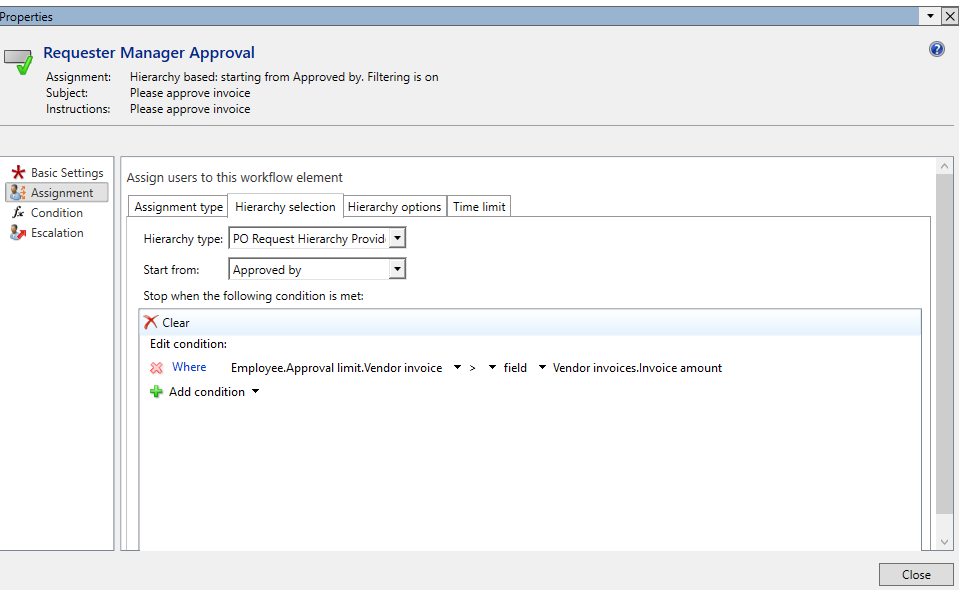
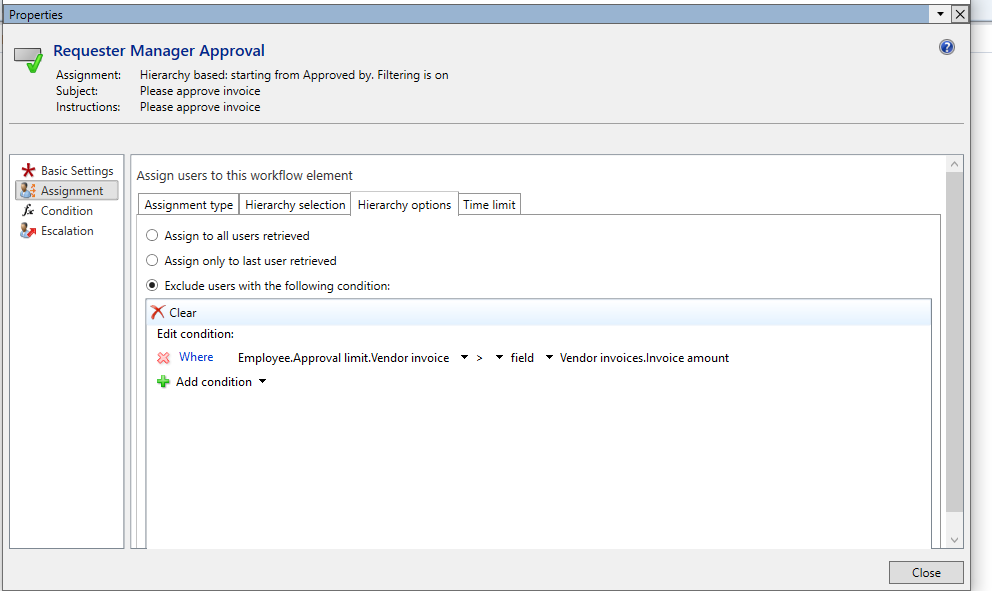
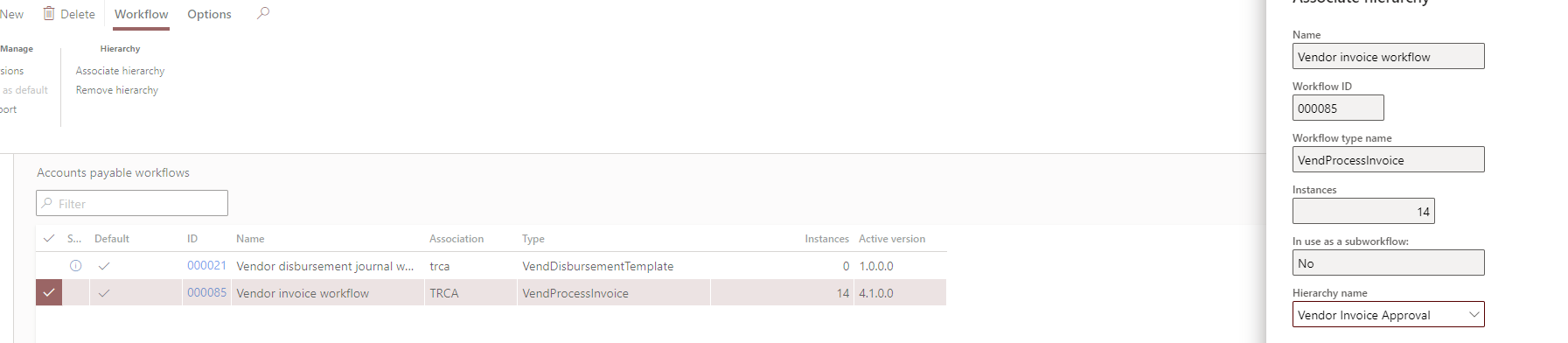
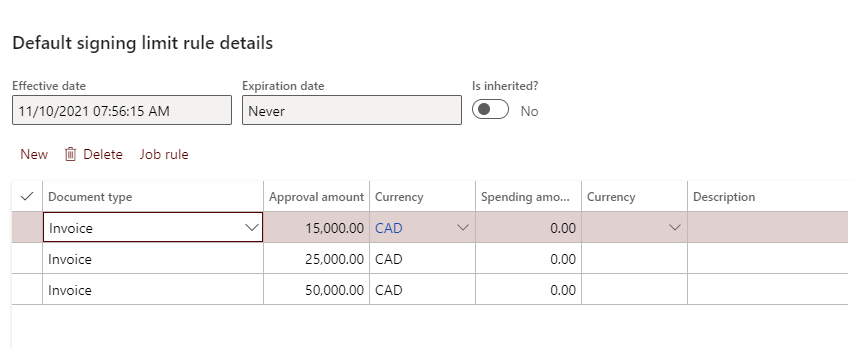
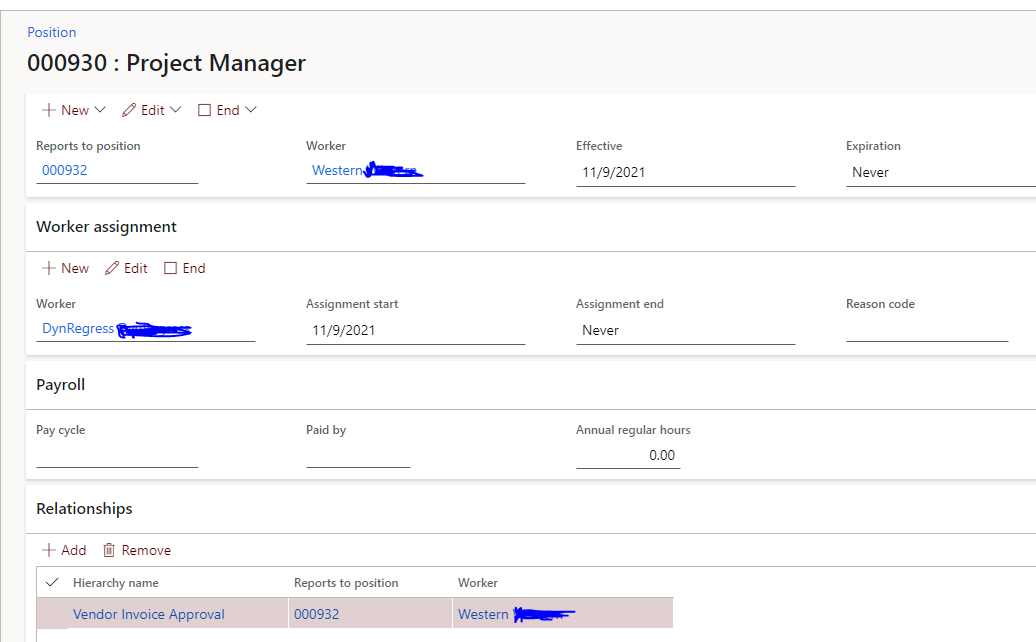
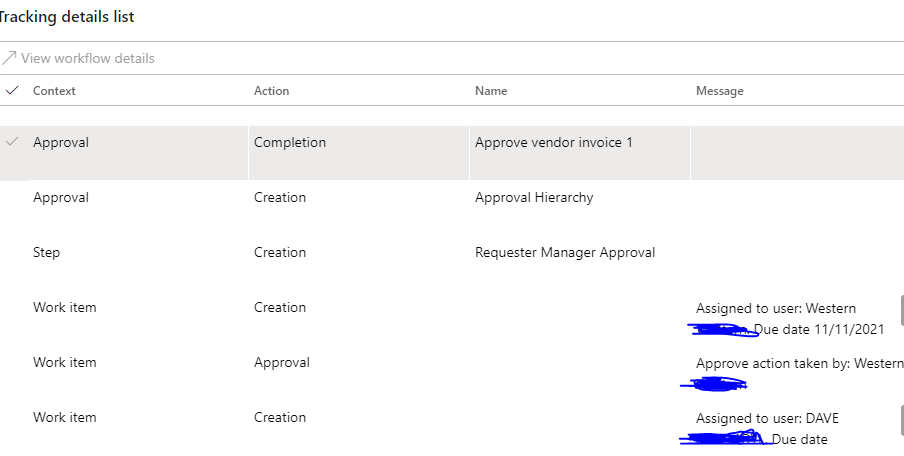
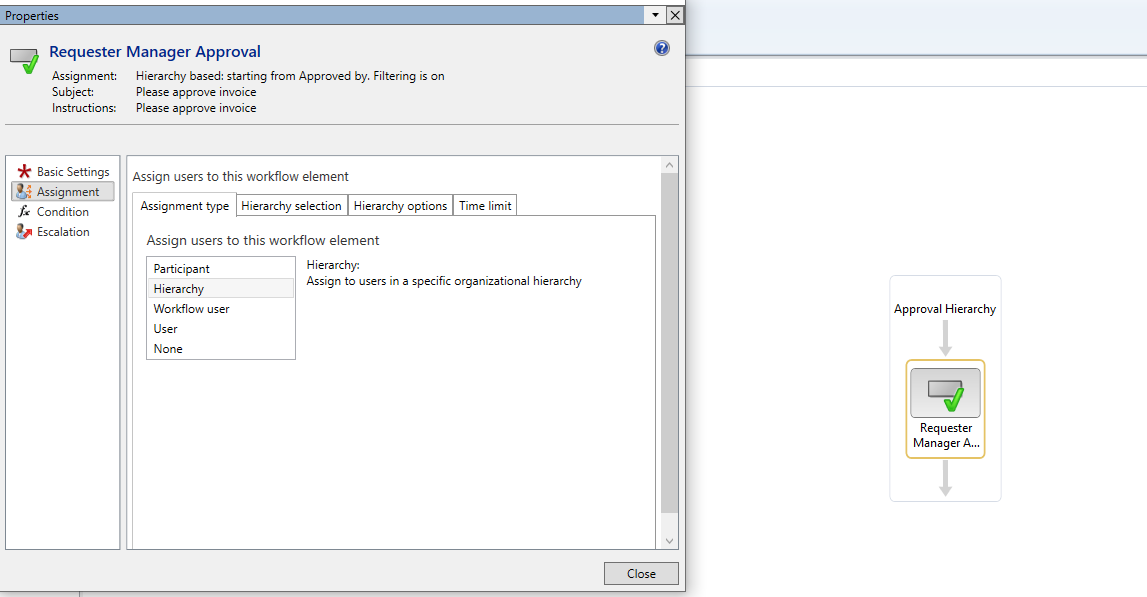
    I have managed to create a hierarchy provider and start from the PO requester. But it is not stopping based on the condition of invoice signing limit. It keeps going up the based on the position hierarchy and not the heirarchy assigned to the workflow. 

    Is there any code or configuration missing. Kindly find below the code and configurations.

    class MY_TaskWorkflowHierarchyProvider implements WorkflowHierarchyProvider
    {
    const str Workflow_Employee = 'Employee';

    ExpressionDataSource dataSource;
    WorkflowHierarchyProviderHelper helper;

    protected void new()
    {
    helper = WorkflowHierarchyProviderHelper::construct();
    dataSource = ExpressionDataSource::newDataSourceDefinition(Workflow_Employee, "@SYS121302");
    helper.setupDataSource(dataSource);
    }

    public static MY_TaskWorkflowHierarchyProvider construct()
    {
    return new MY_TaskWorkflowHierarchyProvider();
    }

    public anytype convertUserIdToNodeDataType(userId _userId,
    WorkflowContext _workflowContext)
    {
    return helper.convertUserIdToNodeDataType(_userId, _workflowContext);
    }

    public ExpressionDataSource getDataSource()
    {
    return dataSource;
    }

    public WorkflowHierarchyProviderNode getNextNode(anytype _nodeId,
    WorkflowHierarchyLevel _level,
    WorkflowContext _workflowContext)
    {
    return helper.getNextNode(_nodeId, _level, _workflowContext, dataSource);
    }

    public extendedDataTypeName getNodeDataType()
    {
    return helper.getNodeDataType();
    }

    public Set getSupportedDataType()
    {
    Set supportedDataTypes = helper.getSupportedDataType();

    if(!supportedDataTypes)
    {
    supportedDataTypes = new Set(Types::String);
    }
    return supportedDataTypes;

    }

    public anytype convertToNodeDataType(extendedDataTypeName _dataType,
    anytype _value,
    WorkflowContext _workflowContext)
    {
    HcmPersonnelNumberId personnelNumberId;
    VendInvoiceInfoTable vendInvoiceInfoTable = this.getVendInvoiceInfoTableFromContext(_workflowContext);

    PurchTable purchTable;
    purchTable = purchTable::find(VendInvoiceInfoTable::findRecId(_workflowContext.parmRecId()).PurchId);

    personnelNumberId = HcmWorker::find(purchTable.Requester).PersonnelNumber;

    return personnelNumberId;

    }

    private VendInvoiceInfoTable getVendInvoiceInfoTableFromContext(WorkflowContext _context)
    {
    VendInvoiceInfoTable vendInvoiceInfoTable;

    if (_context.parmTableId() == tableNum(VendInvoiceInfoTable))
    {
    vendInvoiceInfoTable = VendInvoiceInfoTable::findRecId(_context.parmRecId());
    }
    else if (_context.parmTableId() == tableNum(VendInvoiceInfoLine))
    {
    vendInvoiceInfoTable = VendInvoiceInfoLine::findRecId(_context.parmRecId()).vendInvoiceInfoTable();
    }

    return vendInvoiceInfoTable;
    }

    }
    pastedimage1636561438146v2.png

    pastedimage1636561493640v3.png

    pastedimage1636561527170v4.png

    pastedimage1636561595900v5.png

    pastedimage1636561632098v6.png

    pastedimage1636561666870v7.png

    15,000

    pastedimage1636561695795v8.png

    25,000

    pastedimage1636561723589v9.png

    pastedimage1636561923143v10.png

    pastedimage1636561325932v1.png

  • Hossam EL Hassan Profile Picture
    469 on at

    Hi Andrea,

    I have found the issue, it was related to legal entites assigned to the policy. Also I had to add the code.

    protected HcmPositionHierarchyTypeRecId findPositionHierarchyType(WorkflowContext _workflowContext)
    {
    SysWorkflowTable sysWorkflowTable = SysWorkflowTable::find(_workflowContext.parmWorkflowCorrelationId());
    HcmPositionHierarchyType hcmPositionHierarchyType;
    HcmPositionHierarchyTypeWorkflow hcmPositionHierarchyTypeWorkflow;

    SelectableDataArea dataAreaContext = helper.getConfigurableHierarchyDataAreaContext(_workflowContext);

    dataAreaContext = dataAreaContext == '' ? curExt() : dataAreaContext;

    select firstonly crosscompany RecId from hcmPositionHierarchyType
    exists join hcmPositionHierarchyTypeWorkflow
    where hcmPositionHierarchyType.RecId == hcmPositionHierarchyTypeWorkflow.PositionHierarchyType
    && hcmPositionHierarchyTypeWorkflow.WorkflowConfiguration == sysWorkflowTable.ConfigurationSequenceNumber
    && hcmPositionHierarchyTypeWorkflow.DataAreaId == dataAreaContext;

    return hcmPositionHierarchyType.RecId;
    }

    public WorkflowHierarchyProviderNode getNextNode(anytype _nodeId, WorkflowHierarchyLevel _level, WorkflowContext _workflowContext)
    {
    HcmPositionHierarchyTypeRecId positionHierarchyTypeRecId = this.findPositionHierarchyType(_workflowContext);

    if (positionHierarchyTypeRecId == 0)
    {
    throw error("@HCM:HierarchyNotConfigured");
    }

    return helper.getNextNode(_nodeId, _level, _workflowContext, dataSource, positionHierarchyTypeRecId);
    }

  • André Arnaud de Calavon Profile Picture
    301,037 Super User 2025 Season 2 on at

    Hi Hossam,

    Please update this last information on your other question as you are now mixing two different topics in one post: Workflow validation two approver tasks are not approved by the same user - Dynamics 365 Finance Forum Community Forum

  • Hossam EL Hassan Profile Picture
    469 on at

    Thanks André.

    But I still need a solution for the other question.

    The scenario is I need two users to approve the invoice if the amount is greater than 50,000, the first one is predefined which is the PO requester, and the second one to be defined by the first approver. Is there a way to achieve that?

Under review

Thank you for your reply! To ensure a great experience for everyone, your content is awaiting approval by our Community Managers. Please check back later.

Helpful resources

Quick Links

Responsible AI policies

As AI tools become more common, we’re introducing a Responsible AI Use…

Neeraj Kumar – Community Spotlight

We are honored to recognize Neeraj Kumar as our Community Spotlight honoree for…

Leaderboard > Finance | Project Operations, Human Resources, AX, GP, SL

#1
Martin Dráb Profile Picture

Martin Dráb 544 Most Valuable Professional

#2
André Arnaud de Calavon Profile Picture

André Arnaud de Cal... 450 Super User 2025 Season 2

#3
Sohaib Cheema Profile Picture

Sohaib Cheema 250 User Group Leader

Last 30 days Overall leaderboard

Product updates

Dynamics 365 release plans