I used this link: https://community.dynamics.com/ax/b/axatoz/archive/2019/03/07/d365-positive-pay-file-wells-fargo to create my file for the positive pay format and to do the extension on BankPositivePayExport to replace the default XML-output type with a CSV-output type.
The file is generated as a CSV-file and I am presented with that to save or open.
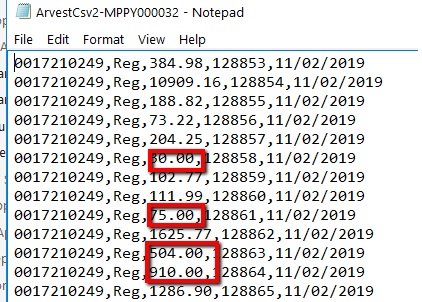
When I open the file using Notepad, the number formatting is respected. However when I open it in Excel, it throws away the trailing zeroes.
I need to show $30 as 30.00 and it does in notepad, but once opened in Excel, it shows as just: 30.
/* Snippet out of my positive pay file:
<xsl:variable name="amtdec" select="AMOUNTCUR" />
<xsl:value-of select="format-number($amtdec, '#.00')" />
Opened in Excel:
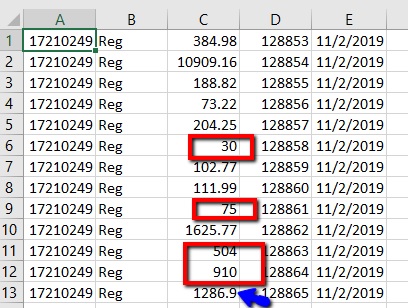
Also look at the 1286.9 that shows in Notepad correct as 1286.90
My whole file:
<xsl:stylesheet version="1.0"
xmlns:xsl="www.w3.org/.../Transform"
xmlns:msxsl="urn:schemas-microsoft-com:xslt"
exclude-result-prefixes="msxsl xslthelper"
xmlns="urn:iso:std:iso:20022:tech:xsd:pain.001.001.02"
xmlns:xsi="www.w3.org/.../XMLSchema-instance"
xmlns:xslthelper="schemas.microsoft.com/.../xslthelper">
<xsl:output method="text" omit-xml-declaration="yes" version="1.0" encoding="utf-8"/>
<xsl:template match="/">
<xsl:value-of select="''" />
<Document>
<xsl:value-of select="''" />
<xsl:for-each select="Document/BANKPOSITIVEPAYEXPORTENTITY">
<!--Cheque Detail begin-->
<xsl:value-of select="ACCOUNTNUM/text()"/>
<xsl:value-of select='string(",")'/>
<xsl:value-of select='string("Reg")'/>
<xsl:value-of select='string(",")'/>
<xsl:variable name="amtdec" select="AMOUNTCUR" />
<xsl:value-of select="format-number($amtdec, '#.00')" />
<xsl:value-of select='string(",")'/>
<xsl:value-of select="normalize-space(CHEQUENUM/text())"/>
<xsl:value-of select='string(",")'/>
<xsl:variable name="year" select="substring(TRANSDATE/text(),1,4)" />
<xsl:variable name="month" select="substring(TRANSDATE/text(),6,2)" />
<xsl:variable name="day" select="substring(TRANSDATE/text(),9,2)" />
<xsl:value-of select="concat($day,'/',$month,'/',$year)" />
<xsl:text> </xsl:text>
</xsl:for-each>
</Document>
</xsl:template>
</xsl:stylesheet>


