web
You’re offline. This is a read only version of the page.
close
Skip to main content

Notifications

Announcements

No record found.

Community site session details

Community site session details

Session Id :
Microsoft Dynamics AX (Archived)

Deployable package validation Error

(0) ShareShare
ReportReport
Posted on by 446

Hi,

We have Dynamics 365 for finance and operations platform update 8. The development topology is as follow: A local DEV environment that is linked to the Build server (Cloud) through the VSTS project.

We did a customization on the local DEV (by adding new control to a form using extensions), Checked in the modifications to the VSTS and then run the build and it run successfully.

Now I downloaded the deployable package but unfortunately once I uploaded it to the LCS shared asset library it was not validated and I got an error "Invalid - HotfixInstallationInfo.xml could not be found or is invalid" as shown below.

LCS.png

After investigation I noticed that the deployable package content that was generated automatically by build server is xxxxxxx.axmodel file and there is no "HotfixInstallationInfo.xml" file.

On the other hand if we tried to create a deployable package using the visual studio DEV tools locally we are getting a valid deployable package with the below content and structure.  Not xxxxxxx.axmodel as generated from the build server.
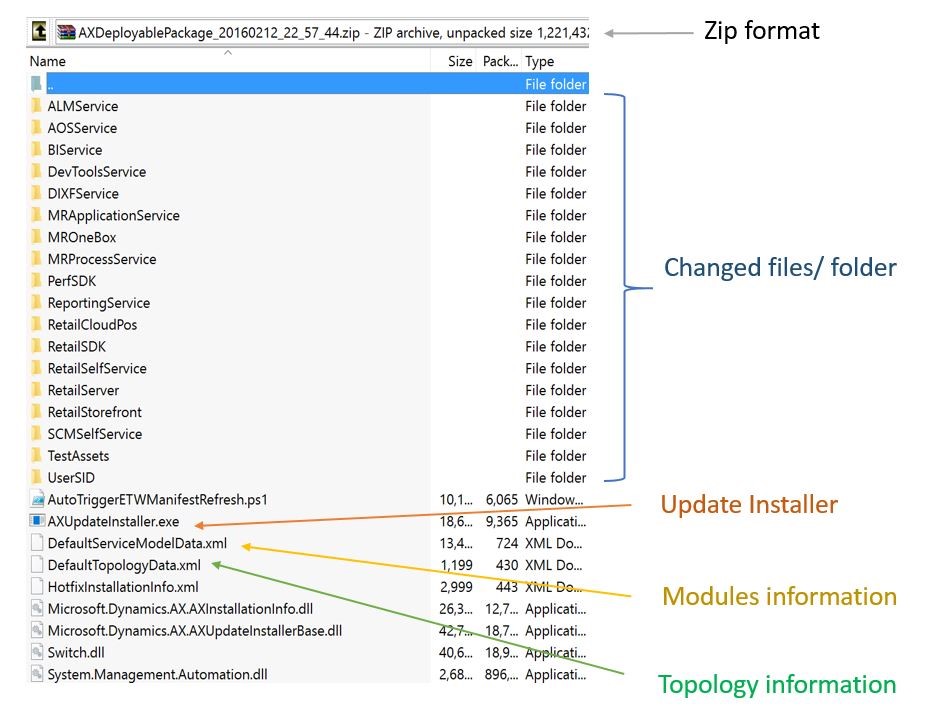
So I would like to know what is missing?? Do I have to change any parameters into the build process?

And what is the difference between these two types of deployable packages??

*This post is locked for comments

I have the same question (0)
  • Suggested answer
    Joris dG Profile Picture
    17,775 on at

    Hi Peter,

    how did you download the package from the build? VSTS by default zips all the files in a download. You have to "explore" to download an individual file like the deployable package, otherwise the zip you download contains zips within it (which are the ones you need).

  • Brian J. Parker Profile Picture
    10 on at

    Since this still turns up in the first few results on a search for the error message, here's a link to the earlier post with the same question that eventually got an answer: https://community.dynamics.com/enterprise/f/759/t/243786

    Short version: if you upload the "AXModelSource" build results instead of the "AXDeployableRuntime" build results, or the entire Packages.zip, or possibly almost anything else, you get this error. From the VSTS build results artifacts, you need to either (1) download the "Packages," UNZIP IT, and only upload the AXDeployableRuntime zip file contained in Packages.zip; or (2) use the Explore button next to packages and only download the AXDeployableRuntime zip, then upload it.

Under review

Thank you for your reply! To ensure a great experience for everyone, your content is awaiting approval by our Community Managers. Please check back later.

Helpful resources

Quick Links

Responsible AI policies

As AI tools become more common, we’re introducing a Responsible AI Use…

Neeraj Kumar – Community Spotlight

We are honored to recognize Neeraj Kumar as our Community Spotlight honoree for…

Leaderboard > 🔒一 Microsoft Dynamics AX (Archived)

#1
Martin Dráb Profile Picture

Martin Dráb 4 Most Valuable Professional

#1
Priya_K Profile Picture

Priya_K 4

#3
MyDynamicsNAV Profile Picture

MyDynamicsNAV 2

Last 30 days Overall leaderboard

Featured topics

Product updates

Dynamics 365 release plans
