web
You’re offline. This is a read only version of the page.
close
Skip to main content

Announcements

No record found.

News and Announcements icon
Community site session details

Community site session details

Session Id :
Customer experience | Sales, Customer Insights,...
Answered

Adding Users from Azure AD

(0) ShareShare
ReportReport
Posted on by

Hi,

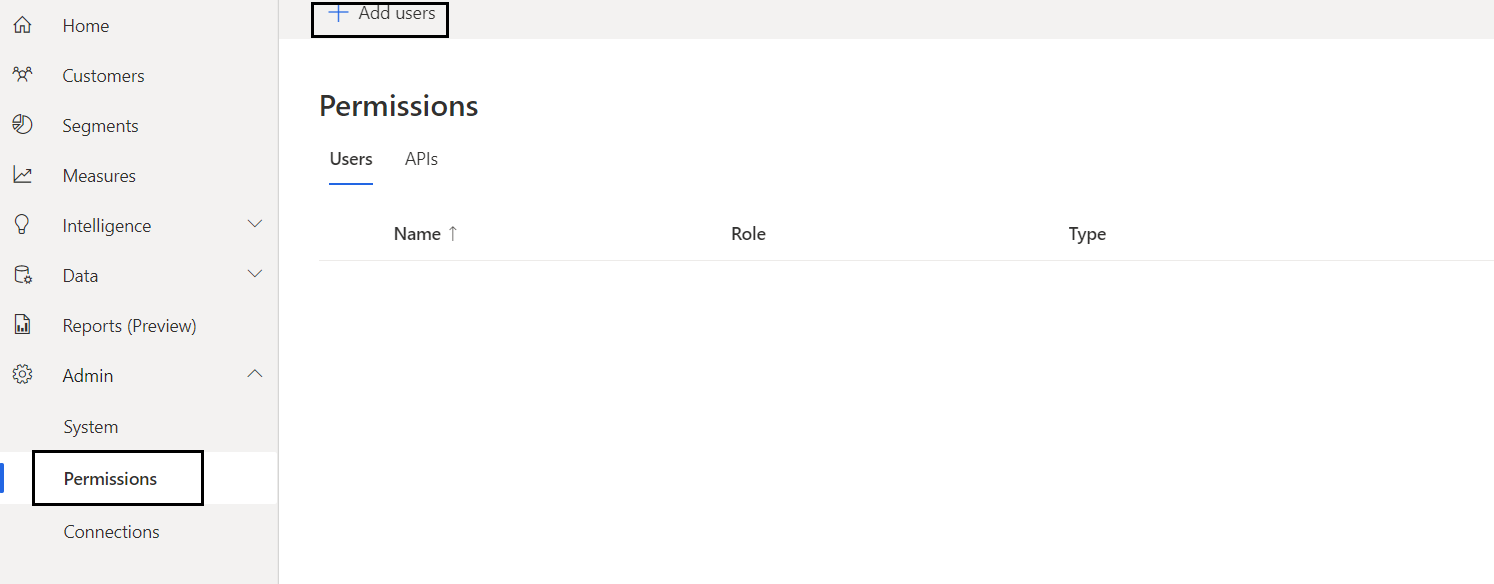
Have a question about adding users to Dynamics 365 Customer Insights.

In Dynamics 365 CE, the users are synced from the Azure AD.

Does the same happen in Dynamics 365 CI as well? Or do we have to manually add each user to Customer Insights?
CustomerInsights3.PNG

Suppose a new person joined the company, she/he is added to the Azure AD.

Once added, the user gets synced to Dynamics 365 CE automatically.
Will the user be synced to Dynamics 365 Customer Insights automatically as well?

Thanks

I have the same question (0)
  • Suggested answer
    Nya Profile Picture
    29,060 on at

    Hi,

    Yes, the users can be synced automatically.

    In your screenshot, to assign permissions to users, please following the next steps:

    1. Select the correct environment.

     pastedimage1626860251984v1.png

    1. Click the Add users and Search the user you’d like to select in the right-hand pop up.

     pastedimage1626860258452v2.png

    The Add users button does not mean that you need to add or sync the users manually from here. It is used to search and select the users who need to be granted permissions.

  • Community Member Profile Picture
    on at

    Thanks for the reply.

    Currently, I am working on a Trial instance.

    Is that the reason users in my organization did not get synced automatically?

    When I click Add Users and search for a person in the organization, I am able to add them manually and assign a permission (Viewer/Contributor/Admin)

    Does this mean once we have purchase license the users will sync automatically. Am I correct here?

    Thanks

  • Verified answer
    John Wiese Profile Picture
    Microsoft Employee on at

    No, users will not sync automatically.  Customer Insights (CI) is not licensed on a per user basis, it is licensed by the number of profiles you will have in the system.  The data produced by CI can be viewed by any user if it is surfaced outside of CI in something like a Power BI dashboard/report or a Power App or something else.  You only need to grant permissions in CI to users who will be using the CI application...and this must be done manually inside the CI interface. 

Under review

Thank you for your reply! To ensure a great experience for everyone, your content is awaiting approval by our Community Managers. Please check back later.

Helpful resources

Quick Links

Introducing the 2026 Season 1 community Super Users

Congratulations to our 2026 Super Stars!

Congratulations to our 2025 Community Spotlights

Thanks to all of our 2025 Community Spotlight stars!

Leaderboard > Customer experience | Sales, Customer Insights, CRM

#1
ManoVerse Profile Picture

ManoVerse 118 Super User 2026 Season 1

#2
Jimmy Passeti Profile Picture

Jimmy Passeti 46 Most Valuable Professional

#3
NeerajPawar Profile Picture

NeerajPawar 41

Last 30 days Overall leaderboard

Product updates

Dynamics 365 release plans
