web
You’re offline. This is a read only version of the page.
close
Skip to main content

Notifications

Announcements

No record found.

Community site session details

Community site session details

Session Id :
Microsoft Dynamics CRM (Archived)

Can we change the Labels of Horizontal and vertical Axis of the Dashboard in crm 2013?

(0) ShareShare
ReportReport
Posted on by

Hi, 

As per below dashboard i want to change the Horizontal Label name from 4314_PR/C to PR/C only and from the Region_Dest to Region.Is it possible somehow?
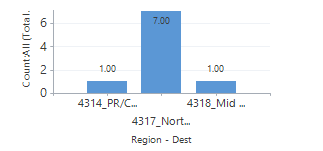
Please Guide on the same.

Thanks,

Kandarp

*This post is locked for comments

I have the same question (0)
  • Community Member Profile Picture
    on at

    I want it without adding extra field in the crm Form.

  • Verified answer
    Aileen Gusni Profile Picture
    44,524 on at

    Hi Kandarp,

    Don't think so.

    Because the Chart in CRM is showing its real data.

    Unless, you have field that having value 4314_PR/C and PR/C only...

    So, yes, you need to add more data to fill the new field.

    Because they are Data...

    And for the Region - Dest, it is different.

    It is only Axis title right? Or drill-down title?

    If yes it is Axis title then you can use this method:

    mscrmninja.tumblr.com/.../changing-chart-axis-titles-in-crm-2011

    Hope this helps.

    Thank you.

  • Community Member Profile Picture
    on at

    Thanks Gusni.

    Your link helped me.

  • Suggested answer
    Mithilesh Kumar Profile Picture
    10,047 on at

    Hi Kandarp,

    Two things

    1. 4314_PR/C is Data Values for the field Mapped. This cannot be changed on Bar Charts. However, I found that it can be changed for Pie Charts though.

    blog.customereffective.com/.../how-to-change-the-data-labels-on-a-crm-2011-chart.html

    2. Region - Dest is X-Axis Tilte. This can be changed/modify according to your choice.

    This should help you achieve that.

    crmchartguy.wordpress.com/.../axes-modifications

    www.powerobjects.com/.../modifying-chart-xml-in-crm-2013the-basics

    Hope that helps

    Thanks

  • Community Member Profile Picture
    on at

    There is a way to achieve what the OP wants if caveats below are acceptable. (Adding this to help others who come across the post looking for a similar solution for them). 

    Caveats:

    i) It is not the prettiest solution

    ii) It only works once the number of bars (and therefore bar titles) do not increase or decrease

    iii) You need to edit XML (scary as beginner but I will describe things a little).  

    iv) You do not intend to change the sort order 

    Basically my solution is only one step above drawing tippex on the screen to rename the axis labels!! :D ;)  

    It requires the following steps:

    1. Export the chart you have made (select export chart from the charts top-right corner) and open in Notepad or an xml editor

    2. Hide the Axis Labels - Look for the line (between <AxisX> and </AxisX>) if it is the X axis labels you want to change.

    <LabelStyle Font="{0}, 10.5px" ForeColor="59, 59, 59"

    and changing it to... 

    <LabelStyle Font="{0}, 10.5px" ForeColor="Transparent"

    3. Add your desired axis labels by adding <Annotations> and </Annotations> tags. You set where you want the text to appear by setting an x and y value.

    See CRMChartGuys page on this for a fuller description: crmchartguy.com/.../annotations-in-ms-crm-charts


Under review

Thank you for your reply! To ensure a great experience for everyone, your content is awaiting approval by our Community Managers. Please check back later.

Helpful resources

Quick Links

Responsible AI policies

As AI tools become more common, we’re introducing a Responsible AI Use…

Neeraj Kumar – Community Spotlight

We are honored to recognize Neeraj Kumar as our Community Spotlight honoree for…

Leaderboard > 🔒一 Microsoft Dynamics CRM (Archived)

#1
SA-08121319-0 Profile Picture

SA-08121319-0 4

#1
Calum MacFarlane Profile Picture

Calum MacFarlane 4

#3
Alex Fun Wei Jie Profile Picture

Alex Fun Wei Jie 2

Last 30 days Overall leaderboard

Featured topics

Product updates

Dynamics 365 release plans



