web
You’re offline. This is a read only version of the page.
close
Skip to main content

Notifications

Announcements

No record found.

Community site session details

Community site session details

Session Id :
Microsoft Dynamics 365 | Integration, Dataverse...
Answered

Is it possible to archive environments before deleting

(0) ShareShare
ReportReport
Posted on by 6

Hi,

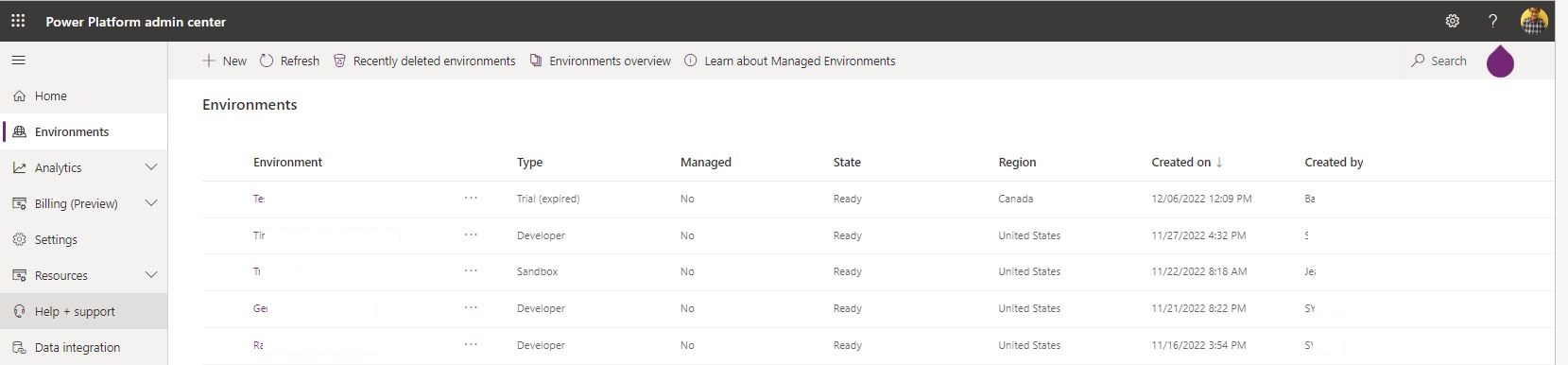
Currently my company's Dynamics CRM shares data verse capacity with our Dynamics 365 apps in Power Platform. As we have a few apps installed, it doesn't take much to fill the capacity up. In the Environments section, I could see what environments are in the data verse, as well as the delete option:
20230104_5F00_Environmentcleanup.JPG

If I delete an environment, it goes in the deleted environments, where it remains for 7 days before getting autodeleted.

I was wondering if there's a way to archive environments before deleting? e.g Ideally I can archive the environment somewhere (could be cloud or on my local machine) before deleting. If someone comes back after more than 7 days, I can still restore the environment. Currently it's limited to 7 days.

Jason

I have the same question (0)
  • Suggested answer
    a33ik Profile Picture
    84,331 Most Valuable Professional on at

    Hello Jason,

    As far as I know, 7 days is the restriction that Microsoft provides and there is no way I am aware of to keep it for a longer time period.

  • Suggested answer
    Bipin D365 Profile Picture
    28,983 Moderator on at

    Hi,

    If environment type is production then backup is retained for 28days.

    learn.microsoft.com/.../backup-restore-environments

  • Verified answer
    Leah Ju Profile Picture
    Microsoft Employee on at

    Hi Jason,

    Your best option is to restore it within 7 days of deletion.

    You can recover a recently deleted environment (within 7 days of deletion), by using the Microsoft Power Platform admin center or the Power Apps cmdlet Recover-AdminPowerAppEnvironment.

    If deleted for more than seven days, you need create a support ticket for Microsoft Support team and if they can find this environment in the backend database they can restore it.

    Get Help + Support - Dynamics | Microsoft Docs

    Backups of production environments with a database and Dynamics 365 applications deployed are retained for up to 28 days. In contrast, backups of production environments that don't have Dynamics 365 applications deployed in them will be retained for 7 days.

    All other environment type backups are retained up to 7 days only.

    Since orgs are soft-deleted for three days before the SQL DB is dropped, the total recoverability window may be as long as 10 days.

    Publicly we will document and express this as either 7 days or 28 days recoverability window since the soft deletion window is an internal implementation detail subject to change.

  • Jason Yeung Profile Picture
    6 on at

    Hi Leah,

    Thanks for the info. I'll try to contact Microsoft support if someone asks me to restore the environment that was deleted after 7 days.

    Sincerely,

    Jason

Under review

Thank you for your reply! To ensure a great experience for everyone, your content is awaiting approval by our Community Managers. Please check back later.

Helpful resources

Quick Links

Responsible AI policies

As AI tools become more common, we’re introducing a Responsible AI Use…

Neeraj Kumar – Community Spotlight

We are honored to recognize Neeraj Kumar as our Community Spotlight honoree for…

Leaderboard > Microsoft Dynamics 365 | Integration, Dataverse, and general topics

#1
Martin Dráb Profile Picture

Martin Dráb 41 Most Valuable Professional

#2
iampranjal Profile Picture

iampranjal 39

#3
Satyam Prakash Profile Picture

Satyam Prakash 35

Last 30 days Overall leaderboard

Product updates

Dynamics 365 release plans



