web
You’re offline. This is a read only version of the page.
close
Skip to main content

Notifications

Announcements

No record found.

Community site session details

Community site session details

Session Id :
Customer experience | Sales, Customer Insights,...
Answered

Marketing page & form for subscriptions center

(0) ShareShare
ReportReport
Posted on by 94

Hi Mates, 

How can it shows the unsubscribe email when they click in this marketing page? Seen it could not work? Any solution?? 

Besides, Is Dynamics marketing got this function, Pause all emails for 2 months??

Thanks 


pastedimage1594361810131v1.pngpastedimage1594362074205v2.png

From 
Johnson,

I have the same question (0)
  • Suggested answer
    cloflyMao Profile Picture
    25,210 on at

    Hi Johnson,

    As per my understanding, you could enable Double Opt-In for Marketing Form as notification.

    https://docs.microsoft.com/en-us/dynamics365/marketing/form-double-opt-in

    The notification email will be sent to contact within 2 minutes(as soon as possible), we couldn't schedule the delivery time.

    Please kindly point out if I had misunderstood your question.

    Regards,

    Clofly

  • Johnson95 Profile Picture
    94 on at

    Sry didn't point out the question clearly.

    Can the page detect the email address when they click on this page?  

    Since the content assist could not work on this page({{ contact.emailaddress1 }}), which could not detect the email? - For the first picture as my mention.

    Thanks, Clofly.

    Wish you have a nice day^^.

    From,

    Johnson

  • Verified answer
    cloflyMao Profile Picture
    25,210 on at

    Hi Johnson,

    Content assist only works in Marketing Email, you could take solution below to show contacts' email address in marketing page.

    1. It is required that "Prefill marketing form" field of Contact is set to "Allow".

    2. Create a new personalized page record, add emailaddress1 into Fields subgrid. 
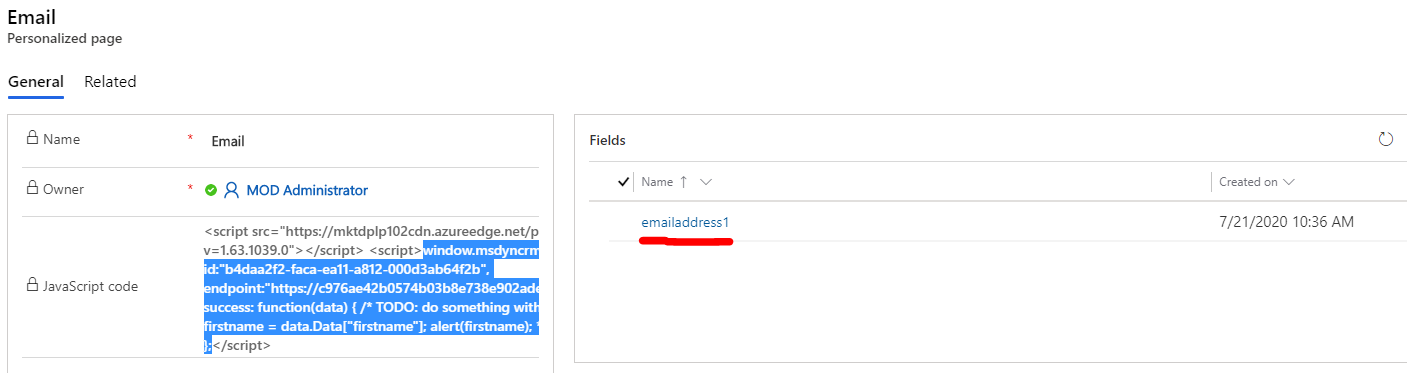
    pastedimage1595300698124v2.png

    3. Copy the automatically generated code from step 1 to marketing page.

    If there is an embedded form-loader script in source code of marketing page, then we only need to copy window.msdyncrm_personalizedpage and its callback function.

    In my page, I append the code after end tag of body.
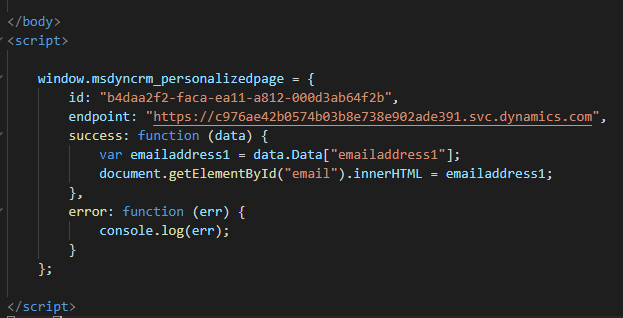
    pastedimage1595300790483v3.png

    Add a span element to display emailaddress1 value.

    pastedimage1595300950752v4.png

    var emailaddress1 = data.Data["emailaddress1"];
    document.getElementById("email").innerHTML = emailaddress1;

    Result:
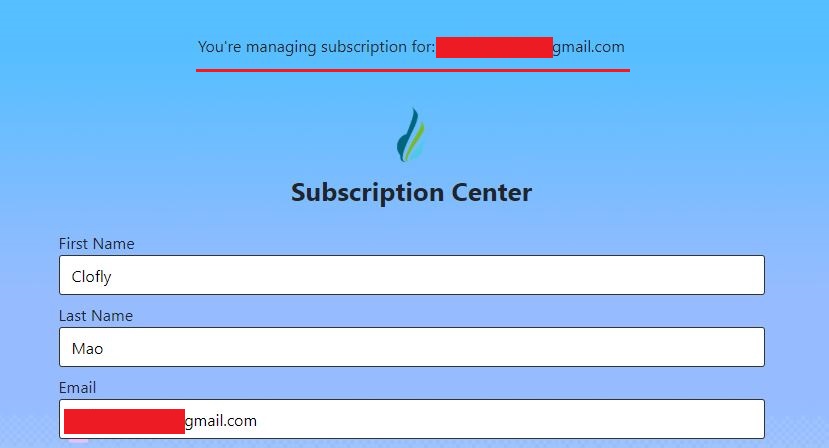
    1882.JPG

    Please read article below for more details about how to use "Personalized Page".

    https://docs.microsoft.com/en-us/dynamics365/marketing/personalized-page-content

    Regards,

    Clofly

  • Johnson95 Profile Picture
    94 on at

    Thanks Clofly,

    The problem solve and have the nice day^^

    From

    Johnson

Under review

Thank you for your reply! To ensure a great experience for everyone, your content is awaiting approval by our Community Managers. Please check back later.

Helpful resources

Quick Links

Responsible AI policies

As AI tools become more common, we’re introducing a Responsible AI Use…

Neeraj Kumar – Community Spotlight

We are honored to recognize Neeraj Kumar as our Community Spotlight honoree for…

Leaderboard > Customer experience | Sales, Customer Insights, CRM

#1
Tom_Gioielli Profile Picture

Tom_Gioielli 137 Super User 2025 Season 2

#2
#ManoVerse Profile Picture

#ManoVerse 57

#3
Jimmy Passeti Profile Picture

Jimmy Passeti 50 Most Valuable Professional

Last 30 days Overall leaderboard

Product updates

Dynamics 365 release plans
