web
You’re offline. This is a read only version of the page.
close
Skip to main content

Announcements

No record found.

News and Announcements icon
Community site session details

Community site session details

Session Id :
Customer experience | Sales, Customer Insights,...
Suggested Answer

Email Smart Scheduler

(0) ShareShare
ReportReport
Posted on by 107

Dear Community, 

Today for the first time, I tried to use the "SMART SCHEDULER" in a Customer Journey.

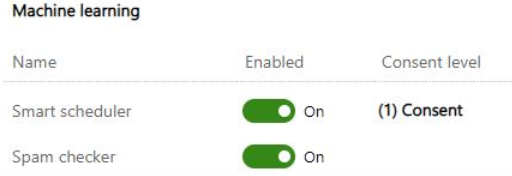
I know it is enabled and in the Marketing Settings of the App I can see it is enabled. See below:
pastedimage1616507087529v1.png

Unfortunately, no matter which customer journey settings and items I set up, the smart scheduler always gives me the same error.

I tried to change Customer Journey Start and End time schedule to see if it was giving obstacles for the smart scheduling to work.

I tried to insert multiple different items (within which, emails, wait until, wait for, etc) but nothing makes the error go away.

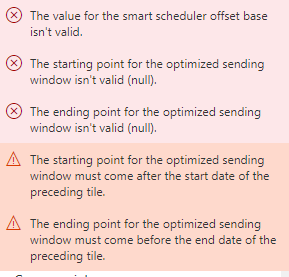
Here is the error message I always get and that prevents me to have the journey go live:
pastedimage1616507287063v2.png

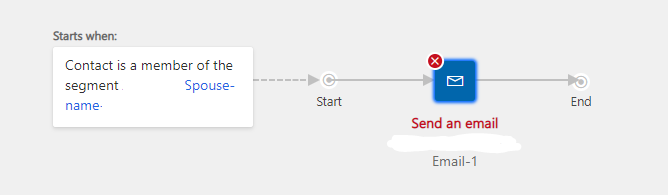
It is very odd because, this is the simplest customer journey I create, there are no scheduling times, nothing more than a segment and an email.
pastedimage1616507486095v3.png

Please let me know what I am missing here.

How can I send my email with the smart scheduler?

Thank you,

Catermina

I have the same question (0)
  • Suggested answer
    Nya Profile Picture
    29,060 on at

    Hi Catermina,

    I found a document called "Use smart scheduler to help improve email engagement", which is in the bottom of the following documentation.

    Email scheduling recommendation - Release Notes | Microsoft Docs

    pastedimage1616566703411v2.png

    But when I click on the link, the title is "Use automated scheduling to help improve email engagement", so I think this feature has been modified, but I can't find any specific instructions.

    Improve email engagement with an automated scheduling (Dynamics 365 Marketing) | Microsoft Docs


    The automated scheduling is set in the email properties in a Customer Journey.

     pastedimage1616566480373v1.png

    Try to re-save your journey and check for errors again to find out if the errors will disappear.


    If this helped you, I'd appreciate it if you'd mark this as a Verified Answer, which may in turn help others as well.

    Best Regards,

    Nya

  • Catermina Profile Picture
    107 on at

    Thank you Nay,

    I have seen the Microsoft documents, but it did not help unfortunately.

    I also tried what you have mentioned - I have the same error no matter how many times I save it or if I change settings of the customer journey.

    But Thank you so much for replying to me quickly!

    BR,

    Catermina

Under review

Thank you for your reply! To ensure a great experience for everyone, your content is awaiting approval by our Community Managers. Please check back later.

Helpful resources

Quick Links

Introducing the 2026 Season 1 community Super Users

Congratulations to our 2026 Super Stars!

Congratulations to our 2025 Community Spotlights

Thanks to all of our 2025 Community Spotlight stars!

Leaderboard > Customer experience | Sales, Customer Insights, CRM

#1
ManoVerse Profile Picture

ManoVerse 189 Super User 2026 Season 1

#2
CU11031447-0 Profile Picture

CU11031447-0 100

#3
NeerajPawar Profile Picture

NeerajPawar 66

Last 30 days Overall leaderboard

Product updates

Dynamics 365 release plans
