web
You’re offline. This is a read only version of the page.
close
Skip to main content

Notifications

Announcements

No record found.

Community site session details

Community site session details

Session Id :
Finance | Project Operations, Human Resources, ...
Answered

Custom JSON service don't store data

(0) ShareShare
ReportReport
Posted on by 5

Hello,

I have created custom service to create/update Customer record in D365FO. It's developer VM version 24.

All works great, JSON is correctly traveling forward and backward, only data changes is not stored in database, neither insert nor update.

I can see in response in Postman or in Visual Studio debugging that customer record for the same Account ID is inserted every time with new RecId. 

TTSCOMMIT is performed. Only data is not stored in DB. Even in moment after TTSCOMMIT and before service return. I cannot understand why.

Any ideas? Is there somewhere any additional parameter or attribute? Couldn't find anything similar on internet.

Thanks in advance!

Service group properties:

pastedimage1661192559805v1.png

Service properties:

pastedimage1661192582300v2.png

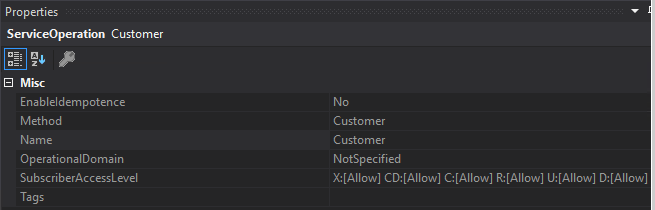
Service operation properties:

pastedimage1661192617547v3.png

Service method:

    public STKSFCustomerDataContract Customer(STKSFCustomerDataContract Customer)
    {
        STKSFCustomerDataContract retContract;
        DataAreaId company = Customer.parmCompany();
        str 20 customerID = Customer.parmCustomerID();
        CustTable custTable,c1;
        int i1 = infologLine();
        int i2;
        List errList;

        STKSFServiceHelper helper = new STKSFServiceHelper();

        ttsbegin;
        try
        {
            changecompany(company)
            {
                custTable = helper.CreateCustomer(Customer);
                select firstonly c1 where c1.RecId == custTable.RecId; 
                retContract = new STKSFCustomerDataContract();
                retContract.initFromCustTable(c1);
            }
        }
        catch
        {
            i2 = infologLine();
        }

        errList = helper.errorList(i1,i2);
        if (errList.elements() == 0)
        {
            ttscommit;
        }
        else
        {
            ttsabort;
            retContract = new STKSFCustomerDataContract();
            retContract.parmCompany(company);
            retContract.parmCustomerID(customerID);
            retContract.parmErrors(errList);
        }

        return retContract;
    }

I have the same question (0)
  • Verified answer
    nunomaia Profile Picture
    25 Moderator on at

    Normally, this is related to unbalanced TTSBEGIN / TTSCOMMIT. Can you check function helper.CreateCustomer(Customer) if you have  unbalanced TTSBEGIN / TTSCOMMIT ?

    The try / catch won't be triggered. From X++ exception handling - Finance & Operations | Dynamics 365 | Microsoft Docs   

    "

    If an exception is thrown inside a transaction, the transaction is automatically canceled (that is, a ttsAbort operation occurs). This behavior applies for both exceptions that are thrown manually and exceptions that the system throws. When an exception is thrown inside a ttsBegin-ttsCommit transaction block, no catch statement inside that transaction block can process the exception, (unless it is a UpdateConflict or a DuplicateKeyException). Instead, the innermost catch statements that are outside the transaction block are the first catch statements that are tested.

    The finally clause will be executed even in transaction scope.

    You can move ttsbegin inside try and is not required to rollback.  

  • IVM Profile Picture
    5 on at

    Thanks Nuno!

    You were right. There were no exceptions, but I didn't notice that on exit TTS level is higher then entering the function.

    Now it works as should.

Under review

Thank you for your reply! To ensure a great experience for everyone, your content is awaiting approval by our Community Managers. Please check back later.

Helpful resources

Quick Links

Responsible AI policies

As AI tools become more common, we’re introducing a Responsible AI Use…

Neeraj Kumar – Community Spotlight

We are honored to recognize Neeraj Kumar as our Community Spotlight honoree for…

Leaderboard > Finance | Project Operations, Human Resources, AX, GP, SL

#1
Martin Dráb Profile Picture

Martin Dráb 664 Most Valuable Professional

#2
André Arnaud de Calavon Profile Picture

André Arnaud de Cal... 522 Super User 2025 Season 2

#3
Sohaib Cheema Profile Picture

Sohaib Cheema 303 User Group Leader

Last 30 days Overall leaderboard

Product updates

Dynamics 365 release plans