web
You’re offline. This is a read only version of the page.
close
Skip to main content

Notifications

Announcements

No record found.

Community site session details

Community site session details

Session Id :
Microsoft Dynamics AX (Archived)

Button "Add line" is Disable. How to find exact duty, privilege to Enable.

(0) ShareShare
ReportReport
Posted on by 132

Dear all friend,

Presently, the but the button "Add line" in tab Sales Order Line of form Sales Order is disable. I had tried find some Duty and Privilege, then add them into Role User but the button "Add line" is still disable (Picture below). This buttion "Add line" is not belong "MenuItem Display/Action/"
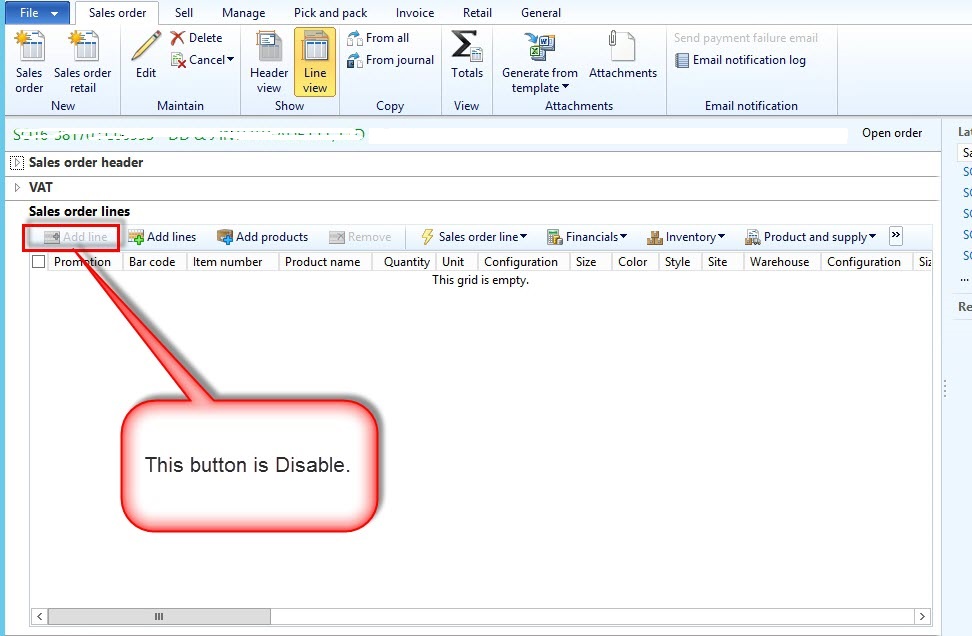
1321.screenshot.1.jpg

May the duty or privilege that i add were wrong ?

Anybody who know please show me the exact Duty Privilege or the way that how can i find exact the Duty,Privilege belong this button "Add line" and another buttons

*This post is locked for comments

I have the same question (0)
  • Verified answer
    Mea_ Profile Picture
    60,284 on at

    Hi Huy Tran,

    As I can see from your screenshot you have "remove" button disabled as well. This means that you don't have either delete or create permissions. To fin you duty and privilege you can go to AOT, find salesLine table, right click -> Add-ins-> security-> view related security roles.

    There you will be able to see all roles, duties and privileges and level of access they give.

  • Verified answer
    krishna.rao@dax Profile Picture
    3,008 on at

    Need to find the menu item associate with the button.

    Then Right-click > Add-ins > Security tools > View related security roles:

    briefly described in the below article.

    timsaxblog.wordpress.com/.../finding-a-security-privilege-in-ax-2012

  • Verified answer
    Community Member Profile Picture
    on at

    Can you edit sales order header?

  • Living Color Profile Picture
    132 on at

    Dear all,

    Thanks for response all of you.

    Typically i define the button belong Menuitem/Action or Display (picutre1 below) before and then i used Right-click > Add-ins > Security tools > View related security roles to define duty and privilege. It's exact the duty and privilege that i need.

    6710.screenshot.1.jpg

    But in this case. This button "Add line" not belong of MenuItem (picture2 below) so that can not use Right-click > Add-ins > Security tools > View related security roles from AOT to define. It's so special. hiii.

    6710.screenshot.1.jpg

    I have created a new role base on Role "Sales Clerk" in AX . It's have "Add line" already and then i continue security permission.

    Good luck to all of you.

    Regards,
    Huy

Under review

Thank you for your reply! To ensure a great experience for everyone, your content is awaiting approval by our Community Managers. Please check back later.

Helpful resources

Quick Links

Responsible AI policies

As AI tools become more common, we’re introducing a Responsible AI Use…

Neeraj Kumar – Community Spotlight

We are honored to recognize Neeraj Kumar as our Community Spotlight honoree for…

Leaderboard > 🔒一 Microsoft Dynamics AX (Archived)

#1
Priya_K Profile Picture

Priya_K 4

#1
Martin Dráb Profile Picture

Martin Dráb 4 Most Valuable Professional

#3
MyDynamicsNAV Profile Picture

MyDynamicsNAV 2

Last 30 days Overall leaderboard

Featured topics

Product updates

Dynamics 365 release plans



