web
You’re offline. This is a read only version of the page.
close
Skip to main content

Notifications

Announcements

No record found.

Community site session details

Community site session details

Session Id :
Customer experience | Sales, Customer Insights,...
Answered

Business Process Error - Workflow to Update Child Records

(0) ShareShare
ReportReport
Posted on by 175

Hi, 

Scenario: When Opportunity = Close as Lost, related Tasks (child 1:N records) are deactivated - set to 'Canceled'.

For this I created a Workflow that runs on change of status and uses Workflow Utilities to "Update Child Records".  Here is what I set in the WF Properties:

pastedimage1582065634372v1.png
pastedimage1582065757842v2.png

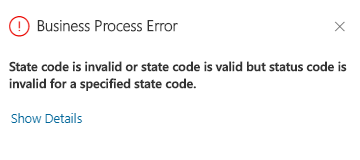
I am getting the error:

pastedimage1582065803110v3.png

With Details:

{"ActivityId":"","errorCode":2147746405,"message":"State code is invalid or state code is valid but status code is invalid for a specified state code.","stacktrace":" at Microsoft.Crm.Extensibility.OrganizationSdkServiceInternal.Execute(OrganizationRequest request, InvocationContext invocationContext, CallerOriginToken callerOriginToken, WebServiceType serviceType, Boolean checkAdminMode, ExecutionContext executionContext, Dictionary`2 optionalParameters)\r\n at Microsoft.Crm.Extensibility.OData.CrmODataExecutionContext.Execute(OrganizationRequest request, ExecutionContext executionContext)\r\n at Microsoft.Crm.Extensibility.OData.CrmODataServiceDataProvider.ExecuteOperation(CrmODataExecutionContext context, EdmOperation edmOperation, Dictionary`2 parameters, Dictionary`2 boundParameters)\r\n at Microsoft.Crm.Extensibility.OData.ActionController.ProcessOperationRequest(String operationName, Dictionary`2 operationParameters, EntityReference entityReference, String boundEntityName, String boundEntityType)\r\n at Microsoft.Crm.Extensibility.OData.ActionController.<>c__DisplayClass9_0.<PostUnboundAction>b__0()\r\n at Microsoft.PowerApps.CoreFramework.ActivityLoggerExtensions.Execute[TResult](ILogger logger, EventId eventId, ActivityType activityType, Func`1 func, IEnumerable`1 additionalCustomProperties)\r\n at Microsoft.Xrm.Telemetry.XrmTelemetryExtensions.Execute[TResult](ILogger logger, XrmTelemetryActivityType activityType, Func`1 func)\r\n at lambda_method(Closure , Object , Object[] )\r\n at System.Web.Http.Controllers.ReflectedHttpActionDescriptor.ActionExecutor.<>c__DisplayClass10.<GetExecutor>b__9(Object instance, Object[] methodParameters)\r\n at System.Web.Http.Controllers.ReflectedHttpActionDescriptor.ExecuteAsync(HttpControllerContext controllerContext, IDictionary`2 arguments, CancellationToken cancellationToken)\r\n--- End of stack trace from previous location where exception was thrown ---\r\n at System.Runtime.ExceptionServices.ExceptionDispatchInfo.Throw()\r\n at System.Runtime.CompilerServices.TaskAwaiter.HandleNonSuccessAndDebuggerNotification(Task task)\r\n at System.Web.Http.Controllers.ApiControllerActionInvoker.<InvokeActionAsyncCore>d__0.MoveNext()\r\n--- End of stack trace from previous location where exception was thrown ---\r\n at System.Runtime.ExceptionServices.ExceptionDispatchInfo.Throw()\r\n at System.Runtime.CompilerServices.TaskAwaiter.HandleNonSuccessAndDebuggerNotification(Task task)\r\n at System.Web.Http.Controllers.ActionFilterResult.<ExecuteAsync>d__2.MoveNext()\r\n--- End of stack trace from previous location where exception was thrown ---\r\n at System.Runtime.ExceptionServices.ExceptionDispatchInfo.Throw()\r\n at System.Runtime.CompilerServices.TaskAwaiter.HandleNonSuccessAndDebuggerNotification(Task task)\r\n at System.Web.Http.Dispatcher.HttpControllerDispatcher.<SendAsync>d__1.MoveNext()","Timestamp":1582065792498}
Activity Id: 7f51a904-e12a-442c-9932-fec8439b85fe

What is the statecode for 'Canceled' on a Task?  I need this String value to be correct for this workflow to run and deactivate the child Tasks from the related Deal.

Any help is appreciated!  

I have the same question (0)
  • William Bradley Profile Picture
    175 on at

    Update: I found the string values for staecode and statuscode for 'Canceled' and tried both:

    pastedimage1582115360801v1.png

    On a Synchronous WF, I am still getting this error (On Async there is no error, but Tasks do not update to Canceled, they stay Open):


    pastedimage1582115996280v2.png

    Does anyone know how I can use this 'Update Child Records' step in WorkflowUtilities to update a Status on child records such as Tasks?

  • meelamri Profile Picture
    13,216 User Group Leader on at

    Hello Bradley, 

    I will replay your scenario and give you a feedback ASAP. 

    I will use MS Flow. Is that ok for you ?

  • William Bradley Profile Picture
    175 on at

    Sure thing, that would be great. Before using Flow, I wanted to see if this Workflow Utlity could update Status of child records (I have used it previously to update field values, etc.)  But if there is another easier way, feel free to let me know!  Thanks again.  

  • Verified answer
    meelamri Profile Picture
    13,216 User Group Leader on at

    Hi,

    Unfortunately, you can't use this workflow utility to update Status. In fact, you need to update two fields (StateCode and statusCode) at the same time. So you need some c# code like plugins, or a modern Flow. I replay your scenario using Ms Flow: 

    First go to make.powerapps.com. In the left clicks solutions and find your solution. Then Click new Flow, and search "common data service", and choose the trigger "when record is updated":

    1106.flow2.png

    As the image above, choose Current as environment. Opportunity as Entity. I choose Organization as scoop.
    Then Show advanced options, add statuscode as filter item. Basically, the flow will execute when the opportunity's status change.

    Next, create a new step. Search "conditions" as an action. The condition will check if the opportunity is lost:

    4454.flow3.pngflow4.png

    The next step is to find the related Tasks if the condition is verified. Search "common data service" as connector and "List records" as action:

    flow6.png

    My filter : _regardingobjectid_value eq '@{triggerOutputs()?['body/opportunityid']}'

    Trick to find the exact attribute to filter: Go to YourOrganisation.dynamics.com/.../tasks

    Ok let's continue the Flow :)

    The next step is to update each Task. Again create a new step, search "Apply to each" and pass the previous step's output. Please don't pain attention to update record in the image below, it's the next step to create.

    flow7.png

    Now, add a new step, search your common data service connector, and update a record as an action, add it inside the loop.

    flow9.png

    And this is the important part, we need to update the two fields, (first and last in the image below)

    flow10.png

    Click Save, and let's go for the Test. Remember you can change your flow's name @top right corner.

    Now, you can test your Flow. Click Test (Top Right), choose the first option (I'll perform the trigger action), Run Flow. Go to you dynamics instance and perform your scenario, go back to Flow and verify:

    Before execution:

    flow11.png

    After execution:

    flow13.png

    Hope this helps.

  • William Bradley Profile Picture
    175 on at

    Worked like a charm!  I can reuse this Flow now for other entities - this is great - thanks!  

  • meelamri Profile Picture
    13,216 User Group Leader on at

    I'm glad to hear that. Have a good one :)

  • William Bradley Profile Picture
    175 on at

    Mehdi, if I wanted to update this flow (same Condition Status Value = 2) and have it Deactivate all Active Deal Reviews (custom record) I assume I can add those steps as I did with listing Tasks, starting beneath the Update Record step at the bottom?

  • Verified answer
    meelamri Profile Picture
    13,216 User Group Leader on at

    Hi !

    Yes, you can !

    Also, you can add your new logic whithin a parallel branch. Please refer to this blog:

    flow.microsoft.com/.../

  • William Bradley Profile Picture
    175 on at

    Yup...parallel branches.  Worked awesomely, thanks again man.  

Under review

Thank you for your reply! To ensure a great experience for everyone, your content is awaiting approval by our Community Managers. Please check back later.

Helpful resources

Quick Links

Responsible AI policies

As AI tools become more common, we’re introducing a Responsible AI Use…

Neeraj Kumar – Community Spotlight

We are honored to recognize Neeraj Kumar as our Community Spotlight honoree for…

Leaderboard > Customer experience | Sales, Customer Insights, CRM

#1
Tom_Gioielli Profile Picture

Tom_Gioielli 72 Super User 2025 Season 2

#2
Daniyal Khaleel Profile Picture

Daniyal Khaleel 32 Most Valuable Professional

#3
Gerardo Rentería García Profile Picture

Gerardo Rentería Ga... 29 Most Valuable Professional

Last 30 days Overall leaderboard

Product updates

Dynamics 365 release plans