web
You’re offline. This is a read only version of the page.
close
Skip to main content

Notifications

Announcements

No record found.

Community site session details

Community site session details

Session Id :
Customer experience | Sales, Customer Insights,...
Suggested Answer

TypeError: Cannot read properties of null (reading 'getParent')

(0) ShareShare
ReportReport
Posted on by 5

Hi,

I am trying to add an onChange event on Dynamics 365 to change the background color of statecode field when an oportunity is Open, Won or Lost.
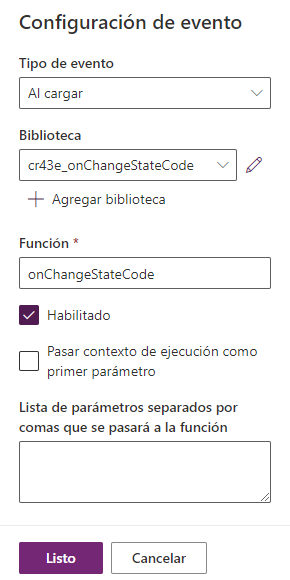
pastedimage1683040212535v1.png

I am getting "TypeError: Cannot read properties of null (reading 'getParent')" when using this JS code:

-----

function onChangeStateCode() {
    var statecodeField = Xrm.Page.getAttribute("statecode");
    var statecodeValue = statecodeField.getValue();
    var statecodeControl = Xrm.Page.getControl("statecode");


    var backgroundColor = "";
    if (statecodeValue === 0) { // 0 represents the Open state
        backgroundColor = "#ffffcc"; // Yellow
    } else if (statecodeValue === 1) { // 1 represents the Won state
        backgroundColor = "#ccffcc"; // Light Green
    } else if (statecodeValue === 2) { // 2 represents the Loss state
        backgroundColor = "#ffcccc"; // Light Red
    } else {
        backgroundColor = ""; // White
    }


    statecodeControl.getParent().style.backgroundColor = backgroundColor;
}


// Register the onChange event handler for the statecode field
Xrm.Page.getAttribute("statecode").addOnChange(onChangeStateCode);

-----

Thank you,

Tomas Cossara

I have the same question (0)
  • Suggested answer
    a33ik Profile Picture
    84,331 Most Valuable Professional on at

    Hello Tomas,

    According to the SDK getParent function of the control returns the section it belongs to - learn.microsoft.com/.../getparent but not the DOM object behind the control.

    Why it doesn't return the section is the other question but the whole approach you use - changing the background of the field using DOM injection is absolutely unsupported and not recommended by Microsoft.

    What you can do is create your own PCF control that will do it in a supported way.

  • Suggested answer
    XM-22040801-0 Profile Picture
    11 on at

    Hi,

    Totally agree with Andrew Butenko, for your need, I invite you to create a PCF or use an existing one. Take a look at https://pcf.gallery/

    For example, would this one be suitable? pcf.gallery/.../

Under review

Thank you for your reply! To ensure a great experience for everyone, your content is awaiting approval by our Community Managers. Please check back later.

Helpful resources

Quick Links

Responsible AI policies

As AI tools become more common, we’re introducing a Responsible AI Use…

Neeraj Kumar – Community Spotlight

We are honored to recognize Neeraj Kumar as our Community Spotlight honoree for…

Leaderboard > Customer experience | Sales, Customer Insights, CRM

#1
Tom_Gioielli Profile Picture

Tom_Gioielli 170 Super User 2025 Season 2

#2
#ManoVerse Profile Picture

#ManoVerse 70

#3
Jimmy Passeti Profile Picture

Jimmy Passeti 50 Most Valuable Professional

Last 30 days Overall leaderboard

Product updates

Dynamics 365 release plans



