web
You’re offline. This is a read only version of the page.
close
Skip to main content

Announcements

No record found.

News and Announcements icon
Community site session details

Community site session details

Session Id :
Finance | Project Operations, Human Resources, ...
Answered

Leave Request Workflow failing after Manager approves

(0) ShareShare
ReportReport
Posted on by 90

Hi all, 

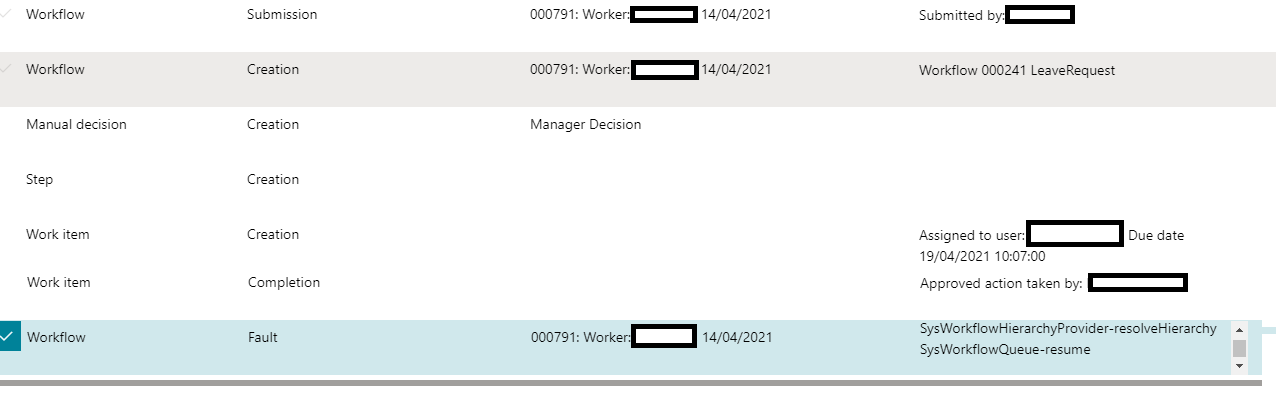
I have a workflow for approving Leave Request but getting the error; 

Stopped (error): X++ Exception: The hierarchy provider did not return any users.
at SysWorkflowHierarchyProvider-resolve
SysWorkflowHierarchyProvider-resolveHierarchy
SysWorkflowQueue-resume

This happens after the manager as approved the workflow as shown in screenshot; 
pastedimage1618831709360v1.png

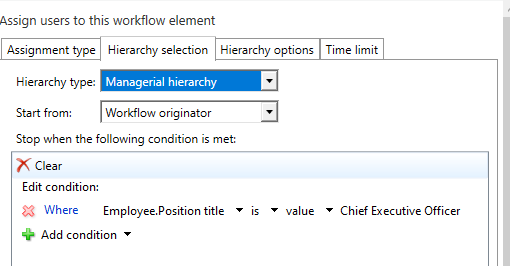
I assume its something to do with the way the workflow could be setup? However there isn't a way to say 'Stop when its been approved' 
pastedimage1618831867140v2.png

Anyone have any ideas?

Cheers,

Matt.

I have the same question (0)
  • Suggested answer
    Parag Chapre Profile Picture
    12,254 Most Valuable Professional on at

    Hi Matt,

    What is the position title for the Manager? Is it the same mentioned in the screenshot?

  • Matthew Falle Profile Picture
    90 on at

    Hi,

    No it isn't, but we definitely don't want the workflow to keep going until it gets to the CEO for every leave request. Is there not an option for once it to be "Approved" it stops and makes the leave request approved?

    Or do you need to make a workflow for every hierarchy?

    E.g If the hierarchy is Employee -> Manager -> CEO. The employee holiday should be approved by the Manager and stop, the Managers should be approved by the CEO and stop, and the CEO's auto approved.

    I do think the issue with how the workflow/hierarchy is structured as this Manager is the last person in his particular hierarchy I believe. Do you know the best way to structure it?

  • Suggested answer
    Michal Krejza Profile Picture
    Microsoft Employee on at

    Hi Matt,

    The easiest solution is to define stop condition based on Line manager level. Condition below stops always for first manager in the line. Meaning when the direct manager approves the request, the workflow is finished. You only need to be careful about CEO, because he has no direct manager. For that scenario you need to create some condition in the workflow and use different workflow thread for CEO approval. 

    platinum.png

  • Matthew Falle Profile Picture
    90 on at

    Hi Micheal,

    Thanks! That has done the trick! For some reason the notification of it being "Approved" is failing due to a translation error but I have disabled that for now.

    I have bumped into another problem now that the Manager has approved the task and the workflow status is completed.

    pastedimage1619107697842v1.png

    How ever for some reason its still locked as submitted and hasen't filtered through to here;

    pastedimage1619107749596v2.png

    pastedimage1619107761295v3.png

    Any ideas on what could be stopping it? 

    Kind regards,

    Matt

  • Alexandra Socea Profile Picture
    Microsoft Employee on at

    Hello Matthew,

    Does this happen for all the leave request that go through this workflow or just this one?

    Thank you!

  • Matthew Falle Profile Picture
    90 on at

    Hi Alexandra,

    It seems to be all of them. I do only have it hooked up to these two individuals currently as I am just in test. I have an auto-approval one which seems to be work correctly and I can view the approved time off. I will attach some images of the workflow incase someone spots anything...

    pastedimage1619170170789v1.png

    pastedimage1619170205798v2.png

  • Alexandra Socea Profile Picture
    Microsoft Employee on at

    Hi Matthew,  

    Can you share more information about this conditional decision you have in there?

    Some screenshots could help.

  • Matthew Falle Profile Picture
    90 on at

    Sure,

    pastedimage1619170997954v1.png

    pastedimage1619171010372v2.png

    pastedimage1619171022887v3.png

    pastedimage1619171033452v4.png

    Escalation and time limit are un ticked. 

    Kind regards,

    Matt

  • Matthew Falle Profile Picture
    90 on at

    Also just to add, really all I am trying to do is make it so an employee can request a holiday -> Manager can approve or deny based on the position hierarchy.

    If i am going about this the wrong way please let me know

  • Verified answer
    Alexandra Socea Profile Picture
    Microsoft Employee on at

    Leave-request-_2800_manager-approval_29002D00_1.0.0.0.xml

    Can you try this workflow configuration then? 

    Hope I understood the requirement correctly.

    And for the CEO I would create a conditional decision, before the approval step that is included in the configuration provided. So if it's CEO --> auto-approve or send it to HR, or whatever your business it. If not, go into the approval step for the line manager.  

Under review

Thank you for your reply! To ensure a great experience for everyone, your content is awaiting approval by our Community Managers. Please check back later.

Helpful resources

Quick Links

Introducing the 2026 Season 1 community Super Users

Congratulations to our 2026 Super Stars!

Meet the Microsoft Dynamics 365 Contact Center Champions

We are thrilled to have these Champions in our Community!

Congratulations to the April Top 10 Community Leaders

These are the community rock stars!

Leaderboard > Finance | Project Operations, Human Resources, AX, GP, SL

#1
Giorgio Bonacorsi Profile Picture

Giorgio Bonacorsi 620

#2
André Arnaud de Calavon Profile Picture

André Arnaud de Cal... 521 Super User 2026 Season 1

#3
CP04-islander Profile Picture

CP04-islander 430

Last 30 days Overall leaderboard

Product updates

Dynamics 365 release plans
