Hello Rickster,
It is complex but still possible, Because you are defining the price at customer level.
Below will be the logic which you can follow and also this solution will be more flexible compare the OOB solution for a product price.
As we already knows a product is sold globally that means the price will be the critical part. i.e. If product is sold in USA around $100 then it will be sold in Mexico in their local currency which will be around 2040 Pesos.
This information you can store in the Product Price list that means defining a estimated price for a product as per the currency.
So when you will look at the "Opportunity Product" Record you will see there is a field called "Pricing(Logical name = ispriceoverridden)" is used. So if it is "false" that will indicate you are using Product Price which is already defined in the Price List(Default Price) and if it is "True" you can "Override the price" of that product by providing the Custom Amount.

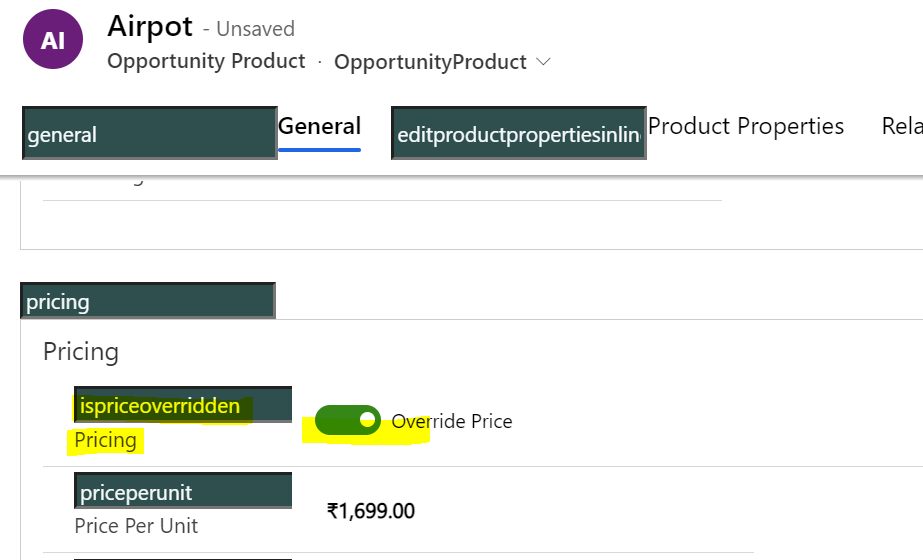
Now you can use this functionality for your benefit to set the custom price.
1. First Create an entity(Custom table) which have below fields
- Uniquely Identify Customer : You need this field to identify a customer uniquely which includes email id, phone number, etc like primary key that is already available in the Customer form.
- Currency field : it will have currency name.
- Price list : it will have price list name.
- Product code/Product name : this should be unique for identification.
- Price : it will have the custom price.
2. Register a plugin on the "Opportunity Product" which can be on create as well as on update and it should run on Post operation.
in this plugin get information of the above mentioned field from the customer as well as from the opportunity and opportunity product.
then create a query and compare fetch data with the "Identify Customer Unique", "Currency field", "Price list" , "Product Code" of custom table. if it matches with the Custom table then it will return the Price and you can set this price on the opportunity product form by making "Pricing(Logical name = ispriceoverridden)" as "Override price".
Also check if user is providing any discount or not. if yes then you need to calculate the discount manually if the used product price is custom.
Make other fields on the Opportunity product as locked so that user can not make any changes manually.
If you need to make it more advanced level then you can implement below scenario :
- If user change the Customer in the opportunity then update all the Opportunity Product price one by one as per new customer.
- If user create or updates a record in Custom table then you can get all the opportunity products where Custom price is used and update it with the new price.
This will be one of the solution which you can implement your requirement.
Thank you,
Amit katariya







