web
You’re offline. This is a read only version of the page.
close
Skip to main content

Notifications

Announcements

Community site session details

Community site session details

Session Id :
Microsoft Dynamics CRM (Archived)

XRM Toolbox User Settings only working for my own account

(0) ShareShare
ReportReport
Posted on by 25

Been using the XRM Toolbox User Settings module, was working great a few months back.  Went to use it this week and it will only allow me to make changes to my own settings.  I have System Admin role, if I try to push settings for anyone else I get this:
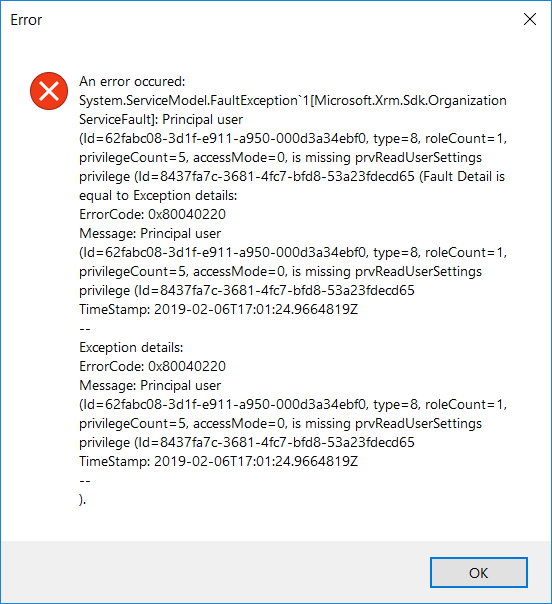
XRM-error.png

I cleared the logs and tried again, the only entry in the new log is:

Microsoft.Xrm.Tooling.Connector.CrmServiceClient Error 2 2/6/2019 1:15:51 PM OrganizationWebProxyClient is null

Any ideas?  Is it a configuration issue, or did something happen to the security model perhaps?

*This post is locked for comments

I have the same question (0)
  • gdas Profile Picture
    50,091 Moderator on at

    Hi ,

    The error says missing prvReadUserSettings , so please check user having Organization level read privilege of User Settings entity under Business Management.

    2019_2D00_02_2D00_07_5F00_23_2D00_54_2D00_35.png

  • JRas Profile Picture
    25 on at

    First thing I checked.  As noted in my question, I was using an account with the System Admin role - Full Org level access across the board and it was working previously with the same account.

Under review

Thank you for your reply! To ensure a great experience for everyone, your content is awaiting approval by our Community Managers. Please check back later.

Helpful resources

News and Announcements

Season of Giving Solutions is Here!

Quick Links

Responsible AI policies

As AI tools become more common, we’re introducing a Responsible AI Use…

Neeraj Kumar – Community Spotlight

We are honored to recognize Neeraj Kumar as our Community Spotlight honoree for…

Leaderboard > 🔒一 Microsoft Dynamics CRM (Archived)

#1
SA-08121319-0 Profile Picture

SA-08121319-0 4

#1
Calum MacFarlane Profile Picture

Calum MacFarlane 4

#3
Alex Fun Wei Jie Profile Picture

Alex Fun Wei Jie 2

Last 30 days Overall leaderboard

Featured topics

Product updates

Dynamics 365 release plans



