web
You’re offline. This is a read only version of the page.
close
Skip to main content

Notifications

Announcements

No record found.

Community site session details

Community site session details

Session Id :
Customer experience | Sales, Customer Insights,...
Suggested Answer

How to change CSS for entity form and entity lists?

(0) ShareShare
ReportReport
Posted on by

I would like to use personalize the layout of the entity forms and entity list using my own css.

Could someone please guide me on how to do so?

I have the same question (0)
  • Community Member Profile Picture
    on at

    I would like to use personalize the layout of the entity forms and entity list using my own css.

    Could someone please guide me on how to do so?

  • Suggested answer
    cloflyMao Profile Picture
    25,210 on at

    Hi Neeraja,

    An entity form is associated with a form in Dynamics, therefore, you can change layout of the corresponding form in form editor, it will reflect on entity form in portal.

    If you would like to only change layout of form in portal, to apply own css to entity form or entity list, we can take following steps.

    1. Find the web page record that we added entity form or entity list.

    2. Open the associated localized content record.
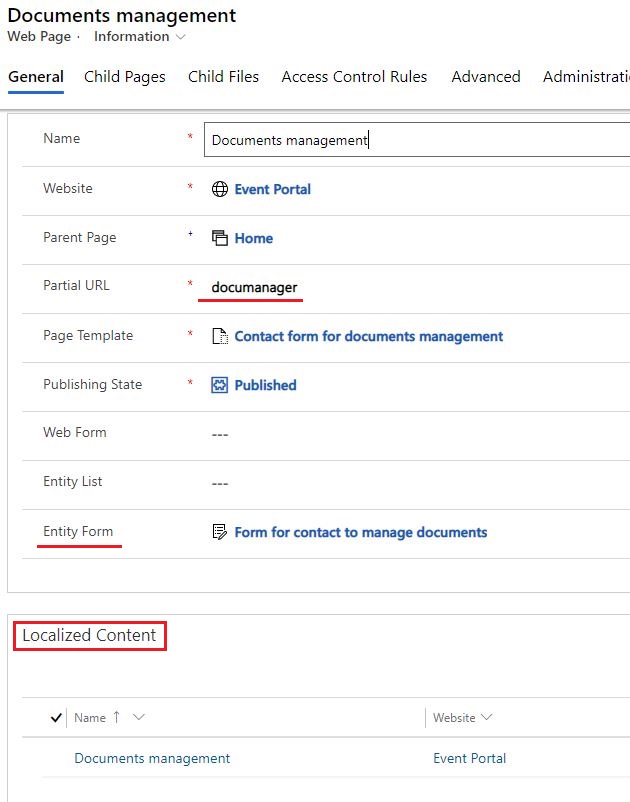
    6507.JPG

    3. Add custom css in Advanced > Custom CSS
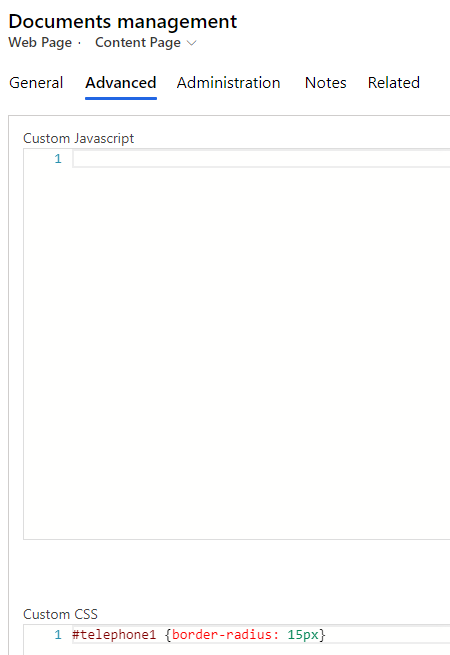
    pastedimage1600066454345v1.png

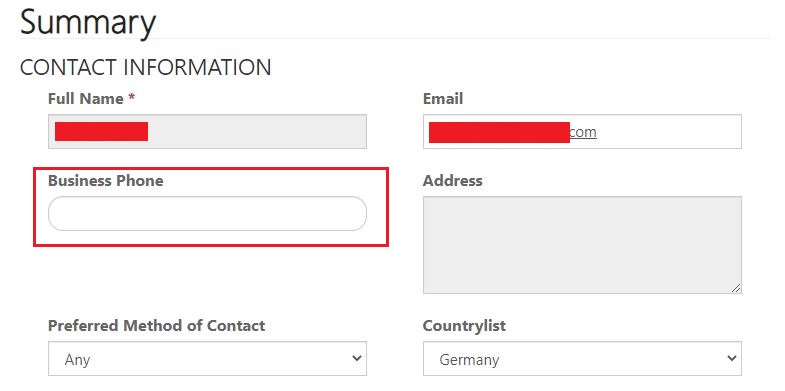
    Result:

    6138.JPG

    In addition, it may takes several minutes to sync modification, you can force portal to refresh in https://make.powerapps.com/

    Power Apps > Apps > Portal > Edit > Browse website.

    3_2D00_1.JPG

    Regards,

    Clofly

  • urklnme Profile Picture
    439 on at

    I can add custom css.

    How do I identify the html elements of the entity list and which css is being applied to them?

    I would like to add:

    width:200px;
    white-space: nowrap;
    text-overflow: ellipsis;
    overflow: hidden;

    to a field in the entity list.

    yes, I am still fairly new to the powerapps portal and css. 

  • Suggested answer
    Prakash Kalimuthu Profile Picture
    on at

    Hi Neeraja,

    In portal, entity list and entity form will be associated with webpage.

    go to localized content of webpage and under Advanced section of custom css write your custom code.

    to find html elements of form or list, go to browsers developer tools and using selector you can find the html element id or class.

    finally, apply necessary styling to it.

    Please mark it as resolved, if it answers your question.

    Regards,

    Prakash

  • urklnme Profile Picture
    439 on at

    Thank you Prakash.  I did add custom jquery in the entity list/options/custom javascript field.

    I had the task of making a multi-line text(MLT) field appear on each row of a entity list and be scrollable, but the height of the field should be only 3 rows high.  The MLT was in the ninth position on each row.

    I used this jquery/CSS to achieve this.

        
     })
            $(".entitylist.entity-grid").on("loaded", function () {
                var rows = $("table tr td:nth-child(3)").length;
                for (var i = 0; i < rows; i  ) {
                $("table tr td:nth-child(8)").eq(i).css('display', '-webkit-box');
                    $("table tr td:nth-child(8)").eq(i).css('overflow', 'hidden');
        		    $("table tr td:nth-child(8)").eq(i).css('text-overflow', 'ellipsis;');
        		    $("table tr td:nth-child(8)").eq(i).css('-webkit-line-clamp', '3');
                    $("table tr td:nth-child(8)").eq(i).css('-webkit-box-orient', 'vertical');
                    $("table tr td:nth-child(8)").eq(i).addClass('descScroll-width');
                }
            })
    
    the row in the entity list appears like
    22021_2D00_01_2D00_10_5F00_9_2D00_02_2D00_44.png
    I came up with this solution by combining the code from several other posters on the internet and trial-by-error.
  • Prakash Kalimuthu Profile Picture
    on at

    Awesome.

    Kindly, mark it as resolved, If it resolves your problem/question/issue.

    Regards,

    Prakash

Under review

Thank you for your reply! To ensure a great experience for everyone, your content is awaiting approval by our Community Managers. Please check back later.

Helpful resources

Quick Links

Responsible AI policies

As AI tools become more common, we’re introducing a Responsible AI Use…

Neeraj Kumar – Community Spotlight

We are honored to recognize Neeraj Kumar as our Community Spotlight honoree for…

Leaderboard > Customer experience | Sales, Customer Insights, CRM

#1
Tom_Gioielli Profile Picture

Tom_Gioielli 70 Super User 2025 Season 2

#2
Gerardo Rentería García Profile Picture

Gerardo Rentería Ga... 43 Most Valuable Professional

#3
Daniyal Khaleel Profile Picture

Daniyal Khaleel 32 Most Valuable Professional

Last 30 days Overall leaderboard

Product updates

Dynamics 365 release plans