web
You’re offline. This is a read only version of the page.
close
Skip to main content

Announcements

News and Announcements icon
Community site session details

Community site session details

Session Id :
Dynamics 365 Community / Forums / Finance forum / Document Routing Layou...
Finance forum

Document Routing Layout Design

(0) ShareShare
ReportReport
Posted on by 265

Hi All,

I am able to print the Label  of License Plate through the ZPL Printer after the work completed through the mobile APP.

I have taken the Document routing layout code from some blog,now i need to add some extra field in layout .

I have tried to add some extra field basis of  available code after adding code its not printing the label.

Could you please suggest  how we can design the layout or printer vendor will provide the code basis of fields we required.
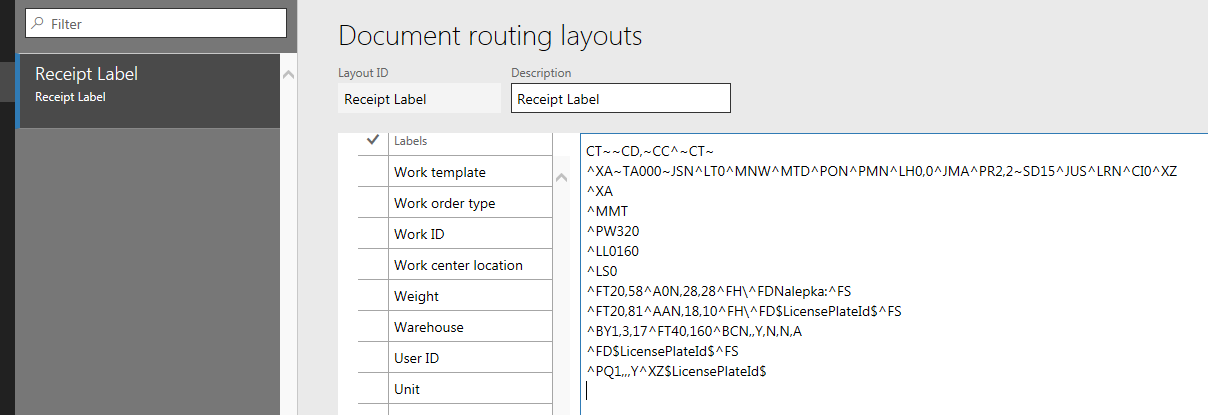
1488.8715.label.PNG

Thank you so much  for your reply!!!!!!

Categories:
I have the same question (0)
  • Verified answer
    Community Member Profile Picture
    on at

    Hi deepak,

    We used Nicelabel pro software to generate "Document routing" layout for AX2012 and for us to enable to print product receipt labels.

    Write down AX fields from Document routing layout form you want to add on the label for example $itemid$, $inventbatchid$ etc., create label template within the software (Nicelabel Pro) with field layout and  field description.

    Once you are happy with your label design and layout - click print to file, save the file - open the saved file with notepad to extract the code - copy&paste it back in your AX document routing layout form.

    Regards,

    V

  • Community Member Profile Picture
    on at

    There is a free site that allows you to view ZPL code renders called Labelary.com.    Between this and using Zebra Code guide (link below) I've been able to write all my labels directly in ZPL code without too much trouble.  

    https://www.zebra.com/content/dam/zebra/manuals/printers/common/programming/zpl-zbi2-pm-en.pdf

  • Suggested answer
    Hazwan Mokhtar Profile Picture
    25 on at

    Normally I use this to design the label.

    labelary.com/viewer.html

Under review

Thank you for your reply! To ensure a great experience for everyone, your content is awaiting approval by our Community Managers. Please check back later.

Helpful resources

Quick Links

November Spotlight Star - Khushbu Rajvi

Congratulations to a top community star!

Forum Structure Changes Coming on 11/8!

In our never-ending quest to help the Dynamics 365 Community members get answers faster …

Dynamics 365 Community Platform update – Oct 28

Welcome to the next edition of the Community Platform Update. This is a status …

Leaderboard > Finance

Last 30 days Overall leaderboard

Featured topics

Product updates

Dynamics 365 release plans
