web
You’re offline. This is a read only version of the page.
close
Skip to main content

Notifications

Announcements

No record found.

Community site session details

Community site session details

Session Id :
Customer experience | Sales, Customer Insights,...
Suggested Answer

Rollup SUM Field Not Working

(0) ShareShare
ReportReport
Posted on by 70

Hi,

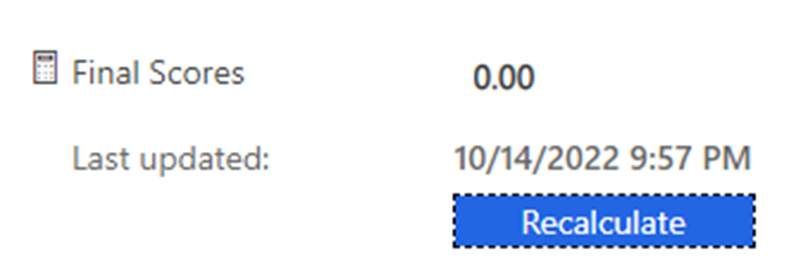
I have 2 related entities - Reviews & Final Approval. For each proposal there would be multiple review records by multiple people, but there will only be 1 record of Final Approval. Review form has a field called 'Review Score' given by each reviewer, and in my Final Approval form, I have a field called 'Final Score' which would be the sum of all the scores from all the review records. I tried using Rollup to get that sum in my Final Score field, but somehow its not working. Its always showing 0, I keep 'Recalculating' it, but still the value remains 0. Here are few screenshots...

My Roll-Up Setting...
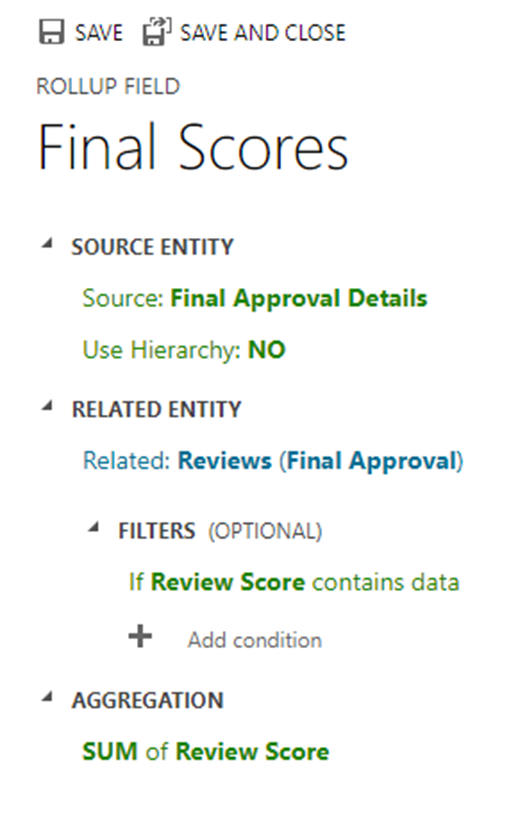
pastedimage1665799766629v1.png

This is my field on the form...

pastedimage1665799874147v2.png

Can someone please tell me what wrong am I doing?

Thanks!

I have the same question (0)
  • Suggested answer
    Abdul Wahab Profile Picture
    12,119 Moderator on at

    Hi D365 User 06,

    Can you please share record screenshot containing column Review Score and Review.

    If I answer your question then please mark it as verified.

    Let me know if I can provide you with more details.

    Thanks
    Regards,

    Abdul Wahab
    Power Platform & Customer Engagement Developer/Lead/Solution Architecture/Project Manager
    Direct/WhatsApp:+923323281237
    E-mail: abdulwahabubit@outlook.com
    Skype: abdul.wahabubit
    Linkedin: www.linkedin.com/.../

  • D365 User 06 Profile Picture
    70 on at

     Abdul Wahab 

    Thanks for your response. Here is my screenshot of my Review record with the Score field...

    pastedimage1665801516691v1.png

  • Suggested answer
    Bipin D365 Profile Picture
    28,983 Moderator on at

    Hi,

    Each Rollup field creates two accessory fields with <fieldname>_date and <fieldname>_state suffix pattern. The _date field is of the Datetime data type and _state field is of the integer data type.

    Can you please add <field name>_status field on the form to see the value of it.

    learn.microsoft.com/.../define-rollup-fields

  • Suggested answer
    Abdul Wahab Profile Picture
    12,119 Moderator on at

    Hi D365 User 06,

    Can you please share relationship screenshot?

    If I answer your question then please mark it as verified.

    Let me know if I can provide you with more details.

    Thanks
    Regards,

    Abdul Wahab
    Power Platform & Customer Engagement Developer/Lead/Solution Architecture/Project Manager
    Direct/WhatsApp:+923323281237
    E-mail: abdulwahabubit@outlook.com
    Skype: abdul.wahabubit
    Linkedin: www.linkedin.com/.../

  • D365 User 06 Profile Picture
    70 on at

     Bipin Kumar 

    Thank you for your response. I can see those 2 extra fields in my columns list, and have added the _state field on the form. It shows the value 1, but the main Final Scores field still shows 0...

    pastedimage1665805790511v2.png

  • D365 User 06 Profile Picture
    70 on at

     Abdul Wahab 

    This is my relationship screenshot...

    pastedimage1665805908275v1.png

  • D365 User 06 Profile Picture
    70 on at

    I think the problem is related to Reviews entity not having any lookup to Final Approval entity. Review entity has a lookup to Proposal entity, from which you select the Proposal to which these reviews are related to. I tried adding the same rollup field in my Proposal entity, and it worked. Its showing me the Final score correctly. However there is no lookup field connecting Review entity and Final Approval. The only common factor connecting these 2 entities is the Proposal name (which is a lookup in both the entities). So due to this reason, I'm trying to add a subgrid of all the Reviews in Final Approval, but thats also not working. If the subgrid will work, Rollup will also work. So is there anyway to show all the Reviews related to a particular Proposal in the Final Approval entity?

  • Suggested answer
    Abdul Wahab Profile Picture
    12,119 Moderator on at

    Hi D365 User 06,

    After seeing the relationship, the review is the column on the child table (Final Approval)...

    Can you please do one thing for me? 

    Create 2 parent records. Create 3 child records against each parent record. Show me 2 screenshots from the parent record that is showing child records from the related tab. Do not forget to include the Review column from the child tab (Final Approval).

    If I answer your question then please mark it as verified.

    Let me know if I can provide you with more details.

    Thanks
    Regards,

    Abdul Wahab
    Power Platform & Customer Engagement Developer/Lead/Solution Architecture/Project Manager
    Direct/WhatsApp:+923323281237
    E-mail: abdulwahabubit@outlook.com
    Skype: abdul.wahabubit
    Linkedin: www.linkedin.com/.../

  • D365 User 06 Profile Picture
    70 on at

     Abdul Wahab 

    As I had mentioned in my previous post, the related records from Review is not being shown in the Subgrid or Associated View of Final Approval. I think this is because there is no lookup in the Review form for Final Approval, as Final Approval will be created only after all the Reviews are done. If they have 4 Reviews with 4 Reviewers, only after these 4 records are created, a Final Approval record will be created.

    Here are some screenshots of my Subgrid and Associated View. In both cases it says 'No data available'...

    pastedimage1665925280266v3.png

    pastedimage1665925158125v2.png

  • Suggested answer
    Abdul Wahab Profile Picture
    12,119 Moderator on at

    Hi D365 User 06,

    The review is the parent table. Final Approval is the child table. For the rollup to work you must have records in both tables and these records must be associated with each other.

    As per your design, The lookup columns Review of the parent table 'Review' exists in the child table Final Approval. In other words, you have one Review against multiple Final Approvals.

    To test your rollup. Do one thing.

    1. Create a record in the review table.
    2. From Review table. Navigate to the related tab.
    3. Select the Final Approval section.
    4. Create a new record for Final Approval. Allocate values for the score

    After creating records in such a manner refresh the rollup column. Now it's started showing value to you.

    For more details about roll-up. Read it out: Calculated and rollup columns (Microsoft Dataverse) - Power Apps | Microsoft Learn

    If I answer your question then please mark it as verified.

    Let me know if I can provide you with more details.

    Thanks
    Regards,

    Abdul Wahab
    Power Platform & Customer Engagement Developer/Lead/Solution Architecture/Project Manager
    Direct/WhatsApp:+923323281237
    E-mail: abdulwahabubit@outlook.com
    Skype: abdul.wahabubit
    Linkedin: www.linkedin.com/.../

Under review

Thank you for your reply! To ensure a great experience for everyone, your content is awaiting approval by our Community Managers. Please check back later.

Helpful resources

Quick Links

Responsible AI policies

As AI tools become more common, we’re introducing a Responsible AI Use…

Neeraj Kumar – Community Spotlight

We are honored to recognize Neeraj Kumar as our Community Spotlight honoree for…

Leaderboard > Customer experience | Sales, Customer Insights, CRM

#1
Tom_Gioielli Profile Picture

Tom_Gioielli 70 Super User 2025 Season 2

#2
Gerardo Rentería García Profile Picture

Gerardo Rentería Ga... 33 Most Valuable Professional

#3
Daniyal Khaleel Profile Picture

Daniyal Khaleel 32 Most Valuable Professional

Last 30 days Overall leaderboard

Product updates

Dynamics 365 release plans