web
You’re offline. This is a read only version of the page.
close
Skip to main content

Notifications

Announcements

No record found.

Community site session details

Community site session details

Session Id :
Finance | Project Operations, Human Resources, ...
Answered

PO received included in the percentage complete calculation of an estimation

(0) ShareShare
ReportReport
Posted on by

Hi all

I am looking for a solution (standard settings or workaround solution) to take into account the purchase orders received amount in the percentage complete calculation  of an estimation of a fixed price project.

Example :

  • Budgeted charges value (item forecasts = 10000€ on a purchased item)
  • Invoiced PO value = 3000€
  • Received PO value = 1000€

Expected percentage complete = (3000€+1000€)/10.000€ = 40%.


I just had a look on the MS topic below but it does not give hope to do that : "Posting a product receipt does not impact project information. As a workaround, you could generate a draft vendor invoice right after posting the purchase receipt".

 https://docs.microsoft.com/en-us/dynamics365/finance/accounts-payable/project-cost-accrual-purchase-receipts


Do you have an idea to do that in standard D365 or does it need specific development ?


Regards

Claude

I have the same question (0)
  • Suggested answer
    MarkB45 Profile Picture
    755 on at

    Hi Claude,

    If you are using the non-stocked scenario for Project Operations you will need to come up with a project accrual routine to land the costs onto the project as functionality is not available for that configuration.

    However there is a way to achieve your outcome as standard in ProjOps stocked product scenario. In order to recognise a receipted cost onto a project you need to use "Item Requirements" which will link the PO & Item requirement SO together through stock marking. Then when the PO is receipted the SO is also delivered landing the cost on the project.

    Set the following under Project parameters:

    pastedimage1627372012638v1.png

    The only issue with this set up was that the items had to transact through stock so you always had to set up service items as "stocked" products. However there was a feature released in June last year that allows you to create item requirements for Non-stocked products which solved this,

    The only downside to this is the returns process as you cannot use the cancel or correct option on a purchase order when it is linked to item requirements you have to enter a negative line on the PO link to the return LOTID and receipt it.  

    Hope this helps.

    Kind Regards

    Mark

  • Community Member Profile Picture
    on at

    Hi Mark

    First let me apologize for the delay to reply because of the rush before holidays…

    Your answer help me a lot.

    After activation of the settings to have item consumption on item requirement, I could have PO received included in my percentage complete calculation on a stocked product. That’s OK for this type of product.

    However, I need to do the same thing on service items and I activated the new feature that give possible to have item requirements on non stocked items.

    I created and tried to receive my PO on this type of item but I have a financial error when I post a product receipt.

    pastedimage1627899463426v1.png

    The product receipt is created but the SO corresponding line (item requirement) is not delivered because of this message (I suppose). The only packing slip journal on the SO is relative to the stocked product deliver.
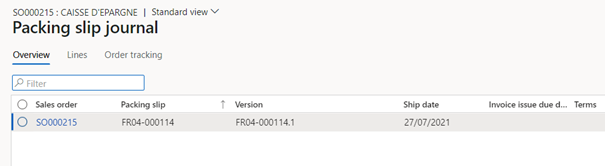
    pastedimage1627899476743v2.png

    I checked some settings with a financial consultant but we did not find the solution to solve this problem.

    Do you have an idea about origin of this error ?

    Let me know if some informations are missing.

    Best regards

    Claude

  • Community Member Profile Picture
    on at

    Hi Mark

    I resolved the financial issue on item requirement posting for non stocked products;

    however I need precision for the return process for these items.

    I didn't understand the process that you mentionned "......you have to enter a negative line on the PO link to the return LOTID and receipt it.".

    Can you detail the process please.

    Thanks for your help.

    Claude

  • Suggested answer
    MarkB45 Profile Picture
    755 on at

    Hi Claude,

    Just back from holiday myself so please excuse the delay in replying.

    The process for a PO return when using item requirements is as follows:

    Service return process

    1. Create original PO with a line, qty = 10. Item requirement automatically created

    pastedimage1629189946294v1.png

    1. Confirm the PO
    2. Deliver the PO (Receive > Product receipt)

    pastedimage1629189964607v2.png

    Sales order packing slip is posted too.

    Return process

    1. In the Purchase order form click the Purchase order you wish to return and select Purchase order > Copy > Copy from all

    pastedimage1629189980498v3.png

    • In the Parameters fast tab set Invert sign to yes
    • In the Product receipts fast tab ensure the required product receipt is selected
    • In the Lines fast tab select the product receipt lines that need to be returned
    • Click OK

    pastedimage1629190051196v4.png

    Negative purchase lines are now created in the PO and on the Item requirement sales order.

    1. Approve and confirm the purchase order
    2. Note: This step might be optional depending on your requirements to track items.
      Click on the Reference number in the Product tab on the return purchase line, noticing the Reference lot.

    pastedimage1629190072532v5.png

    In the respective sales order find the return line using the Reference lot number and populate the Return lot ID with the original.

    pastedimage1629190086143v6.png

    1. Post the return product receipt (Purchase order form > Receive > Product receipt)

    pastedimage1629190099276v7.png

    Respective sales delivery note is posted as well and the cost has been removed from the project.

  • Suggested answer
    Community Member Profile Picture
    on at

    Hi Mark

    It s all right for me.

    Thank you for your answer

    Best regards

    Claude

Under review

Thank you for your reply! To ensure a great experience for everyone, your content is awaiting approval by our Community Managers. Please check back later.

Helpful resources

Quick Links

Responsible AI policies

As AI tools become more common, we’re introducing a Responsible AI Use…

Neeraj Kumar – Community Spotlight

We are honored to recognize Neeraj Kumar as our Community Spotlight honoree for…

Leaderboard > Finance | Project Operations, Human Resources, AX, GP, SL

#1
Martin Dráb Profile Picture

Martin Dráb 592 Most Valuable Professional

#2
André Arnaud de Calavon Profile Picture

André Arnaud de Cal... 478 Super User 2025 Season 2

#3
BillurSamdancioglu Profile Picture

BillurSamdancioglu 305 Most Valuable Professional

Last 30 days Overall leaderboard

Product updates

Dynamics 365 release plans



