Situation:
Client created PO - no problem
Then received on two different shippments the full QTY ordered on the PO
Receipt 1 - 2 items - applied to the PO correctly
Receipt 2 - 18 itesm - applied to the PO correctly
Status of the PO - Ordered : 20
Shipped / Received : 20
Invoiced : 0
Here is where the problem starts. Apparently during the entry of the Invoice - Enter Match Invoice - the client started be creating the receipt - appears to have clicked on the PO - but did not complete the data entry
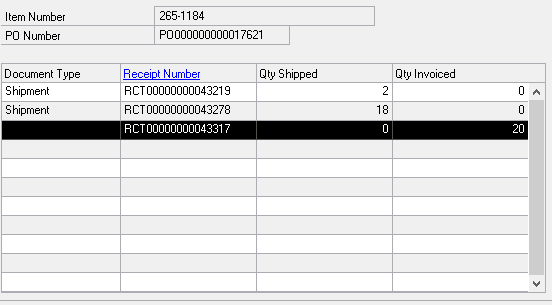
As noted in the above picture, there are no details attached to the Document Type - but the QTY Invoiced is showing correctly.
Now when the client attempted to open and correct the problem they were told that the POP was fully receipted and completed and that they could not enter any other invoices.
My Resolution
Found in the POP tables the RCT.....43317 and worked to remove that reference
Found in the POP tables where RCT.....43317 was referenced and removed the QTY Matched
Tables Adjusted
POP10600 - removed invoice
POP10500 - removed RCT....43317
POP10300 - removed RCT....43317
POP10500 - reset the QTYMATCH to 0 for the documents related to PO.....17621
Remaining Problem
Now when this was completed - the RCT of the Invoice was effectively removed. So, now we attempt to re-enter the Receipt / Invoice
EnterMatch/Invoice
Enter a new RCT number
Enter the correct Vendor Invoice Number
Enter the date, and Vendor Information
Enter the PO....17621
Enter the Item number and select the TWO Shipments to Match
NO PROBLEM TO THIS POINT
Situation now is that the Distribution for the transaction is incorrect.
When the Shipments were received the posting was to Inventory 1300 and Accrued Payables 2021
Now when then Invoice is received the posting SHOULD BE Accrued Payables 2021 and Payables 2000
However when I open the DISTRIBUTION button at the bottom of the EnterMatch Inovice scrreen, the distribution shows 1300 PURCH and if I attempt to change it, the message that we can not change at the Summary Level - to make this change we have to make it at the Item level.
This is where I am lost - when I go the ITEM detail, there is no where to change (that I have found) If I change at the Item Maintenance Level - and go back, click on Default - no change.
What am I missing?


