web
You’re offline. This is a read only version of the page.
close
Skip to main content

Notifications

Announcements

No record found.

Community site session details

Community site session details

Session Id :
Microsoft Dynamics AX (Archived)

customer aging

(0) ShareShare
ReportReport
Posted on by

Hello All 

I have ax 2012 

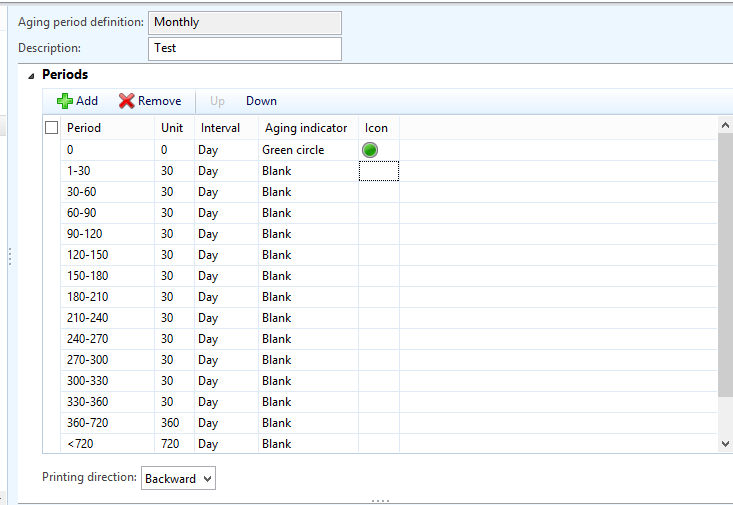
I want to make customer aging for each 30 days like photo bellow 
3817.Capture.PNG

that mean now for customer aging will be for 30 days and more than 1 year will be one column and more will be all in same column 

However I try to generate the report but i get error 

"Too many periods in the aging period definition. The maximum number of aging periods is 6."

any help with that ? 

*This post is locked for comments

I have the same question (0)
  • Suggested answer
    André Arnaud de Calavon Profile Picture
    301,119 Super User 2025 Season 2 on at

    Hi Abdalrahman,

    The standard report supports 6 columns. To have more columns possible you can use the Collection forms in AX (then export to Excel) or customize the report to support more than 6 columns.

  • Community Member Profile Picture
    on at

    Hi Andre

    how can I use Collection form ?

    Regards

  • Ludwig Reinhard Profile Picture
    Microsoft Employee on at

    Hi, the form is available in the Accounts Receivable module in the common section. In addition to what Andre suggested, probably also consider the use of the AX2012 cubes for your detailed analysis. That is, if you need more than the 6 columns for structuring your AR balances, it might be faster and cheaper doing this in the cubes compared to a system modification. Yet, this all depends on your requirements

    Best regards

    Ludwig

  • Community Member Profile Picture
    on at

    Hi Ludwig

    yes I think the best way is customize new report However I want to try the aging report with 6 columns

    I make it like this 

    5025.2.PNG

    5025.2.PNG

    but still get wrong data :( 

  • Ludwig Reinhard Profile Picture
    Microsoft Employee on at

    Hi Abdalrahman Mohammed,

    What do you mean exactly by getting 'wrong data' and how did you find out/analyze that the data are wrong?

    Best regards,

    Ludwig

  • Verified answer
    André Arnaud de Calavon Profile Picture
    301,119 Super User 2025 Season 2 on at

    Hi Abdalrahman,

    You have to tell the current and desired behavior. However, I can see the columns are not set correctly. You are using positive values in the unit field. This needs to be negative values to be able to calculate the correct periods.

    So use e.g. -30 and -210.

    Have also a look at the next thread for more information. community.dynamics.com/.../562776

  • Community Member Profile Picture
    on at

    Hello Dear

    I know the data is wrong by open customer statement and see the invoices with their date

    so I realize that report is wrong

    Regards

  • Community Member Profile Picture
    on at

    Hello Andre

    thank you for the like

    the report didn't accept negative numbers

    I get error "Unit must be greater than 0"

    Regards

  • Verified answer
    Ludwig Reinhard Profile Picture
    Microsoft Employee on at

    Hi,

    Please try to delete the lines in your structure that include the positive numbers and which are arranged below the 0 line.

    To get the negative numbers included you have to setup the structure in a way that they are setup above the 0 line.

    Please note that this setup and the report output will only reconcile with the customer statement if you have overdue amounts. If you already recorded invoices that become due let's say middle of next year also the setup with the negative numbers might not be able to fully reconcile but this depends on your data.

    If you are unsure how to set this up and if you have access to a contoso test system, you can compare your setup with the sample structures provided there.

    Hope this helps

    Ludwig

  • Community Member Profile Picture
    on at

    Hello Ludwig

    Thank you dear I just add number up the 0 line and get negative numbers

    also thanks to Andre for help

Under review

Thank you for your reply! To ensure a great experience for everyone, your content is awaiting approval by our Community Managers. Please check back later.

Helpful resources

Quick Links

Responsible AI policies

As AI tools become more common, we’re introducing a Responsible AI Use…

Neeraj Kumar – Community Spotlight

We are honored to recognize Neeraj Kumar as our Community Spotlight honoree for…

Leaderboard > 🔒一 Microsoft Dynamics AX (Archived)

#1
Martin Dráb Profile Picture

Martin Dráb 4 Most Valuable Professional

#1
Priya_K Profile Picture

Priya_K 4

#3
MyDynamicsNAV Profile Picture

MyDynamicsNAV 2

Last 30 days Overall leaderboard

Featured topics

Product updates

Dynamics 365 release plans



