web
You’re offline. This is a read only version of the page.
close
Skip to main content

Notifications

Announcements

No record found.

Community site session details

Community site session details

Session Id :
Finance | Project Operations, Human Resources, ...
Answered

Linking Data Sources on the Sales Form (2)

(0) ShareShare
ReportReport
Posted on by

This post is a follow up of this one..

https://community.dynamics.com/365/financeandoperations/f/dynamics-365-for-finance-and-operations-forum/411963/linking-data-sources-on-the-sales-form

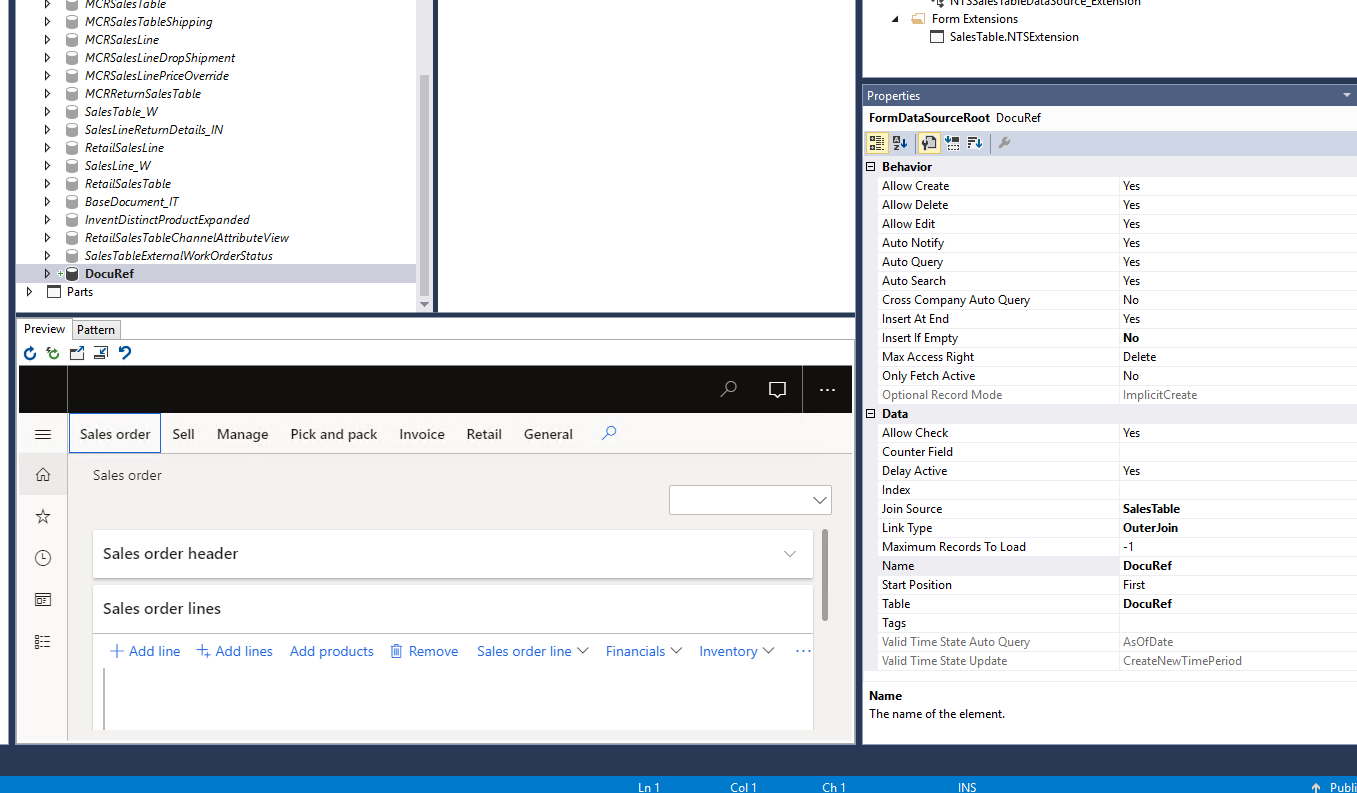
If I Set the link Type to 'Outer Join', the grid will include all the records in the DocuRef Table.

If I set the link type to 'Inner Join', I can only see sales orders that have records in the DocuRef table.
pastedimage1609271158006v1.png

Here is how I'm linking the tables

[ExtensionOf(formDataSourceStr(SalesTable,DocuRef))]
final class TetsSalesTableDatasource_Extension
{
public void init()
{ Query q;
QueryBuildDataSource qbds;
QueryBuildRange qbr;
FormDataSource formDS = this;
DocuRef DocuRef;

next Init();

q = formDS.query();

qbds = q.dataSourceTable(tableNum(DocuRef));

qbds.addLink(fieldNum(SalesTable,RecId),fieldNum(DocuRef,RefRecId));
qbds.addLink(fieldNum(SalesTable,TableId),fieldNum(DocuRef,RefTableId));
}
}

What am I missing?

I have the same question (0)
  • André Arnaud de Calavon Profile Picture
    301,030 Super User 2025 Season 2 on at

    Hi Brianmaric,

    What is the exact issue here? What it the desired result and what is the current behavior? Didn't you provide your own answer to use an outer join?

  • brianmaric Profile Picture
    on at

    Yes but it was not the whole answer.

    It only fixed one problem.

    Using the Outer Join allowed made it possible to use the addLink Function.

    But the results are still not satisfactory as I explain above.

    The Purpose:

    I am trying to add the DocuRef records to the Header part of the Sales Form.  So I added the DocuRef Table to the data sources of the form and added a grid to show records.  To that effect, I followed the steps above.

  • brianmaric Profile Picture
    on at

    If I Set the link Type to 'Outer Join', the grid will include all the records in the DocuRef Table.

    If I set the link type to 'Inner Join', I can only see sales orders that have records in the DocuRef table.

  • André Arnaud de Calavon Profile Picture
    301,030 Super User 2025 Season 2 on at

    Do you mean with 'all records' also records not related to the current sales order?

  • brianmaric Profile Picture
    on at

    Yes, the current code show everything in the DocuRef Table regardless of the Sales ID

  • Blue Wang Profile Picture
    on at

    HI brianmaric ,

    Checked their relations,  joinmode and fetchmodel?

    Is the code you posted your current complete code?

  • brianmaric Profile Picture
    on at

    Yes

  • Martin Dráb Profile Picture
    237,880 Most Valuable Professional on at

    When you have a problem with a query, a good idea is to check how the query looks like. If you fail to spot a problem there, please share thw query with us, so we can review it for you.

    Nevetheless your design looks wrong to me. If a sales order has multiple attachments, you would see the same order multiple times. That's not how the form is intended.

    What you should implement it depends on your business requirements, which you unfortunately didn't share with us. If you want to display a list of attachments related to a an order, use a Delayed link and add a separarate grid (on a fast tab) for this data source. If you want to show something in the list of orders, you must either choose just one attachment, or show some kind of aggregate data.

  • André Arnaud de Calavon Profile Picture
    301,030 Super User 2025 Season 2 on at

    Hi Brianmaric,

    Have you tried debugging the scenario to see what query is generated and if your coding is actually being executed?

    You can also try to move the coding to the initialization of the SalesTable or DocuRef datasources instead of the form init.

    I would recommend to also include a range on the field DocuRef.RefCompanyId.

  • brianmaric Profile Picture
    on at

    Hi Andre, I am using the DocuRef datasource:

    [ExtensionOf(formDataSourceStr(SalesTable,DocuRef))]

    final class TetsSalesTableDatasource_Extension

    {

    public void init()

    { Query q;

    QueryBuildDataSource qbds;

    QueryBuildRange qbr;

    FormDataSource formDS = this;

    DocuRef DocuRef;

    next Init();

    q = formDS.query();

    qbds = q.dataSourceTable(tableNum(DocuRef));

    qbds.addLink(fieldNum(SalesTable,RecId),fieldNum(DocuRef,RefRecId));

    qbds.addLink(fieldNum(SalesTable,TableId),fieldNum(DocuRef,RefTableId));

    }

    }

Under review

Thank you for your reply! To ensure a great experience for everyone, your content is awaiting approval by our Community Managers. Please check back later.

Helpful resources

Quick Links

Responsible AI policies

As AI tools become more common, we’re introducing a Responsible AI Use…

Neeraj Kumar – Community Spotlight

We are honored to recognize Neeraj Kumar as our Community Spotlight honoree for…

Leaderboard > Finance | Project Operations, Human Resources, AX, GP, SL

#1
Martin Dráb Profile Picture

Martin Dráb 611 Most Valuable Professional

#2
André Arnaud de Calavon Profile Picture

André Arnaud de Cal... 529 Super User 2025 Season 2

#3
Sohaib Cheema Profile Picture

Sohaib Cheema 285 User Group Leader

Last 30 days Overall leaderboard

Product updates

Dynamics 365 release plans



