web
You’re offline. This is a read only version of the page.
close
Skip to main content

Notifications

Announcements

No record found.

Community site session details

Community site session details

Session Id :
Finance | Project Operations, Human Resources, ...
Suggested Answer

How the D365 FinOps calculates the sales tax before and after invoicing?

(0) ShareShare
ReportReport
Posted on by 145

Hello Experts,

I am noticed that a difference between individual tax amount before (Temporary sales tax transaction from action pane Sell tab -> Tax group -> Sales tax) and after (Posted sales tax from invoice journal screen). Attached the screen shot as bellow,

pastedimage1628749707668v1.png

Temporary sales tax transaction screen.

Actual tax for highlighted row = 3511 * (15 / 100) = 526.65

Debugged the Temporary sales tax transaction calculation and figure out the following steps,

1. Base tax - Sales subtotal / (tax code), Here we are using 15%.

2. Calculated tax at run time - Calculate the individual item sales tax and fill the temporary table and takes sum of the calculation.

3. Calculated difference - Calculated tax at run time - Base tax

4. Find the biggest calculated tax amount and subtract the Calculated difference (from Step 3).
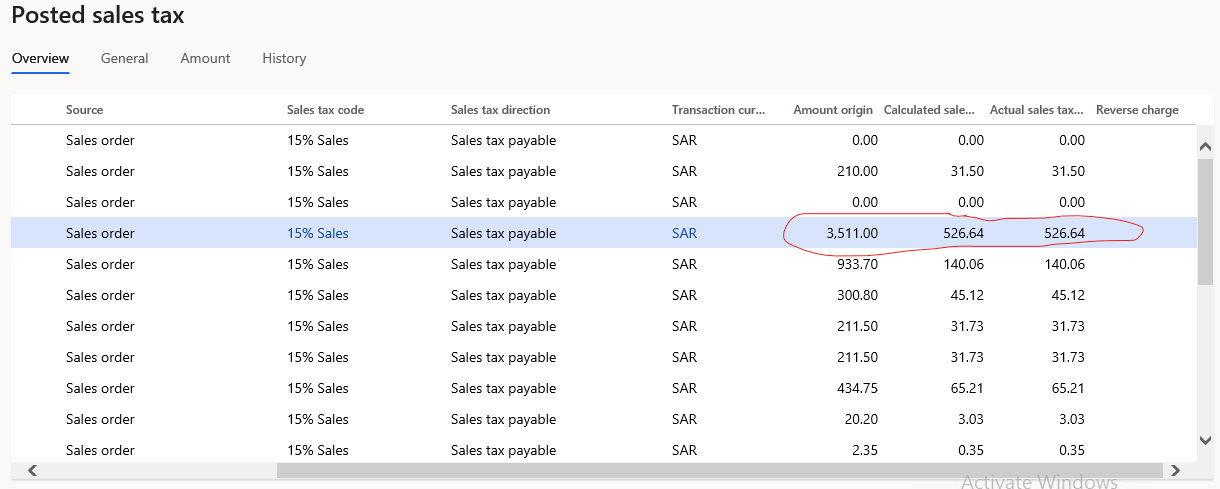
pastedimage1628751432851v2.png

Posted sales tax screen for above same row.

How the calculation are made in FinOps and excited to looking forward to the tax calculation methodology using in FinOps. Any help would be appreciated.

Thank you.

I have the same question (0)
  • Suggested answer
    huijij Profile Picture
    19,811 on at

    Hi sir,

    Please refer the logic in the class of TaxTrans>>displaySourceRegulateAmountCur():

     display TaxRegulationAmountCur displaySourceRegulateAmountCur(TaxTrans _taxTrans)
            {
                //
                changeDisplaySign = this.doChangeDisplaySign(_taxTrans);
                //
                return _taxTrans.SourceRegulateAmountCur * this.taxChangeDisplaySign(_taxTrans.TaxDirection, _taxTrans.ReverseCharge_W);
            }


    regards

  • Suggested answer
    Ludwig Reinhard Profile Picture
    Microsoft Employee on at

    Hi JAYAKRISHNAN M S,

    Is it possible that your users overwrite the calculated sales tax by making use of the adjustment button/functionality in the temporary sales tax group form?

    Best regards,

    Ludwig

  • JAYAKRISHNAN M S Profile Picture
    145 on at

    Hi Ludwig Reinhard,

    Thank you for the quick response.

    In  this case, users did not change anything. I had double check as well.

    Thank you.

  • JAYAKRISHNAN M S Profile Picture
    145 on at

    Hi Judy Jee,

    Thanks for the quick response.

    Sorry for made a confusion here. Actually I am aiming the Methodology / Formula like that instead of method and edit the post as well.

    Thank you.

  • Suggested answer
    Ludwig Reinhard Profile Picture
    Microsoft Employee on at

    Hi,

    If users did not change anything can this issue be the result of a foreign currency / rounding issue?

    Is this a foreign currency order?

    Best regards,

    Ludwig

  • JAYAKRISHNAN M S Profile Picture
    145 on at

    Hi Ludwig Reinhard,

    We are using the SAR (Saudi Riyal) as Accounting currency and below are the details,

    1. Currency in Ledger setup.

    Currency_5F00_LedgerSetup.png

    2. Currency setup.

    Currency_5F00_Setup.png

    3. VAT code setup.

    VAT-Codes_5F00_RR.png

    The Customer account in sales order having the same currency (SAR) as well.

    ie, Its not a foreign currency order and no rounding rule specified / changed in setup as well.

    Also checked in the USMF legal entity with same item price and tax resulting the same, 526.63 (15% Sales) as calculated sales tax amount for 3511.

    Thank you.

  • Suggested answer
    saurabh bharti Profile Picture
    15,039 Moderator on at

    This looks to be issue with Tax calculation method

    Can you check if your calculation is at Line level or Total (GL > Parameters > Tax)

    which gets trigger based on sales tax code on calculation method.

  • JAYAKRISHNAN M S Profile Picture
    145 on at

    Hi Saurabh Bharati,

    Thanks for the response.

    Calculation is based on Total and here is the shot,

    1. GL - General tab

    GL_5F00_General.png

    2. GL - Tax options tab

    GL_5F00_Tax-options.png

    Thank you.

Under review

Thank you for your reply! To ensure a great experience for everyone, your content is awaiting approval by our Community Managers. Please check back later.

Helpful resources

Quick Links

Responsible AI policies

As AI tools become more common, we’re introducing a Responsible AI Use…

Neeraj Kumar – Community Spotlight

We are honored to recognize Neeraj Kumar as our Community Spotlight honoree for…

Leaderboard > Finance | Project Operations, Human Resources, AX, GP, SL

#1
Martin Dráb Profile Picture

Martin Dráb 544 Most Valuable Professional

#2
André Arnaud de Calavon Profile Picture

André Arnaud de Cal... 450 Super User 2025 Season 2

#3
Sohaib Cheema Profile Picture

Sohaib Cheema 250 User Group Leader

Last 30 days Overall leaderboard

Product updates

Dynamics 365 release plans
