web
You’re offline. This is a read only version of the page.
close
Skip to main content

Notifications

Announcements

No record found.

Community site session details

Community site session details

Session Id :
Microsoft Dynamics 365 | Integration, Dataverse...
Answered

How to hide entities in the navigation pane but still allow users to tie records to those entities that will be hidden

(0) ShareShare
ReportReport
Posted on by 26

Hello,

In the left navigation pane there are numerous of entities.  I need to hide some of them from the navigation only, but still allow the user to go into other records and tie those to this entity.

Can that be done and if so how?

I have the same question (0)
  • USA80 Profile Picture
    26 on at

    Also, they want some of the entities to be hidden for some users, not all

  • Verified answer
    Leah Ju Profile Picture
    Microsoft Employee on at

    Hi USA80,

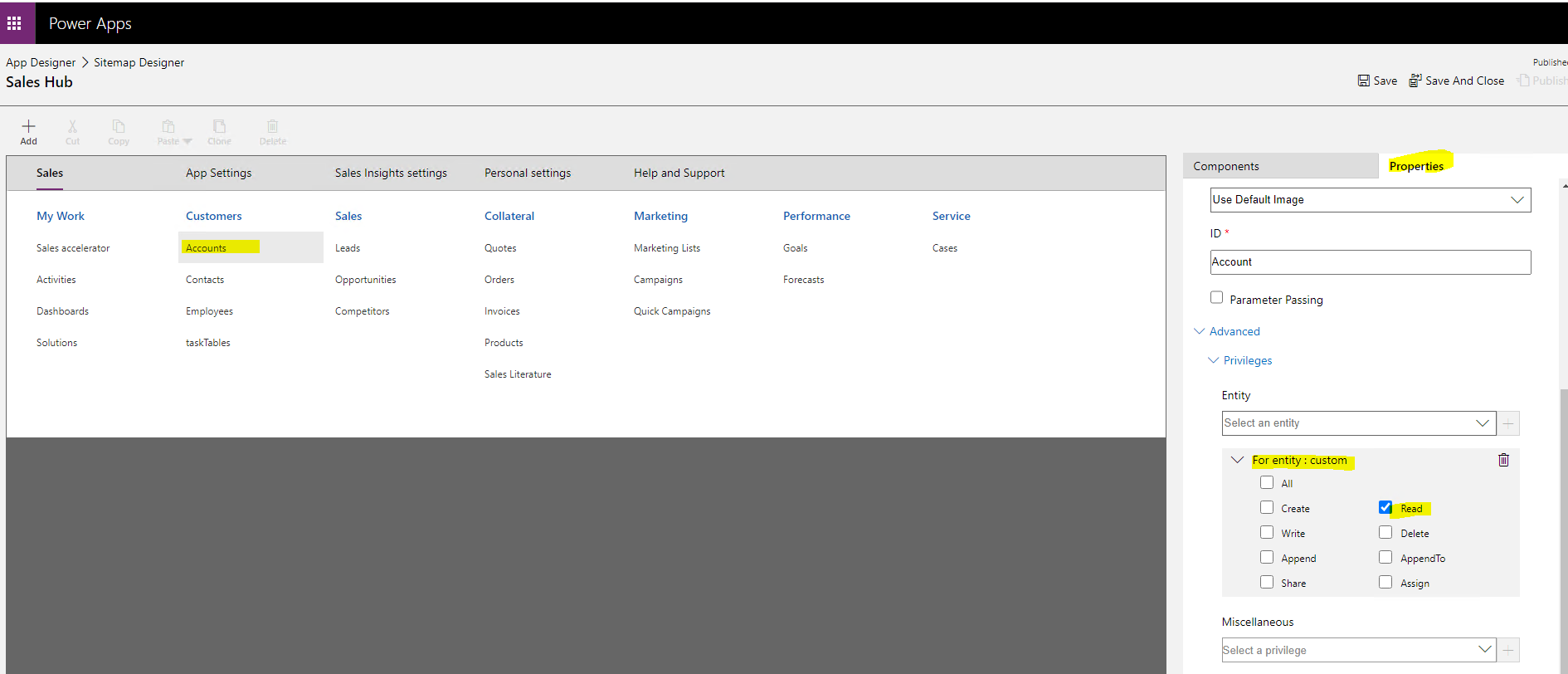
    In the Sitemap Designer under Advance Tab of subarea Properties, the Privileges feature can help you.

    pastedimage1672802645649v3.png

    https://learn.microsoft.com/en-us/dynamics365/customerengagement/on-premises/customize/create-site-map-app?view=op-9-1#add-a-subarea-to-a-group-in-the-site-map 

    You want to hide one entity from the navigation only, but can use it on other place, so you can use other entities' privilege to control it.

    Steps:

    1.Create one custom entity.

    2.Go “Site Map Designer” page, select one entity(subarea) you need.

    • On the right sideunder the properties window, click on Advance, then on Privileges. Select the entity we created earlier, and then click on the “+” button.
    • Expand the command and check only the Read command.
    pastedimage1672801920499v1.png

    3.Set security roles:

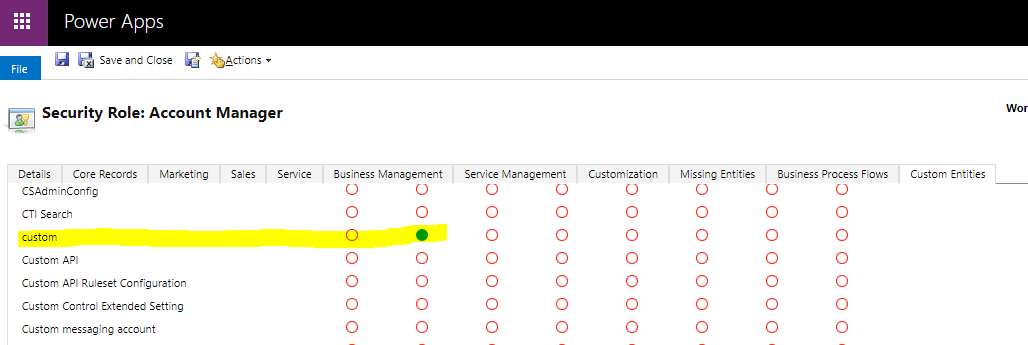
    (1)If the user needs to see this entity(subarea) in the navigation, you need assign 'Read' privilege to them.
    pastedimage1672802425253v2.png

    (2)Conversely, it is not used.

    For users who do not have read access to the custom entity, the entity will not be visible in the navigation, but will still be available elsewhere.

Under review

Thank you for your reply! To ensure a great experience for everyone, your content is awaiting approval by our Community Managers. Please check back later.

Helpful resources

Quick Links

Responsible AI policies

As AI tools become more common, we’re introducing a Responsible AI Use…

Neeraj Kumar – Community Spotlight

We are honored to recognize Neeraj Kumar as our Community Spotlight honoree for…

Leaderboard > Microsoft Dynamics 365 | Integration, Dataverse, and general topics

#1
#ManoVerse Profile Picture

#ManoVerse 93

#1
Siv Sagar Profile Picture

Siv Sagar 93 Super User 2025 Season 2

#3
Martin Dráb Profile Picture

Martin Dráb 62 Most Valuable Professional

Last 30 days Overall leaderboard

Product updates

Dynamics 365 release plans



