web
You’re offline. This is a read only version of the page.
close
Skip to main content

Notifications

Announcements

No record found.

Community site session details

Community site session details

Session Id :
Customer experience | Sales, Customer Insights,...
Answered

Views aren't visible in the new UX

(0) ShareShare
ReportReport
Posted on by 569

I just created a Public View in the Customization backend of Dynamics and then Published All Customizations.  It is visible in the old Web Interface, but when I go into the new UX, it is not there?
Why are System Views that are created and Published only visible in the old Web Interface?  How do I make them visible in the new UX?

You can actually see that there are 18 Active Views in the screen-cap, but in Dynamics, only 6 show?

FWIW, I even created the same view in the PowerApps GUI, but it didn't make any difference.
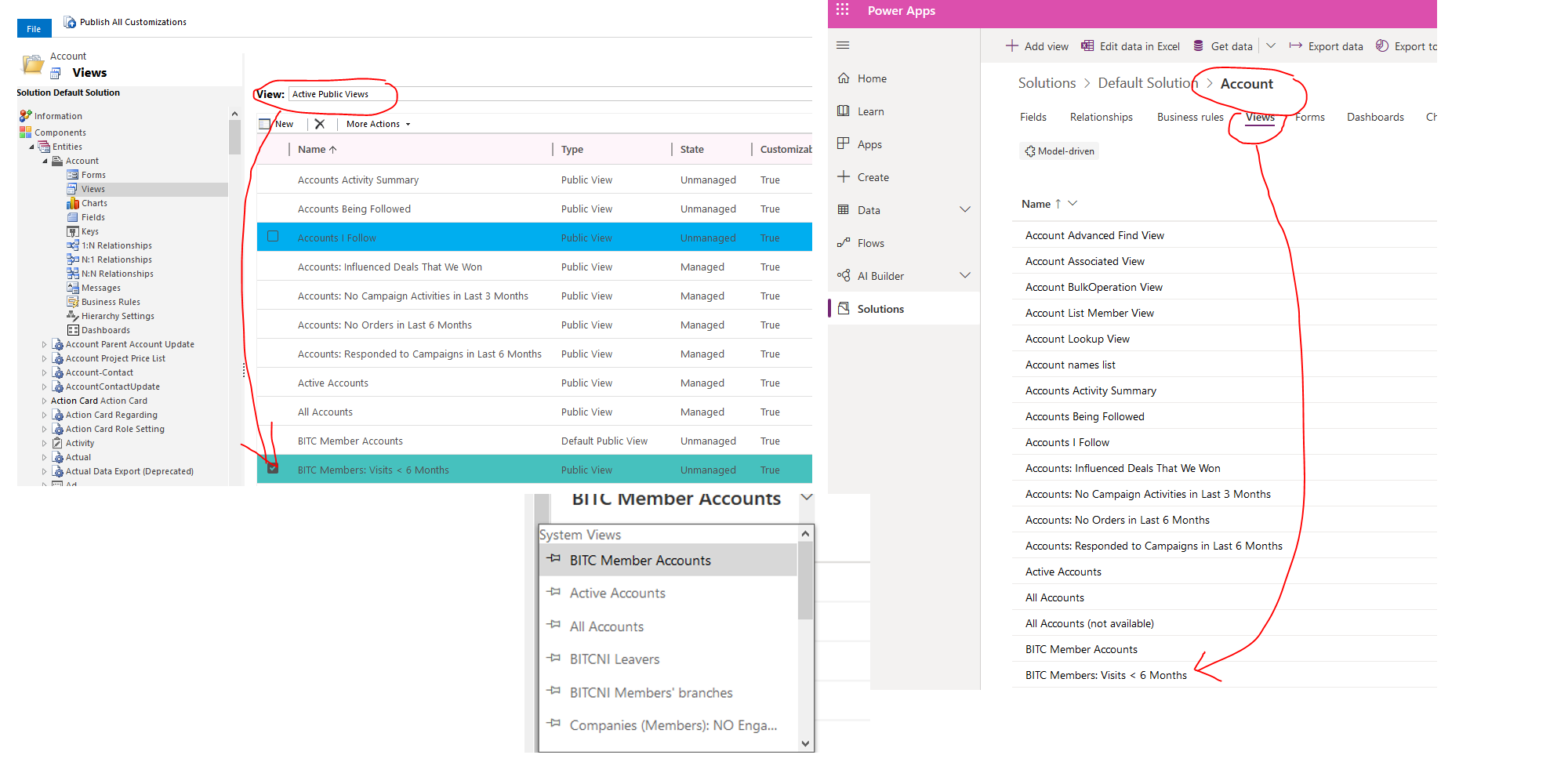
012120_5F00_CRM.png

I have the same question (0)
  • Verified answer
    Wolverine Profile Picture
    569 on at

    I figured it out: after you Publish it, you have to go to Published Apps >> Open in App Designer; select the Entity >> select Views (under Entity Assets) >> and check the boxes of the Views you want to be visible.  

    Ugh---this reminds me of that Bill Gates story where he tried for an hour to get a download from Microsoft's website, and he got directed to so many pages and got so frustrated that he sent an email to the Devs roasting them for making everything so convoluted!  :(

  • Suggested answer
    AJ-22040756-0 Profile Picture
    on at

    Hi Partner

    yes that's correct, additionally you check the All option in App designer for the specific App so that every view you add up it will display in the New UCI App as well.

    pastedimage1579670334766v1.png

  • Wolverine Profile Picture
    569 on at

    Thanks, Akash.  I'd prefer not to turn on All Views, as there are a lot of built-in ones that we wouldn't use.  With all the Views on, there must be 10-20 for users to choose, which is far too many.

    Thanks for the suggestion.

Under review

Thank you for your reply! To ensure a great experience for everyone, your content is awaiting approval by our Community Managers. Please check back later.

Helpful resources

Quick Links

Responsible AI policies

As AI tools become more common, we’re introducing a Responsible AI Use…

Neeraj Kumar – Community Spotlight

We are honored to recognize Neeraj Kumar as our Community Spotlight honoree for…

Leaderboard > Customer experience | Sales, Customer Insights, CRM

#1
Tom_Gioielli Profile Picture

Tom_Gioielli 108 Super User 2025 Season 2

#2
Jimmy Passeti Profile Picture

Jimmy Passeti 50 Most Valuable Professional

#3
Gerardo Rentería García Profile Picture

Gerardo Rentería Ga... 49 Most Valuable Professional

Last 30 days Overall leaderboard

Product updates

Dynamics 365 release plans



