web
You’re offline. This is a read only version of the page.
close
Skip to main content

Notifications

Announcements

No record found.

Community site session details

Community site session details

Session Id :
Microsoft Dynamics 365 | Integration, Dataverse...
Suggested Answer

Dataverse Search - Storage capacity usage

(0) ShareShare
ReportReport
Posted on by 15

Hi Everyone,

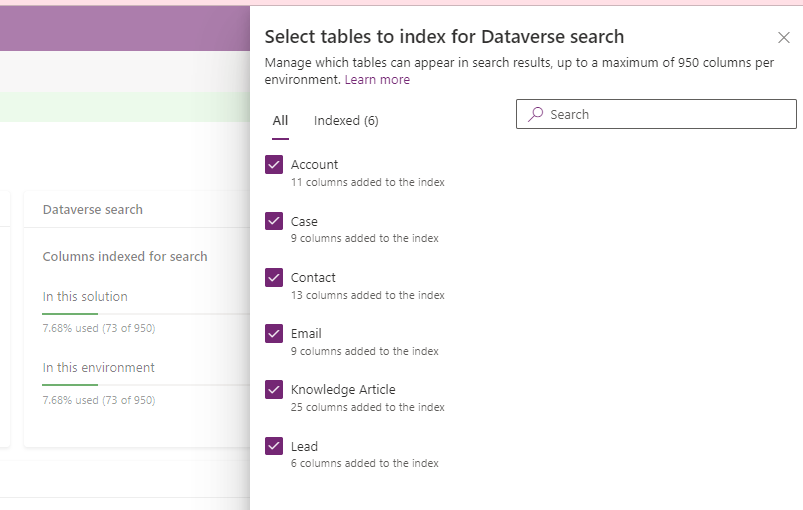
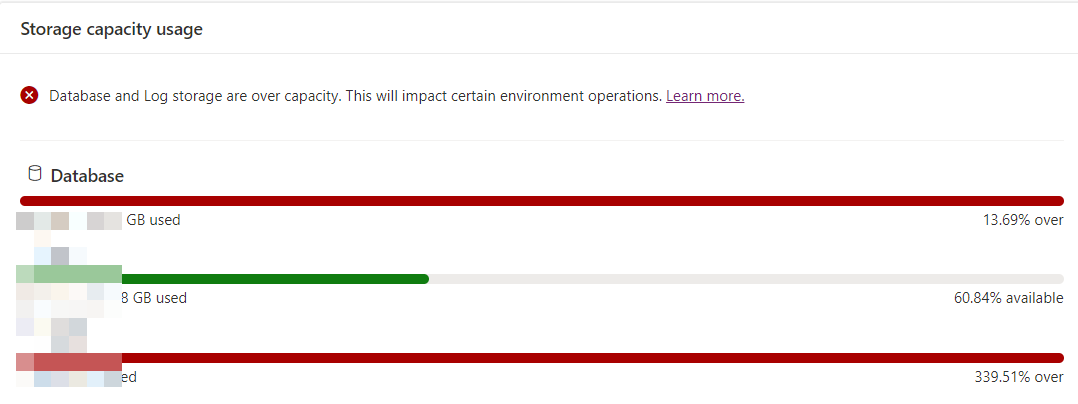
I turned on Dataverse Search and my database storage capacity increased for approx. 30GB (large organisation with more than million contacts, emails, etc.). I done quick research and found out we have 28 entities enabled for dataverse search. I limited this to 6 entities but do not see any decrease on database storage capacity.

I have some questions if anyone can help me with:

1.Should database storage used for index and required tables for dataverse search, reduce automatically, if index for table/entity is removed from  dataverse search? How long do I have to wait to see the difference?

2. Anyone know definition/formula to calculate required storage for specific entity/table included in Dataverse search? I assume this depends on number of columns added to index and number of records on this entity? If I filter records in "Quick find view" (e.g. Created On = Last 3 Months) should this reduce used storage for this entity?

pastedimage1673433029101v2.png

 pastedimage1673433022059v1.png

pastedimage1673433042432v3.png

Thanks 

I have the same question (0)
  • Suggested answer
    Leco Lv Profile Picture
    on at

    Hi partner,

    Removing unneeded tables and columns from Dataverse Search is one way to free up storage space, which should automatically decrease after a refresh. If you don't see the difference, maybe it's not that this item is taking up too much space, could you provide me with a screenshot of the details?

    The details will let us know exactly which part is taking up too much space.

    pastedimage1673491311653v1.png

    pastedimage1673490936507v1.png

    Did you refer to the link below to free up storage space?

    https://learn.microsoft.com/en-us/power-platform/admin/free-storage-space

    learn.microsoft.com/.../capacity-storage

  • Leco Lv Profile Picture
    on at

    Hi partner,

    Did it help you? Have you solved your problem? Or you can also share your method.

Under review

Thank you for your reply! To ensure a great experience for everyone, your content is awaiting approval by our Community Managers. Please check back later.

Helpful resources

Quick Links

Responsible AI policies

As AI tools become more common, we’re introducing a Responsible AI Use…

Neeraj Kumar – Community Spotlight

We are honored to recognize Neeraj Kumar as our Community Spotlight honoree for…

Leaderboard > Microsoft Dynamics 365 | Integration, Dataverse, and general topics

#1
Siv Sagar Profile Picture

Siv Sagar 93 Super User 2025 Season 2

#2
#ManoVerse Profile Picture

#ManoVerse 80

#3
Martin Dráb Profile Picture

Martin Dráb 64 Most Valuable Professional

Last 30 days Overall leaderboard

Product updates

Dynamics 365 release plans