web
You’re offline. This is a read only version of the page.
close
Skip to main content

Notifications

Announcements

No record found.

Community site session details

Community site session details

Session Id :
Microsoft Dynamics AX (Archived)

Filter field selection dropdown in SysQueryForm

(0) ShareShare
ReportReport
Posted on by

Hi, I have created a very simple query off of CustTable and specific fields:

7357.l1.png

When I run this query and choose from range fields drop-down I see everything:
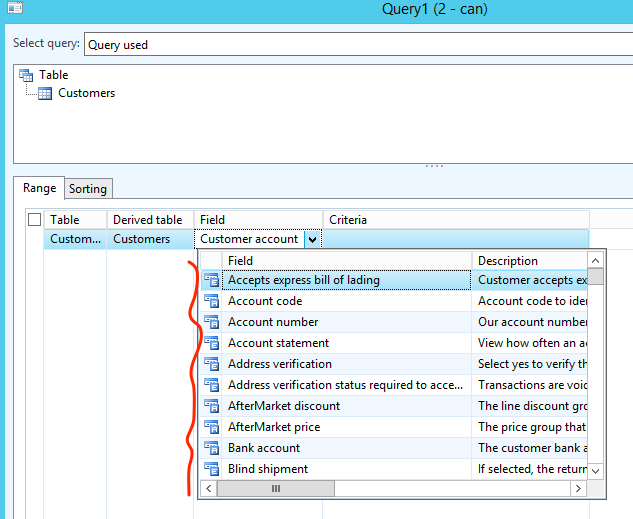
5710.l2.png

How can I make the drop-down lookup only pull the 2 fields in my datasource? Is there a way to apply a filter to the Field lookup at all without major programming effort?

*This post is locked for comments

I have the same question (0)
  • Mea_ Profile Picture
    60,284 on at

    Hi psined,

    You cannot do this without changing code and it won't be easy one.

  • psined Profile Picture
    on at

    Thanks, I suspected that. I had to ask though because one of the solutions which we are working on starts off with generic query and leaves it up for the end-user to refine the ranges. However we want them to be able to choose designated fields only. Would be nice to have this added to SysQueryForm as an option/parameter as I can see many applications where this would make a world of sense..

  • Mea_ Profile Picture
    60,284 on at

    You can go ahead and implement it but please be aware that this functionality is used across whole application and it could a breaking change.

  • psined Profile Picture
    on at

    Would you have a recommendation as to how best to implement? Create a custom form and associated controller class (as a copy of SysQueryForm), or customize the existing one? What would you do? :)

  • Martin Dráb Profile Picture
    237,987 Most Valuable Professional on at

    Note that it's the correct behaviour - fields returned from the query and fields used in the WHERE clause are two separate things. For example, you may want to filter customers by customer group, although you don't need customer group in the resultset.

  • psined Profile Picture
    on at

    Yeah, I realize that, totally agree. This makes the form totally developer friendly. But on another hand, from a typical business end-user perspective, nobody needs to see things like TableId or RecId or relational keys and such...

  • Martin Dráb Profile Picture
    237,987 Most Valuable Professional on at

    Consider creating a view with just those fields you want.

  • psined Profile Picture
    on at

    The best solution would be to designate a special field group on a table, then pass that group id/name to the query object, so the query builder form could discover which fields end-users can select for building ranges. In many cases this would make sense - clean and short list, no duplicates, less error-prone, end-user friendly. Sounds like an improvement request for MSFT...

  • psined Profile Picture
    on at

    Oh, I haven't thought about views.. that's a good tip, I'll look into it. Thanks Martin

  • psined Profile Picture
    on at

    Tried views... There is big challenge - RecId in the view is not returned in X++ the same as in the underlying table, so auto relations don't work..

Under review

Thank you for your reply! To ensure a great experience for everyone, your content is awaiting approval by our Community Managers. Please check back later.

Helpful resources

Quick Links

Responsible AI policies

As AI tools become more common, we’re introducing a Responsible AI Use…

Neeraj Kumar – Community Spotlight

We are honored to recognize Neeraj Kumar as our Community Spotlight honoree for…

Leaderboard > 🔒一 Microsoft Dynamics AX (Archived)

#1
Martin Dráb Profile Picture

Martin Dráb 4 Most Valuable Professional

#1
Priya_K Profile Picture

Priya_K 4

#3
MyDynamicsNAV Profile Picture

MyDynamicsNAV 2

Last 30 days Overall leaderboard

Featured topics

Product updates

Dynamics 365 release plans



