web
You’re offline. This is a read only version of the page.
close
Skip to main content

Notifications

Announcements

No record found.

Community site session details

Community site session details

Session Id :
Microsoft Dynamics AX (Archived)

Adding new TabPage in the form InventLocation

(0) ShareShare
ReportReport
Posted on by

Hi Expert,

Im adding new TabPage in the form InventLocation. I need to display the contact according of the werehouse clicked, but I dont know how to do it. I've tried add some method but still not working.
Can somebody advise me how to do it.

Here is the screen shoot of my problem.
Picture 1

werehouse.png

I already add the Contact Information TabPage in the form InventLocation.

Picture 2
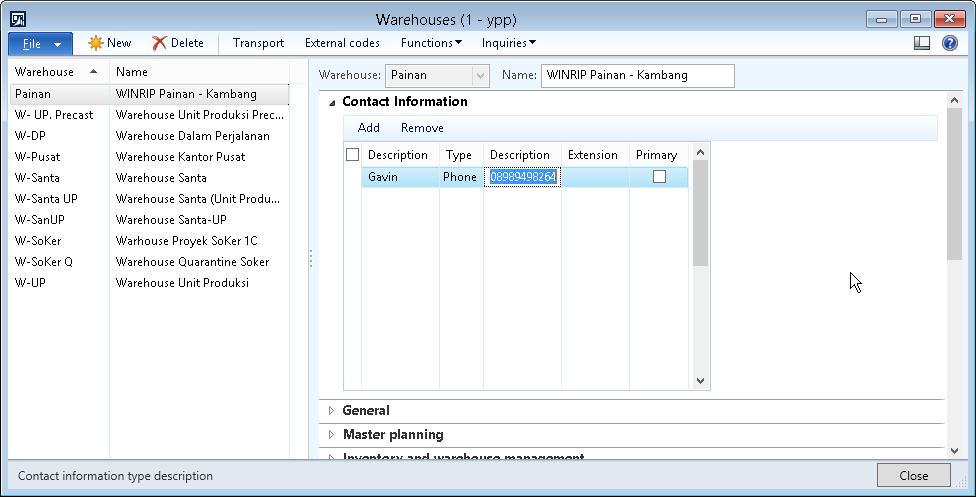
werehourse-add-contact.png

I also can add the new contact for the werehouse. But when I click another werehouse the display contact still the first contact I add. I never add contact for another werehouse, so the table should not display any contact. Then I close the form and open again, the form is missing not display any contact.

Picture 3

contact-info-table.png

When I check LogisticsElectronicsAddress the contact I add before is exist. But not showing in the form

Picture 4

form-properties.png

Here is the data source properties of InventLocation form.

I add 3 table to the data source.

a. LogisticsElectronicAddress

b. LogisticsLocation

c. InventLocationLogisticsLocation

What should I do next to solve the problem?
Your help mean a lot

Thanks and Regards,

Enggar

*This post is locked for comments

I have the same question (0)
  • Verified answer
    Vilmos Kintera Profile Picture
    46,149 on at

    Your relations between the tables might be wrong, or you are not linking the datasources/records correctly on your form.

    Take a look at the CustTable form as an example, they are using DirPartyLocation, DirPartyTable in conjunction with LogisticsElectronicAddress. They are using addLink in the code to connect them.

  • Community Member Profile Picture
    on at

    Hi Vilmos

    Thanks for your reply
    I already join the LogisticsElectronicAddress with InventLocation but not for the other two tables. Im not join it with any table that exist in the form.
    I tried make jobs using InventLocation, LogisticsElectronicAddress, LogisticsLocation, InventLocationLogisticsLocation

    Here is my code :

    static void werehousephone(Args _args)
    {
    str                                 Warehouse;
    
        LogisticsElectronicAddress          LogisticsElectronicAddress;
    
        LogisticsLocation                   LogisticsLocation;
    
        InventLocationLogisticsLocation     InventLocationLogisticsLocation;
    
        InventLocation                      InventLocation;
    
        ;
    
    
        Warehouse   = "W-Pusat";
    
        InventLocation = InventLocation::find(Warehouse);
    
        Select firstOnly InventLocationLogisticsLocation
    
            where InventLocationLogisticsLocation.InventLocation    == InventLocation.RecId;
    
        if (InventLocationLogisticsLocation)
    
        {
    
            select firstOnly LogisticsLocation
    
                where LogisticsLocation.ParentLocation      == InventLocationLogisticsLocation.Location
    
                && LogisticsLocation.IsPostalAddress        == NoYes::No;
    
            if (LogisticsLocation)
    
            {
    
                Select firstOnly LogisticsElectronicAddress
    
                    where LogisticsElectronicAddress.Location    == LogisticsLocation.RecId;
    
                if (LogisticsElectronicAddress)
    
                {
                    info(strFmt("Nama: %1  Nomor: %2",LogisticsElectronicAddress.Description, LogisticsElectronicAddress.Locator));
    
                }
    
            }
    
        }
    
    }

    }

    I got name and number from the code, so I apply the table to the form and just join the LogisticsElectronicAddress. But yeah the result just like the screen shoot I attach above.


    Thanks and Regards,

    Enggar

Under review

Thank you for your reply! To ensure a great experience for everyone, your content is awaiting approval by our Community Managers. Please check back later.

Helpful resources

Quick Links

Responsible AI policies

As AI tools become more common, we’re introducing a Responsible AI Use…

Neeraj Kumar – Community Spotlight

We are honored to recognize Neeraj Kumar as our Community Spotlight honoree for…

Leaderboard > 🔒一 Microsoft Dynamics AX (Archived)

#1
Priya_K Profile Picture

Priya_K 4

#1
Martin Dráb Profile Picture

Martin Dráb 4 Most Valuable Professional

#3
Sukrut Parab Profile Picture

Sukrut Parab 2 Moderator

Last 30 days Overall leaderboard

Featured topics

Product updates

Dynamics 365 release plans



