web
You’re offline. This is a read only version of the page.
close
Skip to main content

Notifications

Announcements

No record found.

Community site session details

Community site session details

Session Id :
Finance | Project Operations, Human Resources, ...
Answered

Expense policy: multiple rules per policy rule type

(0) ShareShare
ReportReport
Posted on by 339

Hello All,

I have set up an expense policy, in my case for policy rule type "Entertainment"

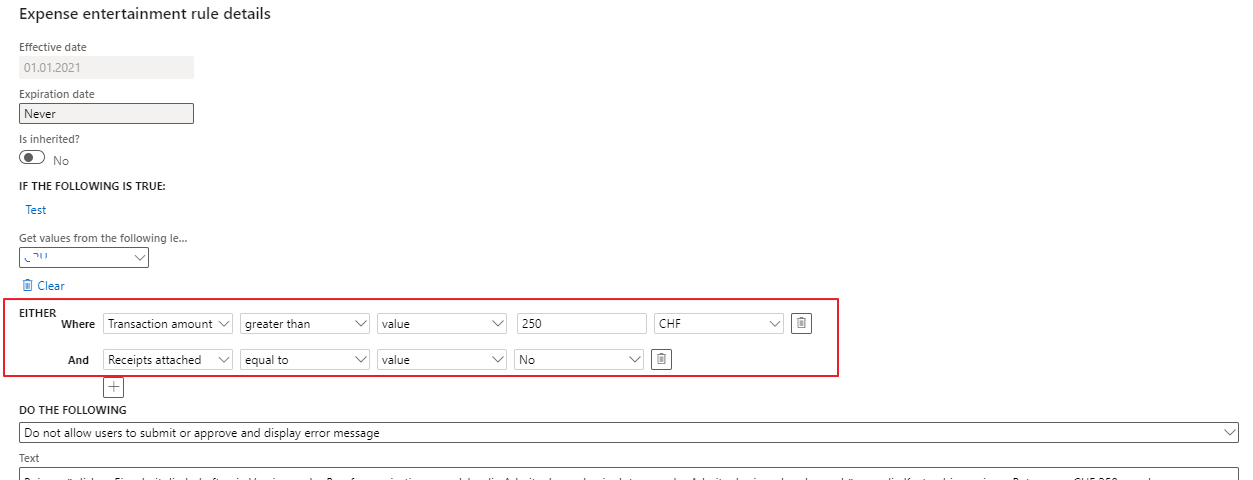
I have defined 2 verifications for this type:

- first: amount should not exceed 250 CHF

- second: receipts should be attached

Scenario: I enter an amount of 300 CHF for example, the error message is popping up. I fix this error by modifying the amount to 250, and no error message is showing anymore. This is not correct, because I have not attached the receipt yet. 

I tried all combinations of "and/or/and either" between the 2 conditions, but my issue is that as soon as 1 condition is OK, the second condition is not being verified anymore and I am able to submit the expense report, which should not be the case.
pastedimage1625130821832v1.png

Has anyone faced this issue and can provide some help?

Many thanks,

Fjorela

I have the same question (0)
  • Suggested answer
    Sheela Ningappa Profile Picture
    on at

    Hi,

    If there are more than one policy on the expense report,  policy rule is not triggered and it is addressed in the below hotfix:

    Please verify the below LCS link:

    fix.lcs.dynamics.com/.../Details

    Thanks,

    Sheela

  • greengrimms Profile Picture
    1,400 on at

    Hi Fjorela,

    Depending on your business scenario, another solution might be to separate the conditions in two different policies.

  • Fjorela Profile Picture
    339 on at

    Thanks Sheela. we are actually on this version, but the issue is still occurring.

  • Fjorela Profile Picture
    339 on at

    Thanks Danilo. I considered this, but I need to define 2 policies on the same expense type policy rule. I opened a case to Microsoft; let's see.

  • Verified answer
    Fjorela Profile Picture
    339 on at

    Microsoft has investigated the scenario and has accepted it as a technical issue and agreed to create a fix in order to mitigate the issue. The repair item can be accessed by using this LCS link: Details for issue 597513 (dynamics.com)

Under review

Thank you for your reply! To ensure a great experience for everyone, your content is awaiting approval by our Community Managers. Please check back later.

Helpful resources

Quick Links

Responsible AI policies

As AI tools become more common, we’re introducing a Responsible AI Use…

Neeraj Kumar – Community Spotlight

We are honored to recognize Neeraj Kumar as our Community Spotlight honoree for…

Leaderboard > Finance | Project Operations, Human Resources, AX, GP, SL

#1
André Arnaud de Calavon Profile Picture

André Arnaud de Cal... 449 Super User 2025 Season 2

#2
Martin Dráb Profile Picture

Martin Dráb 422 Most Valuable Professional

#3
BillurSamdancioglu Profile Picture

BillurSamdancioglu 239 Most Valuable Professional

Last 30 days Overall leaderboard

Product updates

Dynamics 365 release plans



