web
You’re offline. This is a read only version of the page.
close
Skip to main content

Notifications

Announcements

No record found.

Community site session details

Community site session details

Session Id :
Microsoft Dynamics AX (Archived)

Realize Cost Amount not tally for Labour/Overhead

(0) ShareShare
ReportReport
Posted on by 2,075

Dear All,

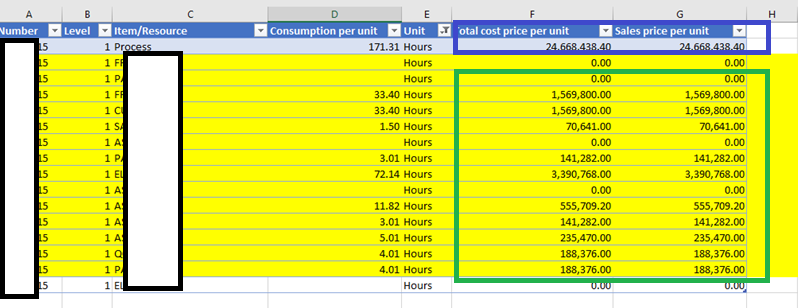
I had some production order, I found at Realize cost amount ( Price calculation ), total hours is tally with total hours at row "process", but the cost is not tally ( summary row in green box versus value at blue box )

anyone ever experience this ?

is this normal behaviour or something wrong ?

please help and advice.

thank you in advance.
Price-Calculation-For-Realize-Cost-Amount.png

*This post is locked for comments

I have the same question (0)
  • Ludwig Reinhard Profile Picture
    Microsoft Employee on at

    Hi Benjamin84,

    Can you elaborate?

    What exactly is not ok? The fact that the cost and the sales price are identical or something else?

    Many thanks and best regards,

    Ludwig

  • benjamin84 Profile Picture
    2,075 on at

    Hi Ludwig,

    yes, as I understand if I summary total hour in yellow row, its tally with total hour in grey row. but cost price in yellow colour if summarized not tally with total cost at grey row.

    wasn't this should be tally,

    I summarized total cost in yellow colour the value is roughly 8 million, but the value at grey colour is roughly 24 million, its not tally.

    do I misunderstand something here ?

    please help./

  • Suggested answer
    Ludwig Reinhard Profile Picture
    Microsoft Employee on at

    Hi benjamin84,

    In general you are right but in the screenshot above you applied some filters.

    If you remove them do the number fit?

    Can you also have a look at the level that you are investigating?

    In the screenprint I just see level 1.

    Maybe you can share a screenprint of the original calculation from AX and not from Excel or would these be too many lines?

    Best regards,

    Ludwig

  • benjamin84 Profile Picture
    2,075 on at

    Hi Ludwig,

    since I checking overhead/labour cost, that's why I filter unit by hours, the other row is for raw material with unit sft/pcs. raw material and labour/overhead has level 1, while level 0 is for the finish goods item.

    this price calculation has 356 row. to many lines to show.

    thank you

  • benjamin84 Profile Picture
    2,075 on at

    Hi Ludwig,

    could you give another advice from where I could check this unusual /not tally.

    Thanks

  • Suggested answer
    Ludwig Reinhard Profile Picture
    Microsoft Employee on at

    Hello Benjamin,

    In AX you have a variance button available in the calculation details form.

    Opening this will give you a break down that you can filter.

    In addition you can print such a variance report with details to get more insights where the variance comes from.

    Hope this helps.

    Best regards,

    Ludwig

Under review

Thank you for your reply! To ensure a great experience for everyone, your content is awaiting approval by our Community Managers. Please check back later.

Helpful resources

Quick Links

Responsible AI policies

As AI tools become more common, we’re introducing a Responsible AI Use…

Neeraj Kumar – Community Spotlight

We are honored to recognize Neeraj Kumar as our Community Spotlight honoree for…

Leaderboard > 🔒一 Microsoft Dynamics AX (Archived)

#1
Martin Dráb Profile Picture

Martin Dráb 4 Most Valuable Professional

#1
Priya_K Profile Picture

Priya_K 4

#3
MyDynamicsNAV Profile Picture

MyDynamicsNAV 2

Last 30 days Overall leaderboard

Featured topics

Product updates

Dynamics 365 release plans



